
Table of Contents
Introduction
Apple Intelligence is Apple’s built-in AI system for iPhone, iPad, and Mac. It’s not a standalone chatbot like ChatGPT or Google Gemini. It’s integrated right into iOS, iPadOS, and macOS, helping you write text, edit photos, summarize notifications, improve Siri, and handle everyday tasks, with a lot of that processing happening right on your device.
AI has turned into one of the biggest areas of competition among smartphone makers. Google has Gemini, Samsung has Galaxy AI, and Microsoft keeps pushing Copilot further. Apple took a different route. Rather than building a standalone assistant, it built AI straight into the OS itself.
In this guide, we’ll cover what Apple Intelligence is, how it works, its key features, supported devices, privacy protections, its limitations, and whether it’s actually worth using in 2026.
What Is Apple Intelligence?
If you’re wondering what Apple Intelligence actually does, the idea is simple, it brings AI directly into iPhone, iPad, and Mac. Apple Intelligence is Apple’s personal intelligence system. It combines generative AI with personal context to give you relevant help across your Apple devices. According to Apple, the system can understand language, generate content, take actions across apps, and help you get everyday things done more easily.
Unlike many AI platforms that rely mostly on cloud processing, Apple Intelligence handles many tasks directly on your device. This means it can use personal information when needed without sending every request to cloud servers.
It’s built into iOS, iPadOS, and macOS, not a separate app. So you’ll find its features naturally in Mail, Messages, Notes, Photos, Safari, and Siri. The goal isn’t to add AI just to say it has AI. Apple wants it to feel like a natural part of using your device.
How Apple Intelligence Works
One of the biggest differences between Apple Intelligence and many other AI platforms is how it processes your requests. Rather than sending everything to the cloud, Apple AI decides whether a task can be completed on your device or whether it needs additional computing power through Private Cloud Compute.
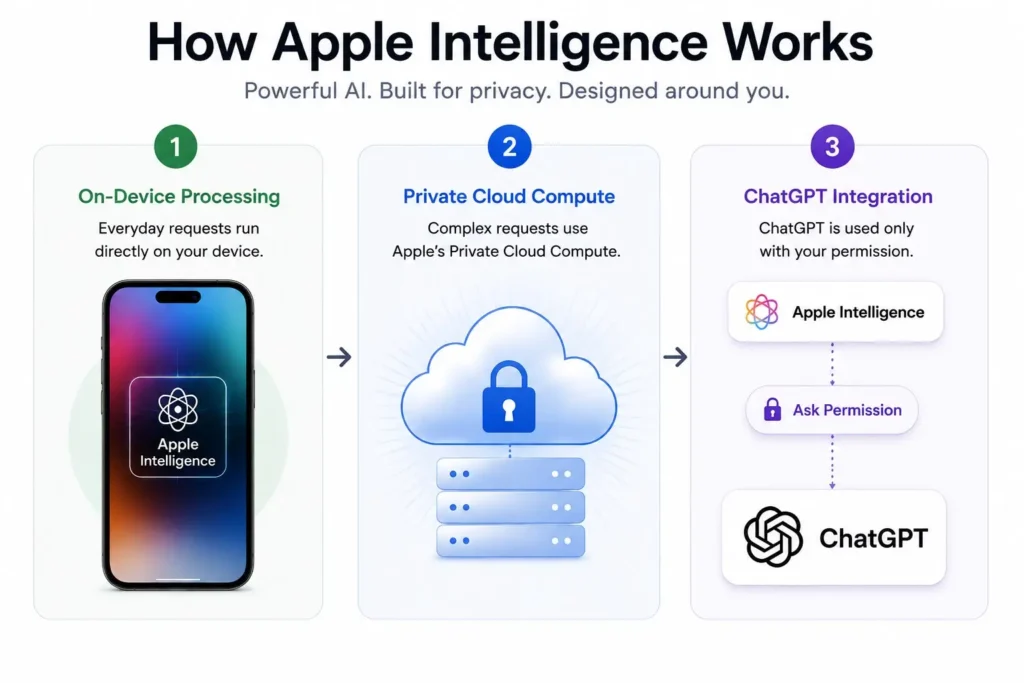
On-Device Processing
Apple says that many Apple Intelligence requests are handled on-device whenever possible. This covers many writing tasks, notification summaries, language features, and Siri requests. Doing these tasks locally has two clear benefits.
It reduces how much personal information is sent to outside servers, and it makes many features faster since the data never leaves your device. This is possible on supported devices because Apple’s newer A-series and M-series chips include neural processing hardware designed for machine learning tasks.
Private Cloud Compute
Some tasks need more computing power than a phone, tablet, or laptop can provide. For those tasks, Apple built Private Cloud Compute. Apple says these servers, powered by Apple’s custom chips, handle more demanding requests. Your data is used only for that specific request and is not saved afterward.
According to Apple Security Research, Apple itself can’t access what gets processed through Private Cloud Compute. The company has published technical documentation explaining how this system works. Together, on-device AI processing and Private Cloud Compute are the backbone of Apple Intelligence.
| Feature | On-Device Processing | Private Cloud Compute | ChatGPT |
|---|---|---|---|
| Internet Required | No | Yes | Yes |
| Privacy | Highest | Very High | Depends on OpenAI settings |
| Used For | Everyday AI tasks | More demanding requests | Advanced reasoning and knowledge |
| Requires Permission | No | No | Yes |
| Apple Can Access Data | No | N0 | Governed by OpenAI’s privacy policy |
Apple Intelligence Writing Tools
Some of the most useful Apple Intelligence features are built directly into apps people already use every day For a lot of people, Writing Tools will probably be the most useful Apple Intelligence feature.
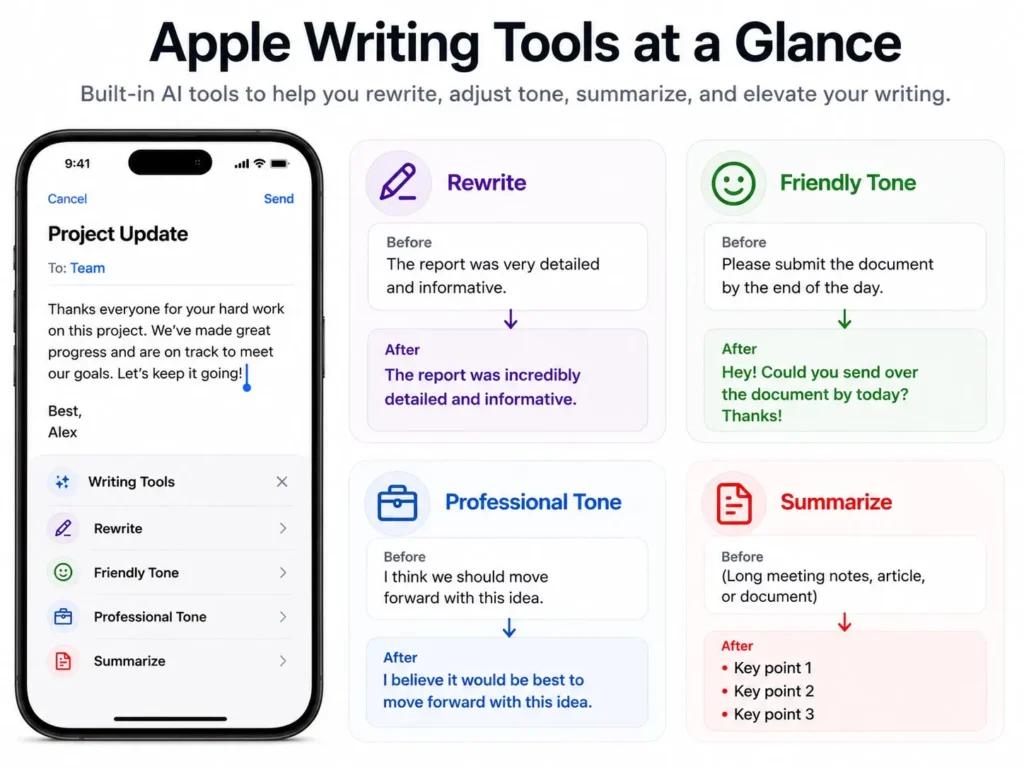
Instead of copying and pasting text into a separate AI tool, Writing Tools work directly inside the operating system. You can use them in Mail, Messages, Notes, Pages, and many third-party apps.
The feature can rewrite text, fix grammar, change the tone of a message, and summarize long passages. A casual email can be turned into something more professional before you send it. A long document can be summarized into its main points.
Students can use it to improve assignments, professionals can clean up business communication, and writers can quickly improve drafts. While AI image tools often get more attention, Writing Tools are arguably more useful in day-to-day life.
Apple’s Biggest Siri Update in Years
Siri’s been around since 2011, but Apple Intelligence brings some of its biggest upgrades yet. It turns Siri from a basic voice assistant into something far more capable. It is better at understanding what you’re actually saying, following the conversation, and getting the most out of your Apple devices.
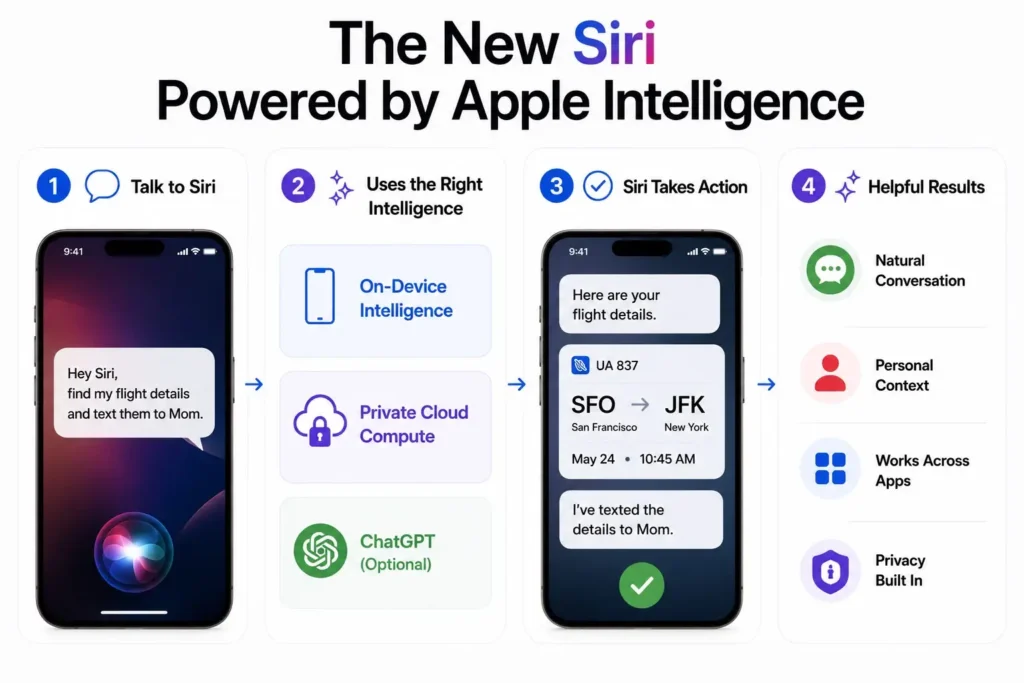
Siri Understands Natural Language Better
If you’ve used Siri for a while, you know it used to work best with precise requests. Apple Intelligence changes that. You can speak more naturally rather than trying to remember exactly how to phrase things.
For example, instead of saying “Set a reminder for tomorrow at 6 PM to call Sarah,” you can just say “Remind me to call Sarah after work tomorrow.” Siri’s better at understanding what you actually mean, which makes the whole thing feel easier to use.
Siri Remembers the Conversation
Apple Intelligence also lets Siri remember the context across multiple requests. Ask about a document, then follow up with another question about it, and Siri can usually understand the context without you repeating yourself.
For example, say “Show me the presentation John sent yesterday,” and once Siri brings it up, just ask “Summarize the main points.” Siri knows you’re still talking about the same document and you don’t need to spell it out again. It makes the whole conversation feel a lot more natural.
Ask Siri More About Your Devices
Apple’s also improved Siri’s knowledge of its own products and system features. Ask about device settings, accessibility options, or how something works, and Siri can guide you through it step by step, acting as a built-in support assistant for your Apple devices.
For example, ask “How do I enable Live Captions on my iPhone?” or “Where can I change the default browser?” and Siri points you to the right settings or explains the feature immediately.
How Siri Works with ChatGPT
Apple has invested heavily in Apple Intelligence, but it also recognizes that some requests are better handled by larger language models like ChatGPT. That’s why Apple added optional ChatGPT integration. When Siri thinks ChatGPT could give a better answer, it asks for your permission before sharing anything. You can also access ChatGPT through Writing Tools in certain situations. Apple is clear that nothing gets sent to OpenAI automatically.
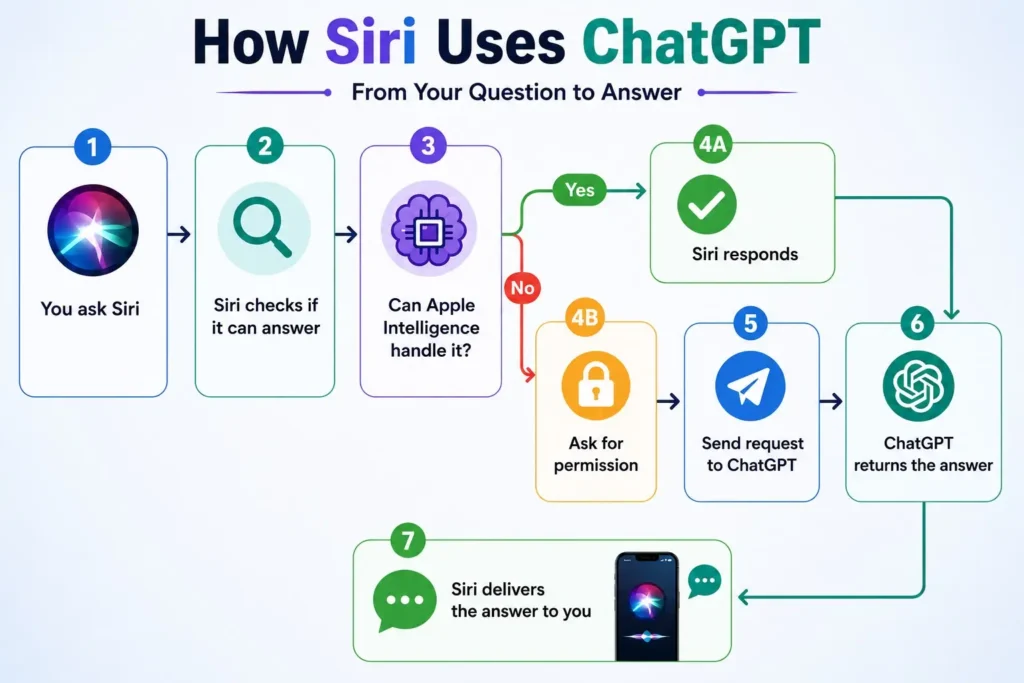
For example, if you ask Siri something like “explain quantum computing in simple terms” or “help me write a thank-you email after a job interview,” it might suggest using ChatGPT if it thinks a more advanced model can give a better answer. Siri always asks your permission first before sharing anything.
Apple Intelligence is a major part of Apple’s AI strategy, but it isn’t the only AI platform available on smartphones today. Samsung has been expanding its own Galaxy AI features, which we compare in detail in our iPhone vs Samsung comparison guide.
Genmoji and Image Playground
Apple Intelligence also brings some creative tools into the mix for communication and content creation.
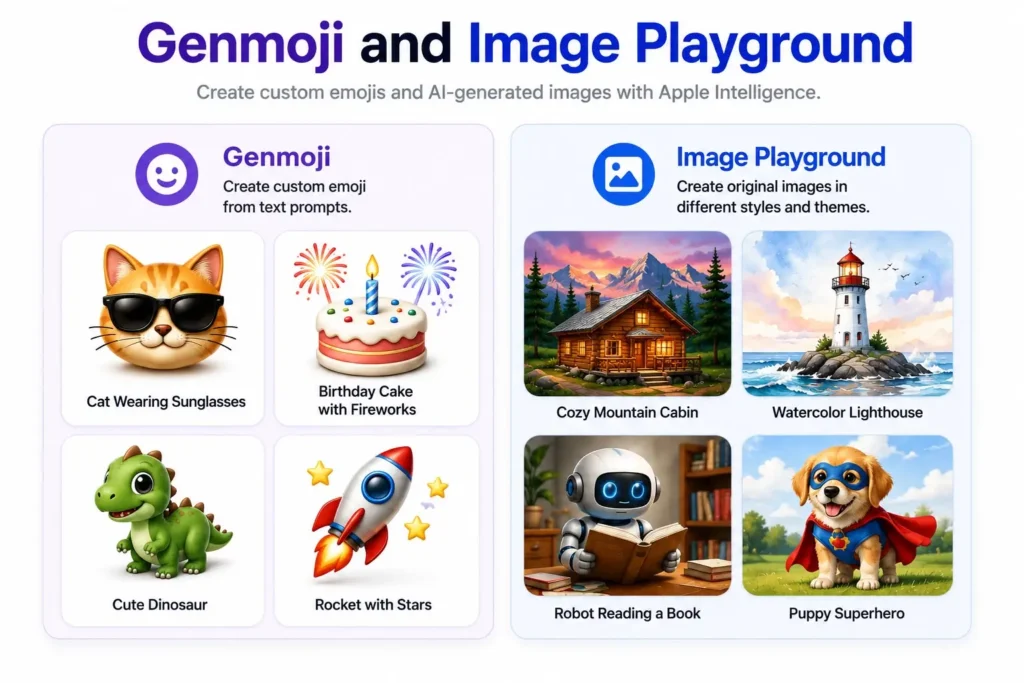
Create Your Own Genmoji
Genmoji lets you generate custom emoji-style images from a simple text description. Type something like “a smiling cat wearing sunglasses” or “a birthday cake with fireworks,” and you get a unique emoji built for that exact moment, instead of being limited to Apple’s built-in options.
Create Images with Image Playground
Image Playground takes it further, letting you generate original images using prompts, themes, or even people from your photo library. Try a prompt like “a cozy mountain cabin in winter” or “a robot reading a book in a library,” and it produces a stylized illustration. Apple has focused on a creative, approachable look here rather than trying to achieve photorealistic results.
These tools won’t replace professional design software or heavyweight AI image generators, but they make image creation genuinely easy for everyday use, great for fun illustrations, custom emojis, and personal touches, right on your Apple device.
Apple Intelligence in the Photos App
The Photos app gets several useful Apple Intelligence improvements.
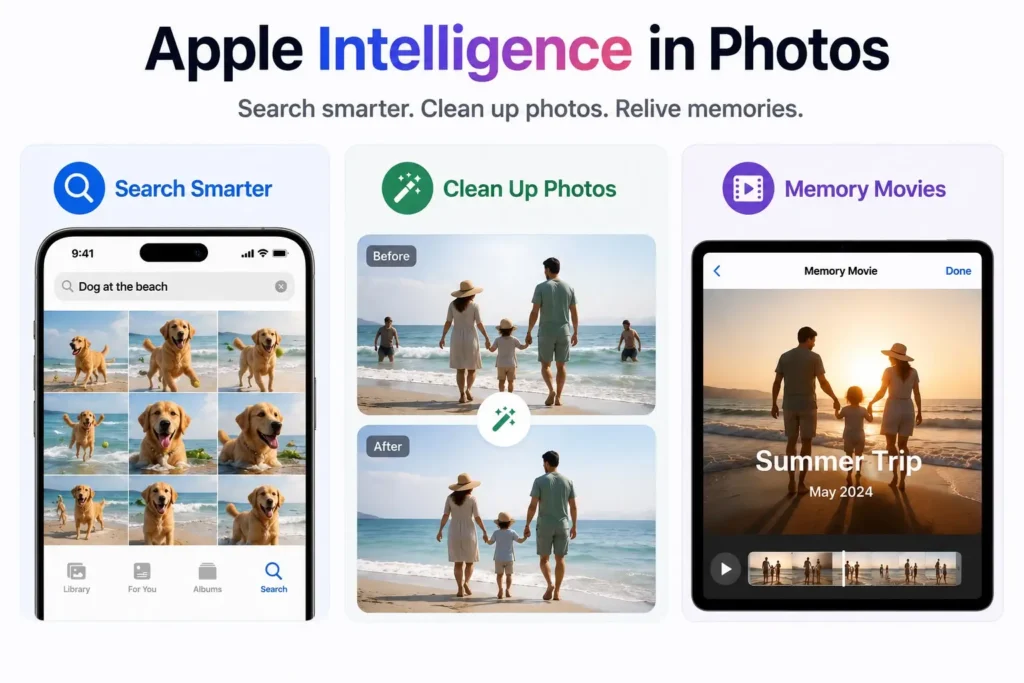
Find Photos Using Natural Language
Scrolling through years of photos to find a specific one may take some time. Apple Intelligence fixes that by letting you search the way you’d actually describe something like “photos from my birthday dinner”, “pictures of my dog at the beach”, or “sunset photos from my trip to Dubai”. No exact dates, no searching through albums, just describe it, and it’ll appear.
Remove Unwanted Objects from Photos
The Clean Up feature lets you remove unwanted objects or distractions from a photo. For example, you can remove a person walking in the background, a parked car, or another distracting object to help keep the focus on your main subject. The system looks at the surrounding image and tries to fill in the removed area in a way that looks natural.
Create Memory Movies Automatically
You can even build personalized memory videos just by describing what you want. Ask for something like “our family vacation in the mountains” or “highlights from Emma’s birthday party”, and Apple Intelligence finds the relevant photos and videos and makes a movie for you, choosing suitable transitions and music to bring everything together.
Notification Summaries and Mail Features
One of the less obvious but genuinely helpful parts of Apple Intelligence is how it handles information overload.
Phones now send a constant stream of notifications from messaging apps, social media, email, and news. Apple Intelligence can group these into short summaries so you can quickly catch up without reading every single alert.
For example, instead of opening multiple messages from a group chat or checking several news alerts individually, you can read a single summary that highlights the most important updates.
Mail also benefits from AI summaries. Long email threads can be shortened, and important messages can be highlighted automatically. For anyone dealing with a heavy stream of notifications every day, this can save real time.
For example, instead of reading an entire email thread with multiple replies, you can quickly review the AI-generated summary to understand the main discussion and decide whether the message needs your immediate attention.
Privacy and Security
Privacy is a big part of Apple’s identity, and Apple Intelligence reflects that commitment. The system prioritizes on-device processing and only uses Private Cloud Compute when extra power is needed. Apple says that data processed through Private Cloud Compute is not stored and cannot be accessed by Apple.
For example, rewriting a note or summarizing a notification can often be handled directly on your device, while more complex requests may use Private Cloud Compute to provide additional processing power.
For third-party integrations like ChatGPT, users are always asked before anything is shared. You stay in control of where your information goes. No AI platform can promise perfect privacy, but Apple’s approach is one of the more careful ones available in consumer AI today.
Apple Intelligence Supported Devices
Apple Intelligence supported devices are limited to newer iPhones, iPads, and Macs because the system needs advanced machine learning hardware.
You’ll also need a recent version of iOS, iPadOS, or macOS. Device support can change with future software updates, so readers should check Apple’s official Apple Intelligence availability page before buying a device mainly for these features.
| Device | Apple Intelligence |
|---|---|
| iPhone 15 | ❌ |
| iPhone 15 Plus | ❌ |
| iPhone 15 Pro | ✅ |
| iPhone 15 Pro Max | ✅ |
| All iPhone 16 models | ✅ |
| All iPhone 17 models | ✅ |
| iPads with A17 Pro or M-series chips | ✅ |
| Macs with M1 or later | ✅ |
If you’re using an older iPhone, updating to the latest version of iOS won’t enable Apple Intelligence unless your device meets the hardware requirements.
Limitations of Apple Intelligence
Apple Intelligence has some important limitations you should know about.
Hardware is the first one. A lot of its features rely on the Neural Engine in newer A-series and M-series chips, so even if your iPhone runs the latest iOS, that doesn’t guarantee it can run Apple Intelligence.
Availability is another. Not every feature works in every language or country yet. Apple is rolling out support gradually, so what you see depends on your device’s language, region, and OS version. If something’s missing, you can find the latest list on Apple’s Apple Intelligence availability page.
It can also just be wrong sometimes. Like any generative AI, it may misread what you’re asking, summarize something incompletely, or generate inaccurate details. It’s genuinely useful day to day, but it’s important to double-check anything that matters. If it summarizes a long email, for example, check the original source if the details matter.
Connectivity matters too. Most things happen on-device, but requests that go through Private Cloud Compute or ChatGPT need internet, and ChatGPT is always optional, Apple asks first before sharing anything.
Even with these gaps, Apple Intelligence keeps getting better with each update, and it’s already helpful on supported devices. Knowing what it can and can’t do just helps you use it better.
Is Apple Intelligence Worth Using?
It’s especially helpful if you’re regularly in apps like Mail, Messages, Notes, Photos, or Siri. Students, professionals, and anyone who spends a lot of time writing, organizing information, or sorting through photos will probably get the most out of its built-in AI features.
The real strength of Apple Intelligence isn’t any one feature. It’s that Apple has integrated AI into the operating system rather than adding it as a separate feature. Writing help, smarter notifications, better Siri, improved photo tools, and creative features all work together.
Unlike many AI tools that feel disconnected from the device they run on, Apple Intelligence feels like it actually belongs there. As Apple continues to update the platform, it will likely get more useful over time.
Final Thoughts
Apple Intelligence is Apple’s most significant step into AI so far. Rather than just building a chatbot, Apple has brought artificial intelligence into the whole user experience.
From Writing Tools and Genmoji to a smarter Siri and privacy-focused cloud processing, Apple Intelligence shows what AI can look like when it’s built directly into everyday iPhone, iPad, and Mac use.
It’s still too early to know how Apple Intelligence will compare with other AI platforms over time. But it already stands out for one thing: it doesn’t feel like a separate AI tool you have to reach for. It feels like a natural part of using your device. And as Apple keeps building it out with future updates, it’s set to become an even bigger part of everyday life on iPhone, iPad, and Mac.
What is Apple Intelligence?
Apple Intelligence is Apple’s AI system for iPhone, iPad, and Mac. It uses generative AI and your personal context while protecting the privacy, to help you write, communicate, stay organized, and get everyday tasks done faster.
Which devices support Apple Intelligence?
It works on the iPhone 15 Pro, iPhone 15 Pro Max, all iPhone 16 models, all iPhone 17 models, iPads with an A17 Pro or M-series chip, and Macs with M-series chips.
How does Apple Intelligence protect user privacy?
It processes most tasks directly on your device. For tougher requests, it uses Apple’s Private Cloud Compute system instead. Apple states that it doesn’t store your data and applies privacy protections during processing.
Does Apple Intelligence use ChatGPT?
Yes, but only if you choose. Apple lets you opt into ChatGPT for requests that need a more powerful model, and it always asks first before sending anything.
Is Apple Intelligence better than Samsung Galaxy AI?
Both offer similar tools, writing help, translation, image editing, and productivity features. Apple leans more into privacy and keeps everything together across its system, while Samsung spreads a wider range of AI features across its Galaxy lineup.
Is Apple Intelligence free?
Yes. Apple Intelligence is included with supported iPhone, iPad, and Mac devices at no additional cost. However, you’ll need a compatible device and supported software version to use its features.
Does Apple Intelligence work offline?
Many Apple Intelligence features can run directly on your device without an internet connection. However, some advanced requests that use Private Cloud Compute or ChatGPT require internet access.