
Table of Contents
Introduction
Dark Mode is easier on the eyes for many people, especially at night. But there is another reason iPhone users switch to it: battery life. So, does Dark Mode save battery on iPhone, and is the difference actually noticeable during everyday use?
We tested it on an iPhone 15 using four apps: Facebook, Safari, Chess.com, and Gemini. We used each app for 30 minutes in Light Mode, then repeated the same two-hour routine in Dark Mode after charging the phone back to 100%.
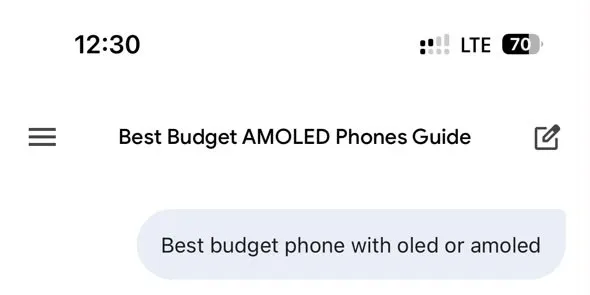
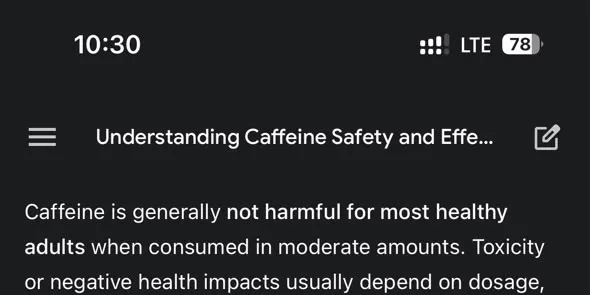
The difference was bigger than we expected. Our iPhone finished the Light Mode test at 70%, while Dark Mode left it at 78%. Here’s exactly what happened.
Does Dark Mode Save Battery on iPhone?
Yes, it did in our test. After two hours of continuous use, the iPhone 15 consumed 30% of its battery in Light Mode and 22% in Dark Mode. That left us with 8 percentage points more battery remaining when using Dark Mode. Dark Mode also performed better in every individual app we tested, although the size of the difference varied considerably.
We wouldn’t take these results to mean that every iPhone will save eight percentage points every two hours. Battery drain changes with brightness, apps, network conditions, temperature, signal strength, and what is actually displayed on the screen. But on our iPhone 15, under our test conditions, Dark Mode clearly used less battery.
How Does Dark Mode Save Battery?
The answer comes down largely to the type of display in your iPhone. The iPhone 15 we used has a 6.1-inch OLED display. Unlike an LCD, an OLED display doesn’t rely on one backlight illuminating the entire screen. Individual pixels produce their own light.
If you want a deeper look at how these display technologies differ, we’ve also compared OLED vs AMOLED displays and what those differences actually mean in everyday use.
That matters when displaying dark content. A darker OLED pixel can require less power than a bright one, while a pixel displaying true black can effectively be switched off. As more of the interface changes from bright backgrounds to dark ones, display power consumption can fall.
This doesn’t mean Dark Mode automatically produces huge battery savings. Screen brightness and the actual content displayed make a huge difference. That’s one reason we wanted to test it ourselves rather than simply assume Dark Mode would make a major difference.
We used the same hands-on approach when testing whether Low Power Mode actually saves battery on iPhone, where we compared battery drain with the feature turned on and off.
How We Tested Dark Mode vs Light Mode
We used the same iPhone 15 for both tests and started each two-hour session at 100% battery. For the first run, the phone was set to Light Mode. We used four apps continuously for 30 minutes each:
- Safari
- Chess.com
- Gemini
After completing the Light Mode test, we charged the iPhone back to 100%, switched the system appearance to Dark Mode, and repeated the same sequence. We kept the main conditions consistent between the two runs:
- Brightness around 50%
- Auto-Brightness off
- Low Power Mode off
- Wi-Fi off
- LTE mobile data
- Same iPhone 15
- Same location
- 30 minutes per app
- No charging during either two-hour run
We recorded the battery percentage after every 30-minute session.
This was a hands-on real-world test, not a laboratory measurement. Facebook content can change, webpages aren’t identical workloads, and network conditions can fluctuate. Those limitations are important when interpreting differences of only one or two percentage points.
Dark Mode vs Light Mode Battery Test Results
Here are the battery readings we recorded:
| App | Light Mode | Dark Mode | Battery Saving |
|---|---|---|---|
| Facebook, 30 min | 100% → 89% (11%) | 100% → 93% (7%) | 4 points |
| Safari, 30 min | 89% → 82% (7%) | 93% → 87% (6%) | 1 point |
| Chess.com, 30 min | 82% → 77% (5%) | 87% → 83% (4%) | 1 point |
| Gemini, 30 min | 77% → 70% (7%) | 83% → 78% (5%) | 2 points |
| Total | 30% used | 22% used | 8 points |


The overall pattern is more interesting than any single result. Dark Mode used less displayed battery in all four apps. But the difference wasn’t consistent. Facebook showed a four-point gap, while Safari and Chess.com differed by only one point each. Let’s look at what happened.
Facebook Showed the Biggest Difference
Facebook was the first app in both tests. In Light Mode, our iPhone went from 100% to 89%. That’s an 11-percentage-point drop in 30 minutes.
With Dark Mode enabled: 100% → 93%. That’s a 7-point drop. The four-point gap was the largest we recorded during any of the individual tests.
It’s an interesting result, but Facebook is also difficult to test with perfect consistency. The feed contains a changing mixture of photos, text, videos, ads, and other content. Two sessions aren’t going to display exactly the same pixels for the entire 30 minutes.
For that reason, we wouldn’t claim that Dark Mode will always save four percentage points during half an hour of Facebook. It’s simply what our test recorded.
Safari: A Much Smaller Difference
Safari produced a closer result. During the Light Mode run, 89% to 82% = 7% used. During the Dark Mode run, 93% to 87% = 6% used. That’s only one percentage point between the two tests.
This highlights an important limitation of Dark Mode. Changing the browser interface to a darker appearance doesn’t guarantee that every webpage becomes predominantly dark.
If you’re visiting sites filled with white backgrounds, bright images, or video, much of the OLED display can remain illuminated. The content on the screen matters just as much as having the Dark Mode setting turned on.
Chess.com: 5% vs 4%
Chess.com produced another small difference. Light Mode consumed 5 percentage points, taking the battery from 82% to 77%. Dark Mode consumed 4 points, from 87% to 83%. Again, Dark Mode was ahead, but only by one point.
With such a small gap, we wouldn’t treat this individual result as conclusive by itself. Battery percentage is displayed in whole numbers, and real-world phone usage has variables that are difficult to eliminate completely. Combined with the other tests, however, it contributes to the same overall pattern.
Gemini: 7% vs 5%
Gemini was our final 30-minute session. In Light Mode, it used 7%, from 77% to 70%. In Dark Mode, it used 5% from 83% to 78%. That gave Dark Mode a two-percentage-point advantage.
Gemini is particularly interesting for this kind of comparison because much of the interface can consist of text and relatively large areas of background color.
Our test doesn’t isolate how much of the difference came specifically from the OLED display, but the result again favored Dark Mode.
How Much Battery Does Dark Mode Save?
There isn’t a single percentage that applies to every iPhone or every situation. In our two-hour test, Light Mode consumed 30%, while Dark Mode consumed 22%. So Dark Mode left our iPhone 15 with 8 percentage points more battery after two hours. It’s tempting to turn that into a universal percentage claim, but it wouldn’t be accurate.
We tested one iPhone 15, ran each mode once, and used real apps over LTE. That’s useful for seeing what happened in everyday use, but it isn’t enough to establish that Dark Mode will always improve iPhone battery life by the same amount.
Research also suggests that brightness makes a major difference. Purdue University researchers tested Dark Mode on several OLED Android smartphones and found that at roughly 30% to 50% brightness, switching from Light Mode to Dark Mode produced relatively modest average power savings in their testing. The savings became substantially larger at very high brightness.
That reinforces an important point: Dark Mode battery savings aren’t fixed.
Does Dark Mode Save More Battery at Higher Brightness?
Potentially, yes. Brightness is one of the biggest variables in the Dark Mode battery equation. With an OLED display, showing a bright interface at high brightness requires more display power. Switching those bright areas to darker colors can therefore create a larger difference.
At lower brightness, the display is already consuming less power, so there may be less power available for Dark Mode to save.
We deliberately tested at around 50% brightness because that’s closer to normal everyday use than running the display at maximum brightness just to produce a larger result. This also means someone who regularly uses an OLED iPhone outdoors at very high brightness could see a different result from ours.
Does Dark Mode Save Battery on Every iPhone?
Not necessarily to the same degree. The display technology matters. Dark Mode’s power-saving advantage is primarily associated with OLED displays, where individual pixels produce their own light.
That’s different from traditional LCD technology, which uses a backlight behind the display. Making an LCD interface black doesn’t switch off that backlight in the same way.
So if battery saving is your main reason for using Dark Mode, the potential benefit is more relevant on an iPhone with an OLED display. Our test device, the iPhone 15, uses OLED, making it well suited to this comparison.
Does Dark Mode Save Battery If Apps Are Still Bright?
This is where Dark Mode can become a little misleading. Turning on iPhone Dark Mode changes the system appearance, and many apps support the darker interface. But it doesn’t magically turn every piece of content black.
Photos remain photos. Videos remain videos. Websites can still use bright backgrounds. Apps may also implement their own themes differently. Imagine spending 30 minutes watching a full-screen video. Most of the display is occupied by the video itself rather than the iPhone’s interface. Switching the surrounding menus from white to black may have relatively little effect during that activity.
That’s why the content you’re viewing matters. Dark Mode has the greatest opportunity to reduce OLED display power when it actually replaces large bright areas of the screen with darker ones.
Dark Mode vs Lowering Brightness
If your only goal is extending battery life, don’t overlook brightness. Apple itself notes that display brightness can affect battery life and recommends allowing Auto-Brightness to adjust the display or manually dimming the screen when appropriate.
Dark Mode and lower brightness aren’t competing features, either. You can use both. In fact, reducing unnecessary brightness may have a bigger impact than simply switching themes in situations where the content remains relatively bright.
For our experiment, Auto-Brightness was disabled specifically so changing ambient conditions wouldn’t automatically alter the display brightness and interfere with the Light vs Dark comparison. For normal everyday use, you don’t need to copy that part of our testing setup.
If you’re trying to get more from your battery over the long term, our iPhone battery health guide covers more practical ways to reduce unnecessary battery wear.
Is Dark Mode Worth Using for Battery Life?
On an OLED iPhone, yes, particularly if you already like the appearance. Our iPhone Dark Mode battery life didn’t require any change in how we used the phone. We simply switched the interface from Light Mode to Dark Mode and repeated the same four-app routine. After two hours, we had more battery remaining.
It is unrealistic to expect the same eight-point difference daily. If most of your screen time involves video, games, photos, or bright webpages, Dark Mode may have less opportunity to help. If you spend more time in apps with genuinely dark backgrounds, the benefit could be more noticeable.
Battery saving is therefore best viewed as an extra benefit of Dark Mode rather than a guaranteed battery-life upgrade of a specific percentage.
How to Turn On Dark Mode on iPhone
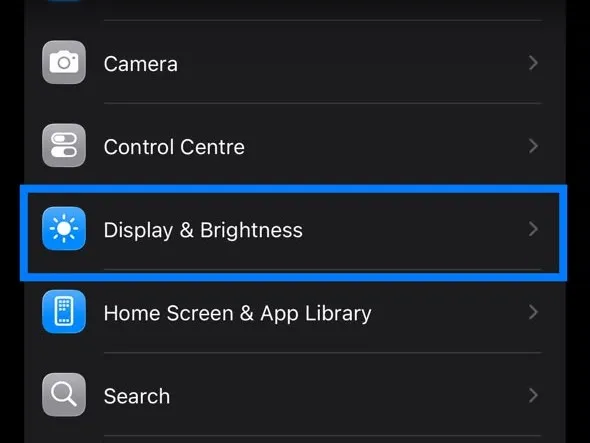
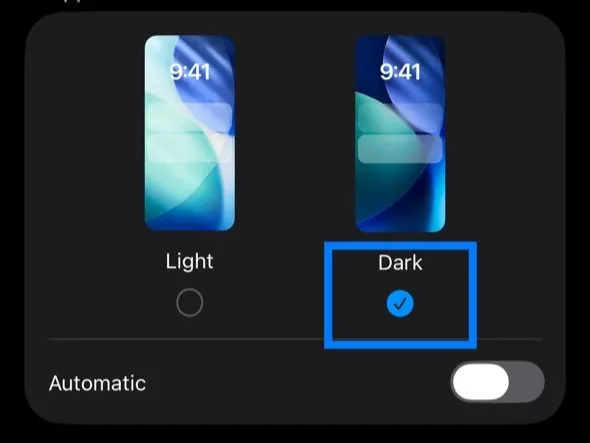
Apple makes the setting easy to change. Go to Settings → Display & Brightness → select Dark under Appearance. You can also access Dark Mode from Control Center by pressing and holding the brightness control.
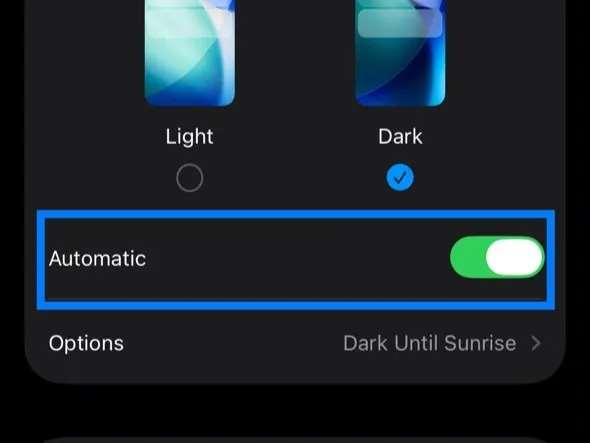
If you don’t want Dark Mode running all day, iOS can switch appearances automatically. Under Display & Brightness, enable Automatic and choose when you want your phone to switch between Light and Dark appearances.
Our Verdict: Does Dark Mode Save Battery on iPhone?
Yes, Dark Mode saved battery in our iPhone 15 test. We started both sessions at 100% and used Facebook, Safari, Chess.com, and Gemini for 30 minutes each. After two hours:
Light Mode finished at 70%.
Dark Mode finished at 78%.
More importantly, Dark Mode used less displayed battery in every individual app test, although the differences ranged from just one percentage point in Safari and Chess.com to four points in Facebook.
We wouldn’t use one two-hour experiment to claim that every iPhone will get the same improvement. Brightness, screen content, apps, network conditions, and the specific iPhone all matter.
But our test answered the question we started with. Does Dark Mode save battery on iPhone? On our OLED iPhone 15, it did, and the difference was measurable.
FAQs
Does Dark Mode really save battery on iPhone?
It can on iPhones with OLED displays. In our iPhone 15 test, Dark Mode consumed 22% over two hours compared with 30% in Light Mode.
How much battery does Dark Mode save on iPhone?
There isn’t a fixed amount. Our iPhone 15 had 8 percentage points more battery remaining after two hours in Dark Mode, but results will vary depending on brightness, apps, content, network conditions, and usage.
Does Dark Mode save battery on OLED iPhones?
OLED technology is particularly suited to benefiting from darker interfaces because individual pixels produce their own light. Darker pixels generally require less display power than bright ones.
Does Dark Mode save battery at 50% brightness?
It can. We kept our iPhone 15 at around 50% brightness and still recorded lower overall battery consumption in Dark Mode. However, research indicates that the size of the benefit depends strongly on brightness and screen content.
Is Dark Mode better than Light Mode for battery life?
For battery life on an OLED iPhone, Dark Mode has the advantage when it results in genuinely darker screen content. But the size of that advantage varies considerably depending on what you’re doing.
Should I keep Dark Mode on all the time?
You can if you like it. If you use an OLED iPhone, reduced display power consumption can be an additional benefit. If you prefer Light Mode, you can also schedule Dark Mode to activate automatically at night.