
Table of Contents
Introduction
Low Power Mode sounds straightforward: turn it on, your iPhone uses less power, and the battery lasts longer. But does Low Power Mode save battery on iPhone in reality when you’re actively using your phone?
We tested it on an iPhone 15 to find out.
Our test consisted of 30 minutes of YouTube, 30 minutes of Safari browsing, and 30 minutes of Instagram over LTE. We ran the same 90-minute routine once with Low Power Mode off and again with it enabled.
The iPhone finished at 75% without Low Power Mode and 79% with it turned on. That’s a noticeable difference, but the individual results also show why Low Power Mode isn’t a magic fix for battery drain.
What Does Low Power Mode Do on iPhone?
Low Power Mode reduces the amount of power your iPhone uses by cutting back on features that aren’t essential at that moment.
According to Apple’s Low Power Mode documentation, it affects Background App Refresh, email fetching, automatic downloads, iCloud Photos syncing, Auto-Lock, display brightness, and some visual effects. On iPhones with ProMotion displays, it also limits the refresh rate to up to 60Hz.
In other words, your iPhone continues doing the important things, but it reduces some background activity and visual features to conserve power.
When Low Power Mode is active, the battery icon turns yellow. Apple also says the feature automatically turns off after your iPhone charges to 80% or higher.
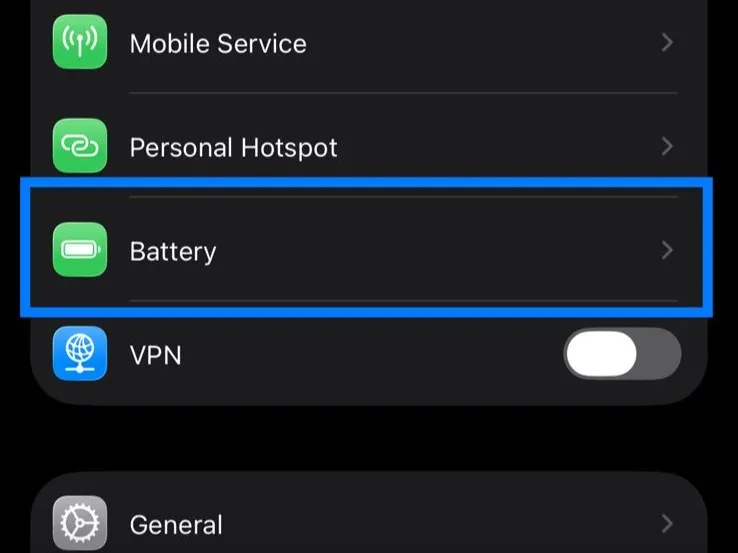
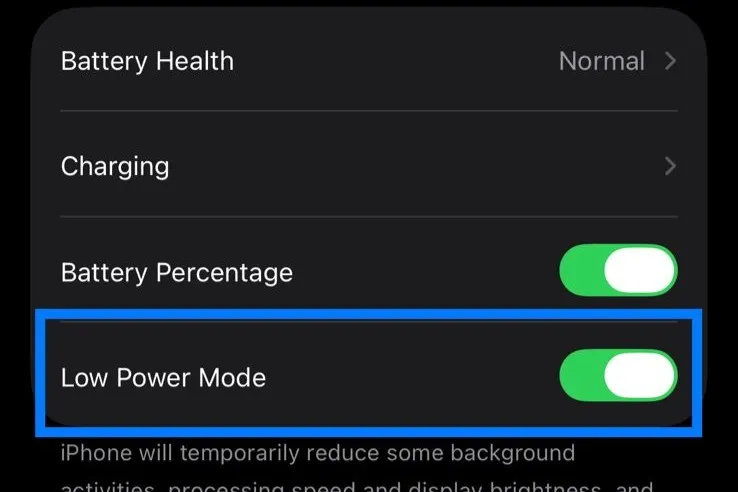
How We Tested Low Power Mode
We used a standard iPhone 15 and performed two separate battery runs from a full charge. The first test had Low Power Mode off. We then recharged the phone to 100% and repeated the routine with Low Power Mode on. Our iPhone Low Power Mode test showed a measurable difference after 90 minutes of mixed use.
Each run included:
- 30 minutes of YouTube
- 30 minutes of Safari
- 30 minutes of Instagram
To make the comparison as consistent as possible, we used LTE with Wi-Fi switched off, kept brightness at around 50%, disabled Auto-Brightness, stayed in the same location, and used the same YouTube video at 1080p. We didn’t charge the phone during either 90-minute session.
This wasn’t a laboratory benchmark. Instagram feeds change, webpages vary, and cellular conditions can fluctuate. Instead, the idea was to see what happens during the kind of everyday use most people actually put their phones through.
Low Power Mode On vs Off: Test Results
Here’s what we recorded:
| Activity | Low Power Mode OFF | Low Power Mode ON |
|---|---|---|
| YouTube, 30 min | 100% → 93% (7% used) | 100% → 94% (6% used) |
| Safari, 30 min | 93% → 86% (7% used) | 94% → 89% (5% used) |
| Instagram, 30 min | 86% → 75% (11% used) | 89% → 79% (10% used) |
| Total, 90 min | 25% used | 21% used |
Low Power Mode used less battery in all three activities. The smallest differences appeared in YouTube and Instagram, where it saved one percentage point in each 30-minute session. Safari showed a larger two-point difference.
Overall, our iPhone 15 consumed 25% without Low Power Mode and 21% with it enabled. That left 4 percentage points more battery after 90 minutes of use.


What Our Test Actually Tells Us
The results support a simple conclusion: Low Power Mode saved battery on our iPhone 15, but the improvement during active use wasn’t huge.
YouTube is a clear example. Streaming the same 1080p video consumed 7% normally and 6% with Low Power Mode enabled. That’s understandable because Low Power Mode can’t remove the main power demands of video streaming. The display is still on, LTE is still transferring data, and the phone still has to process the video.
Instagram showed a similar pattern at 11% versus 10%. It’s also worth remembering that Instagram isn’t a perfectly repeatable workload because the mix of photos, videos, Reels, and ads changes as you scroll.
Safari produced the biggest gap, using 7% normally and 5% in Low Power Mode. Web browsing can vary considerably depending on the pages being loaded, so we wouldn’t assume every 30-minute browsing session will produce the same difference.
What matters more is the overall pattern. Every stage finished slightly better with Low Power Mode enabled, and those smaller differences added up over the full test.
How Much Battery Does Low Power Mode Save?
There’s no fixed percentage that applies to everyone. In our test, Low Power Mode reduced displayed battery consumption by 4 percentage points over 90 minutes. But that doesn’t mean you should expect exactly the same improvement on your iPhone.
Actual battery life can vary considerably depending on how you use the phone. Screen brightness, network conditions, battery condition, temperature, apps, and background activity can all affect how quickly the battery drains.
If your phone regularly gets unusually warm while the battery drops quickly, our guide to iPhone overheating and running slow explains what may be causing it.
That’s why we wouldn’t say that Low Power Mode improves battery life by a particular percentage based on this test alone. What we can say is much simpler: with the same 90-minute routine, our iPhone 15 finished at 79% instead of 75%.
Does Low Power Mode Make Your Battery Last Longer?
Yes. That’s exactly what the feature is designed to do. Low Power Mode doesn’t add capacity to your battery. Instead, it tries to make the charge you already have drain more slowly. The benefit may also become more noticeable during a full day than in our screen-heavy test.
We actively used our iPhone for the entire 90 minutes. In normal life, a phone also spends plenty of time locked while apps refresh, email checks for new messages, photos sync, and other processes operate in the background.
Because Low Power Mode restricts several of those activities, its impact won’t necessarily look the same for someone who spends hours away from their phone.
If your iPhone is losing more charge than expected while you’re not using it, our guide to iPhone battery draining overnight explains which background activities and settings are worth checking.
Does Low Power Mode Slow Down iPhone?
There can be trade-offs. Apple notes that some tasks may take longer when Low Power Mode is on. It also changes several background behaviors to reduce energy use. On iPhones with ProMotion displays, Low Power Mode limits the refresh rate to up to 60Hz, which can make scrolling feel less fluid if you’re used to a higher refresh rate.
That particular limitation wasn’t relevant to our standard iPhone 15 because it doesn’t have a ProMotion display. For everyday tasks such as browsing, messaging, or watching videos, whether you notice the other changes will depend on how you use your phone.
Is Low Power Mode Bad for Your iPhone?
No. Low Power Mode is a built-in iOS feature designed specifically to reduce power consumption. Using it doesn’t damage the battery.
The real trade-off is that some features don’t behave normally while it’s enabled. Background App Refresh and automatic downloads are disabled, email fetching is reduced, and some syncing and visual effects are limited.
If you need maximum battery life, those compromises can be worthwhile. If you’re near a charger with plenty of battery remaining, you may prefer leaving everything running normally.
Does Low Power Mode Affect Battery Health?
Low Power Mode shouldn’t be confused with Battery Health. According to Apple’s explanation of iPhone Battery Health, Maximum Capacity measures the battery’s capacity relative to when it was new, and that capacity gradually decreases as the battery chemically ages. Low Power Mode simply changes how much power the iPhone is using at that moment.
It won’t restore capacity that’s already been lost through normal battery aging. So if your goal is to make today’s charge last longer, Low Power Mode can help. If your battery has significantly degraded over time, Low Power Mode isn’t a replacement for addressing the underlying battery condition.
If you want to slow that decline over time, our guide on how to improve iPhone Battery Health covers the charging habits and settings that matter most.
Should You Keep Low Power Mode On All the Time?
You can, but you don’t necessarily need to. Low Power Mode makes the most sense when battery life matters more than having every background feature available. That could be when you’re traveling, spending a long day away from a charger, or simply trying to make the last 20% survive until you get home.
You also don’t have to wait until your battery is nearly empty. If you know in advance that charging won’t be possible for several hours, turning it on earlier is reasonable. Our test suggests the benefit comes from smaller savings accumulating over time, rather than one dramatic reduction in battery use.
Does Low Power Mode Save Battery? Our Verdict
Yes. Our real-world iPhone 15 test showed lower battery consumption with Low Power Mode enabled. After 90 minutes of YouTube, Safari, and Instagram over LTE, the phone had 79% battery remaining with Low Power Mode on compared with 75% when it was off.
The difference wasn’t dramatic, and we wouldn’t use one test to predict exactly how much battery every iPhone will save. Your apps, signal strength, battery condition, and usage can produce different results.
But the practical answer is clear. If you’re running low and won’t have access to a charger for a while, turning on Low Power Mode is worthwhile. It won’t transform your battery life, but the extra charge it preserves can make a difference when you need your iPhone to last.
FAQs
Does Low Power Mode really save battery on iPhone?
Yes. Low Power Mode reduces power consumption by limiting certain features and background activities. In our iPhone 15 test, the phone used 21% over 90 minutes with Low Power Mode enabled compared with 25% without it.
How much battery does Low Power Mode save?
There’s no universal figure. Our iPhone 15 had 4 percentage points more battery remaining after a 90-minute mixed-use test, but results will vary depending on the phone, apps, network conditions, brightness, and battery health.
What does Low Power Mode do on iPhone?
It reduces or disables several power-consuming features, including Background App Refresh, automatic downloads, email fetching, some visual effects, and certain syncing activities.
Is Low Power Mode bad for iPhone?
No. It’s an Apple-designed battery-saving feature. The main downside is that Low Power Mode temporarily restricts some features and background activities.
Does Low Power Mode affect battery health?
Low Power Mode reduces current power consumption. It doesn’t restore maximum battery capacity lost through normal aging.
Can you leave Low Power Mode on all the time?
Yes, although some background features remain restricted while it’s active. For most people, it’s most useful when extending battery life is more important than having every feature running normally.