
Android phones already come with useful security features, including Google Play Protect, Application Sandbox, encryption, and regular security updates on supported devices. For many people, that built-in protection may be enough.
But Android also gives users the ability to install apps from outside Google Play. Google warns that downloading apps from unknown sources can put your device and personal information at risk. That’s one situation where an additional security app may provide another layer of protection.
The problem is choosing one.
So instead of comparing antivirus apps only by their feature lists, we installed and tested them ourselves on the same Android phone. Our goal was to find the best antivirus for Android based on real-world scanning experience, performance, battery impact, usability, ads, and how clearly each app handled our test APK.
Contents
Best Antivirus for Android: Quick Results
| Antivirus | Scan Time | Setup Before Scan | Performance | Battery Usage | Ads/Prompts | Experience |
|---|---|---|---|---|---|---|
| Bitdefender | 1m 10s | Required | Normal | 0.5% | Few Ads | Excellent |
| ESET | 1m | Not Required | Normal | Not Listed | Upgrade Prompt | Good |
| Avast | 40s | Not Required | Normal | Not Listed | Ads | Good |
| AVG | 40s | Not Required | Normal | Not Listed | Ads | Average |
| Malwarebytes | 2m 18s | Not Required | Normal | Not Listed | No Ads | Good |
| Trend Micro | 1m 42s | Not Required | Normal | 0.28% | Upgrade Prompts | Average |
| Avira | Did not complete | — | — | — | — | Poor |
| McAfee | 1m 11s | Not Required | Normal | Not Listed | None | Good |
| Norton | Not Tested | Purchase/Trial Barrier | — | — | Subscription Prompt | — |
Note: “Not listed” means the antivirus didn’t appear in Android’s battery-usage list during our check. We don’t interpret that as literally zero battery consumption, only that Android did not report measurable usage for the app in that view.
How We Tested These Android Antivirus Apps
We tested the apps on the same Android phone, a OnePlus 8, so the results would be as comparable as possible. For each antivirus, we installed the app, went through whatever initial screens were required, started its available device scan, timed the scan, and watched how the phone behaved while it was running.
We recorded:
- Scan completion time
- Performance during scanning
- Battery usage reported by Android
- Setup difficulty
- Ads and upgrade prompts
- Overall experience
We also kept a potentially risky APK on the phone to see whether the antivirus would flag it.
This wasn’t designed as a laboratory malware-detection test. One APK cannot tell us an antivirus’s overall detection rate, and we didn’t deliberately infect the phone with live malware. Our goal was to see what an ordinary Android user would actually experience after installing each security app.
If you already suspect that your phone is infected rather than simply looking for preventative protection, follow our step-by-step guide on how to remove malware from Android safely.
9 Antivirus Apps We Tested
1. Bitdefender Mobile Security: Best Overall
Bitdefender was the standout in our hands-on test. Its scan took 1 minute and 10 seconds, and the phone remained responsive throughout. We rated performance during the scan as normal, with no obvious slowdown that interfered with using the device.
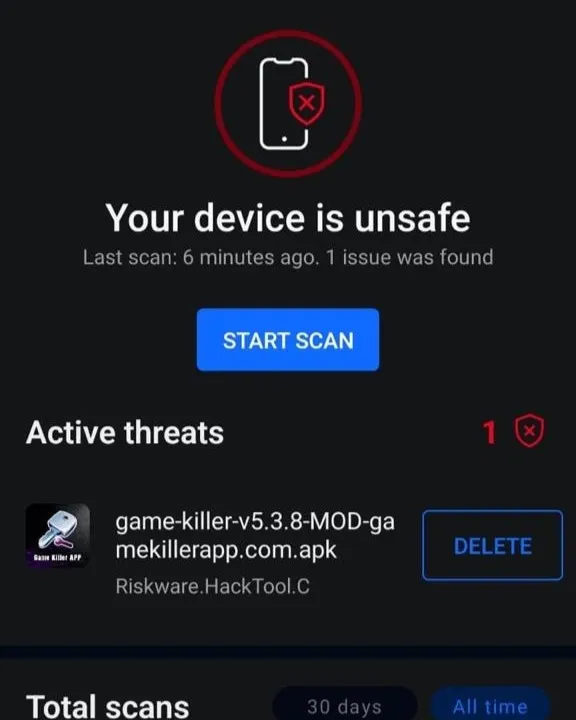
Android reported 0.5% battery usage for Bitdefender during our assessment More importantly, Bitdefender identified the APK we had on the device and classified it as: Riskware.HackTool.C Bitdefender’s official documentation says its Android malware scanner can scan apps when they are installed as well as perform on-demand device scans.
The app clearly displayed the active threat and offered an option to delete the file. That’s significant for our test because it gave us a concrete example of Bitdefender identifying potentially risky software rather than simply completing a clean scan.
The interface was relatively easy to navigate. There were a few ads or promotional elements, so the free experience wasn’t completely distraction-free, but overall we rated it excellent.
Verdict
For our particular test, Bitdefender provided the best balance of clear detection, reasonable scanning time, normal performance, and straightforward results. Our result alone doesn’t prove which app offers the best antivirus protection for Android, but Bitdefender was the only antivirus in our hands-on test that clearly identified and presented a warning for our test APK. Bitdefender is best for users who prioritize malware and risky app detection.
You shouldn’t confuse our hands-on result with an independent malware-detection ranking. In AV-TEST’s July 2026 Android evaluation, Bitdefender Mobile Security received full marks for protection, performance, and usability, alongside several other major security products.
2. ESET Mobile Security: Simple and Lightweight
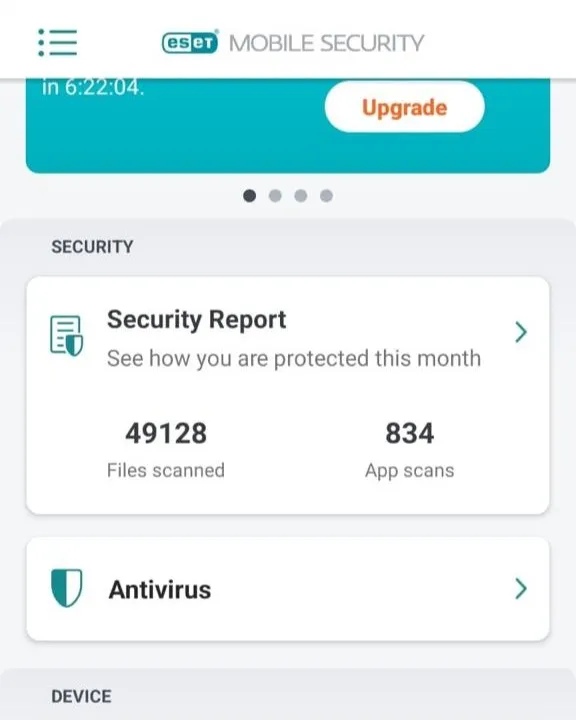
ESET completed its initial scan in approximately 1 minute. The phone continued to perform normally while the scan was running, and ESET didn’t appear in the battery-usage list when we checked afterward.
One thing we liked was that ESET could perform the initial scan without forcing us through a complicated setup process. The app did display an upgrade prompt, but the overall experience was still satisfactory The interface was fairly straightforward and didn’t make running a basic scan difficult.
Verdict
ESET was one of the more balanced apps we tested. It wasn’t the most impressive in any single category, but it combined a quick scan with a relatively uncomplicated experience. It’s best for users who want a straightforward Android security app.
3. Avast: Fast, but Expect Ads
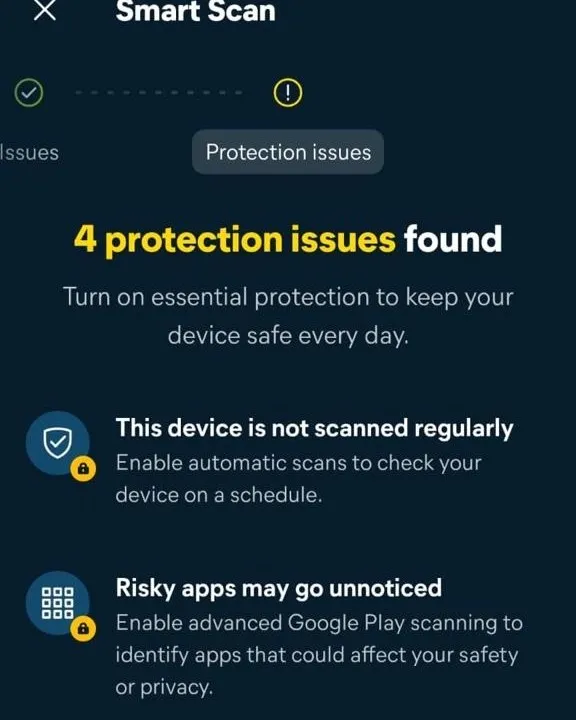
Avast was one of the fastest antivirus apps in our test, completing its Smart Scan in only 40 seconds. No complicated setup was necessary before we could run the scan.
Performance remained normal throughout. Avast didn’t appear in the Android battery-usage list when we checked, so we couldn’t assign it a meaningful battery percentage.
The trade-off is advertising. Avast explicitly offers a free version supported by personalized advertising, and we encountered ads and promotional screens during use. It also encouraged us to enable additional protection features. The experience was still good, but noticeably more commercial than some alternatives.
Verdict
If you’re looking for the best free antivirus for Android, Avast is worth considering if you want quick scans and don’t mind advertising in exchange for using the free version.
4. AVG Antivirus: Fast but Ad-Heavy
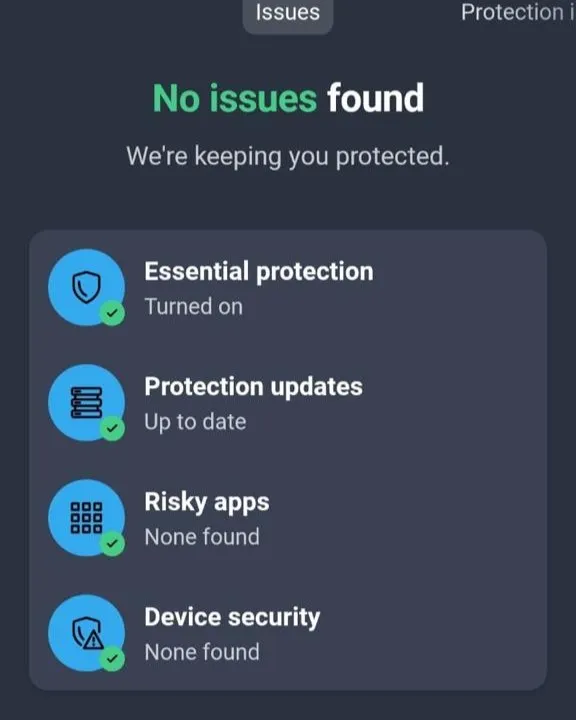
AVG’s experience was quite similar to Avast’s. Its Smart Scan also took approximately 40 seconds, making AVG one of the fastest apps we tested. Phone performance remained normal, and AVG wasn’t listed in Android’s battery usage when we checked.
The scan itself was easy to start, but advertising reduced the overall experience. We therefore rated AVG Average, despite its impressive scan speed.
Verdict
AVG is quick and easy to operate, but there are cleaner choices if ads bother you. If you prioritize scan speed over a completely clean interface, you can choose it.
5. Malwarebytes: Thorough Scan
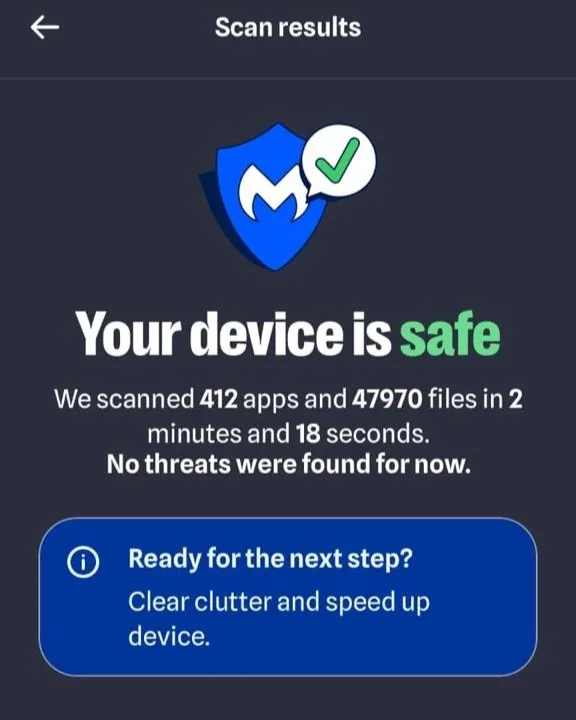
Malwarebytes took considerably longer than Avast or AVG, but there’s an important reason not to compare those times blindly. Our Malwarebytes result showed that it scanned:
412 apps and 47,970 files in 2 minutes and 18 seconds.
That’s a much more informative result than scan time alone. When choosing the best antivirus scanner for Android, it’s important to remember that different antivirus apps may examine different amounts of data.
The phone continued working normally during the scan, and Malwarebytes wasn’t listed in Android’s battery-usage screen afterward. We also encountered no ads during our test.
That made a noticeable difference to the experience. Without constant advertising interrupting the process, Malwarebytes felt cleaner and less distracting. We rated the overall experience Good.
Verdict
Malwarebytes wasn’t the fastest, but its combination of a clearly reported scan scope and clean interface made it one of our favorites. Best for users who dislike ads and want a simple scanning experience.
6. Trend Micro: Functional But No Clear Results
Trend Micro completed its scan in 1 minute and 42 seconds. Performance remained normal while scanning, and Android reported approximately 0.28% battery usage during our test.
The unusual part came after the scan. We didn’t get the same clear results presentation we saw from apps such as Bitdefender or Malwarebytes, which made the overall experience less satisfying.
There were also prominent prompts encouraging an upgrade to unlock additional features. We rated both ease of use and the overall experience as Average.
Verdict
Trend Micro completed the basic job without noticeably slowing the phone, but its results presentation and premium prompts made the overall experience less impressive than some of the other apps we tested.
7. Avira: The Only App That Failed Our Scan Test
Avira produced the worst experience of the apps we were able to install. When we started its Smart Scan, the app became stuck on “Preparing…” and later remained on “Scanning…” without completing normally.
We tried again, but the problem persisted. Because the scan never completed properly, it wouldn’t be fair to provide a scan time or battery comparison against the other apps. We rated the setup/use as Difficult and the overall experience Poor.
This doesn’t prove that Avira will fail on every Android phone. It only reflects what happened on our test device during this test. That experience shouldn’t be interpreted as evidence that Avira generally fails as an Android security product. Independent testing has produced much stronger results: AV-TEST awarded Avira Antivirus Security full scores for protection, performance, and usability in its July 2026 Android evaluation.
Verdict
We couldn’t recommend Avira based on our experience because completing a basic security scan proved unreliable on our phone.
8. McAfee: Best Ad-Free Experience
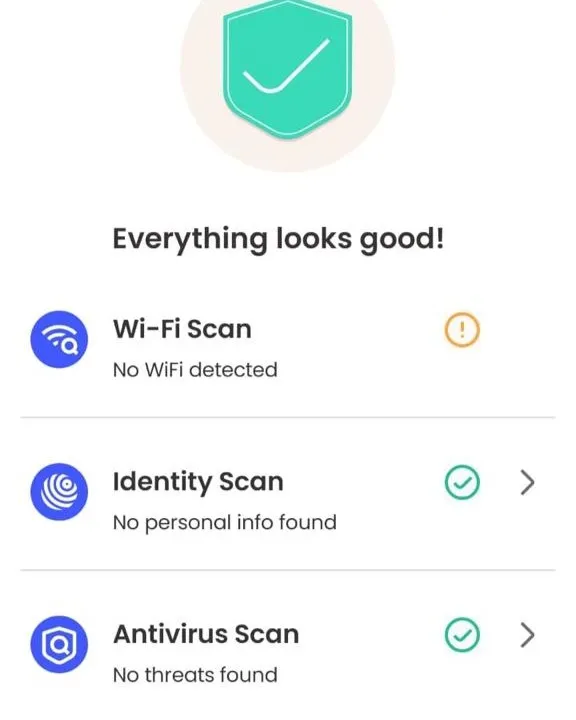
McAfee was the nicest experience. Its Smart Scan finished in 1 minute and 11 seconds and reported that everything looked good. The antivirus portion found no threats.
Phone performance remained normal throughout the test, and McAfee wasn’t listed in Android’s battery-usage screen afterward. Most importantly for usability, we encountered no ads.
The app was easy to navigate and provided a clear result at the end of the scan. We rated the overall experience Good.
Verdict
If your priority is a simple, polished experience without advertising getting in the way, McAfee performed extremely well in our test. Best for ease of use and an ad-free scanning experience.
9. Norton: Not Tested Due to Purchase Barrier
We intended to include Norton in exactly the same test. However, during setup, Norton presented us with its subscription options and a 7-day free trial, with no obvious way for us to continue through the same free testing procedure we were using for the other apps.
Rather than subscribe or change our testing methodology just for one product, we excluded Norton from the direct scan comparison. That doesn’t mean Norton is ineffective. In AV-TEST’s July 2026 Android evaluation, Norton 360 received full scores for protection, performance, and usability. We simply weren’t able to include it under the same hands-on testing conditions used for the other apps.
Did Antivirus Apps Slow Down Our Android Phone?
Surprisingly, not much. For every antivirus that successfully completed its scan, we experienced normal phone performance. We didn’t experience the kind of severe lag or freezing that would make us tell users to avoid running a scan while using their phone.
Battery impact also appeared modest in the cases where Android gave us a measurable figure. Bitdefender showed 0.5%, while Trend Micro showed 0.28% during our checks. Several other apps didn’t appear in Android’s battery-usage list at all.
Again, that doesn’t mean those apps consumed zero energy. Android’s battery reporting has limitations, and our test was relatively short. These results are better treated as an indication that none of the successful scans caused an obvious short-term battery problem on our test phone.
Which Android Antivirus Was Best in Our Test?
After using the apps ourselves, our ranking isn’t based purely on which one finished its scan fastest. If you’re looking for a recommended antivirus for Android,
Bitdefender is our overall pick. It completed the scan in a reasonable 1 minute and 10 seconds, didn’t noticeably slow the phone, and most importantly, it clearly identified our test APK as Riskware.HackTool.
McAfee provided our favorite overall user experience. Its 1-minute-11-second scan was quick, easy to understand, and free from ads during our test.
Malwarebytes also impressed us. Although its 2-minute-18-second scan was slower, it reported scanning 412 apps and 47,970 files, and the ad-free experience was excellent.
Avast and AVG were fastest at only 40 seconds, but advertising made them less pleasant to use. ESET was another solid middle-ground choice.
Avira finished last because we couldn’t get its Smart Scan to complete properly on our test device.
Do You Actually Need Antivirus on Android?
Not necessarily. If you primarily download apps from Google Play, keep Android updated, avoid suspicious links and APK files, and leave Google Play Protect enabled, the built-in protections may be sufficient for many users. We’ve covered what Google Play Protect actually scans, how it works, and whether you should disable it in a separate guide.
A dedicated antivirus becomes more appealing if you regularly download APKs, install apps outside Google Play, visit unfamiliar websites, or simply want another security layer checking what’s stored on your phone.
And our testing highlights another important point: the best antivirus isn’t necessarily the one with the longest feature list. An antivirus needs to be easy enough that you’ll actually use it, light enough that you won’t uninstall it, and clear enough that you understand when it finds something.
Final Verdict
After installing and testing these Android security apps ourselves, Bitdefender is our pick for the best antivirus for Android in 2026.
It wasn’t the fastest scanner, but speed wasn’t our only consideration. Its 1-minute-10-second scan, normal phone performance, relatively small reported battery impact, and detection of our test APK gave it the strongest overall result.
For a cleaner user experience, McAfee and Malwarebytes were particularly impressive, especially because we didn’t encounter ads during our tests.
Avast and AVG are worth considering if scan speed matters most, while ESET provided a good balance without standing out dramatically in any particular area.
Most importantly, these results represent our hands-on experience on one Android test device, not universal malware-detection rankings. Antivirus performance can change with app updates, malware definitions, Android versions, and the files being scanned.
But if you’re wondering what these apps are actually like to install, scan with, and live with on an Android phone, that’s exactly what this test was designed to find out.
FAQs
What is the best antivirus for Android?
Based on our hands-on testing, Bitdefender was the best antivirus for Android overall. It completed its scan in 1 minute 10 seconds without noticeably slowing our phone and was the only successfully tested app that explicitly flagged our test APK as Riskware.HackTool.
Do Android phones really need antivirus protection?
Not necessarily. Android already includes protections such as Google Play Protect and app sandboxing. If you only download apps from trusted sources and keep your phone updated, the built-in protection may be enough. A dedicated antivirus can provide an additional layer of security, particularly if you download APKs or files from outside Google Play.
What is the best free antivirus for Android?
Among the apps we could use without paying, Bitdefender, Avast, ESET, AVG, Malwarebytes, and McAfee all allowed us to perform security scans. Bitdefender produced the strongest result in our test, while Malwarebytes and McAfee provided particularly clean, user-friendly experiences.
Does antivirus slow down an Android phone?
It depends on the phone and the security app. We didn’t notice any significant slowdown during our successfully completed scans. We switched between apps and used the phone while scanning, and performance remained normal. Results can vary depending on the phone, Android version, and antivirus features running in the background.
Is Google Play Protect enough for Android?
For many users, it can be. Google Play Protect checks apps for potentially harmful behavior and is built into Android devices with Google Play services. Users who frequently sideload APKs, download unfamiliar files, or want additional security features may prefer dedicated antivirus protection as another layer of defense.
Can an Android antivirus detect every malicious app?
No. Antivirus software relies on detection engines, threat databases, behavioral analysis, and other techniques, and no security product can guarantee that it will identify every threat.
This was also visible in our practical test. Bitdefender explicitly flagged our test APK as riskware, while the other completed scans didn’t show the same warning. Because we used only one test file, this should not be interpreted as a scientific comparison of overall malware-detection rates.