
Introduction
Your iPhone battery isn’t going to stay at 100% health forever. Like every lithium-ion battery, it slowly loses capacity as it gets older and goes through more charge cycles. So if you open the Battery Health section one day and see 99% instead of 100%, there’s usually no reason to worry.
What you can control is how quickly the battery ages. Heat, charging habits, and even some of the settings you use can make a difference over time. You don’t need to obsess over every charge or completely change the way you use your iPhone, either.
These iPhone battery health tips won’t stop your battery from aging, but they can help slow the process and keep your iPhone performing well for longer. This guide is based on Apple’s official battery recommendations, lithium-ion battery best practices, and real-world iPhone usage.
What Is iPhone Battery Health?
iPhone battery health is basically a measure of how much capacity your battery can still hold compared with when it was new. You can check it in Settings > Battery > Battery Health & Charging. On a new iPhone, Maximum Capacity starts at 100% and then gradually drops as the battery ages.

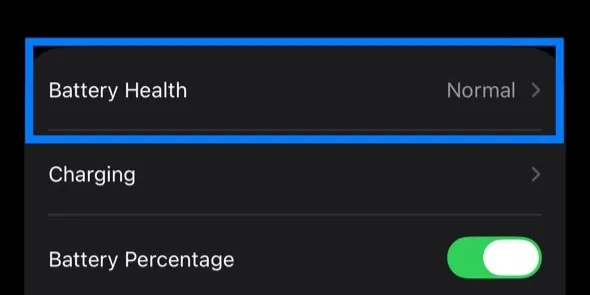

Some of that decline is unavoidable. Lithium-ion batteries chemically age over time, even if you’re careful about how you charge and use your phone.
Apple says its batteries are designed to retain 80% of their original capacity after a certain number of complete charge cycles under ideal conditions. For iPhone 14 models and earlier, that’s 500 cycles, while iPhone 15 models and later are designed to reach 1,000 cycles before hitting the same 80% target.
That doesn’t mean your battery suddenly becomes unusable at 80%. You can keep using the iPhone, but you may notice that it doesn’t last as long between charges. And if your battery health drops from 100% to 99% or loses a few percentage points over time, that’s normal. There’s usually no reason to worry about small changes.
1. Avoid Excessive Heat
Excessive heat is one of the biggest enemies of a lithium-ion battery. Apple recommends avoiding prolonged exposure to high temperatures because heat can permanently reduce the amount of charge your battery can hold.
Your iPhone will naturally get warm from time to time. Gaming, recording video, using GPS, and fast charging can all raise its temperature, and that’s normal. What you want to avoid is exposing the battery to excessive heat repeatedly or for long periods.
Don’t leave your iPhone sitting in a hot car or under direct sunlight. If it gets unusually warm while charging, removing a thick case may help it cool down. Your iPhone can also limit or pause charging when it gets too hot and resume once the temperature returns to normal.
You don’t need to worry every time your iPhone feels a little warm. Just try to avoid unnecessary heat when you can. It’s one of the simplest ways to slow iPhone battery degradation and preserve battery health for longer.

2. Avoid Fully Draining Your Battery
Draining a battery completely before charging used to be common advice, but it doesn’t really apply to the lithium-ion battery in your iPhone. You don’t need to wait until the battery hits 0% before plugging it in. If it’s convenient, charging when you’re somewhere around 20–30% is a better everyday habit.
That doesn’t mean you need to panic if your iPhone occasionally runs out of battery. Doing it once in a while is fine. Just try not to make a habit of regularly running it all the way down. Lithium-ion batteries generally prefer shallower charge and discharge cycles, which can help reduce battery wear over time.
3. Avoid Keeping It at 100% All the Time
Good charging habits can help preserve your iPhone’s battery health over time. Charging to 100% isn’t something you need to avoid completely. The bigger concern is leaving the battery fully charged for long periods, especially when you don’t actually need that extra charge.
That’s where Apple’s Optimized Battery Charging can help. The feature learns your charging routine and can delay charging past 80%, then finish charging closer to when you normally unplug your iPhone.
This is particularly useful if you charge overnight. Instead of having the battery sitting at 100% for several hours, your iPhone can spend less time fully charged. And if you need 100% before a long or busy day, go ahead and charge it fully. The goal isn’t to avoid 100% altogether but to reduce the amount of unnecessary time your battery spends there.
4. Use Certified Chargers
Your charger affects both safety and efficiency. Apple’s chargers work well, but high-quality chargers from other trusted brands are also reliable. Cheap, poorly made chargers can deliver unstable power and generate extra heat, and that heat does more damage than charging speed ever will.
If you need a new charger or cable, pick one certified for Apple devices. It’s a small investment that can help protect one of your iPhone’s most expensive components.
5. Enable Optimized Battery Charging
This feature learns your charging routine and can delay charging past 80% instead of taking the battery straight to 100%. For example, if you usually unplug at 7 a.m., your iPhone might stay around 80% for part of the night and finish charging closer to when you wake up. That means less time sitting at a full charge, which can help reduce battery aging.
Make sure it’s enabled in Settings > Battery > Charging > Optimized Battery Charging. It works quietly in the background and can help preserve iPhone battery health over the long run.


Apple also uses on-device intelligence to learn your charging routine. If you want to know more about Apple Intelligence, read our detailed article, Apple Intelligence Explained.
6. Avoid Fast Charging Frequently
Fast charging is useful when you need to charge your iPhone quickly. With a compatible USB-C adapter, it can add a lot of battery in a short time, especially when the battery is low. The downside is extra heat, which isn’t ideal for battery health.
That doesn’t mean you need to stop using fast charging. The iPhone manages charging speed and temperature automatically. But if you’re charging overnight or sitting at your desk, there’s usually no reason to charge as fast as possible. Save fast charging for the times when you actually need it.
7. Use Wireless Charging Wisely
Wireless charging is convenient. You just put your iPhone down and don’t have to bother with a cable. The trade-off is heat. Wireless charging tends to run warmer than wired charging because some energy is lost during the transfer.
MagSafe helps by keeping the phone properly aligned with the charger, but you’ll probably still notice some warmth. That’s normal. If wireless charging works best for you, there’s no reason to stop using it. Just avoid letting the phone get unnecessarily hot, especially if you charge this way every day.
Where you charge matters too. A desk or other hard surface is better than a bed or couch, where heat can build up around the phone. And if a thick case is making your iPhone noticeably warmer while charging, take it off.

8. Keep iOS Updated
Software updates aren’t just about adding new features. They also bring bug fixes and changes that can affect battery life and power management. After a major update, you may notice your iPhone using more battery than usual while it finishes background tasks. Give it a day or two before worrying about the extra drain.
Keeping your iPhone updated also means you get Apple’s latest fixes and battery-management improvements. If battery life suddenly gets worse right after an update, wait a little while and see if it settles down before assuming something is wrong.
9. Avoid Heavy Tasks While Charging
There’s nothing wrong with checking messages or browsing while your iPhone is charging. The problem comes when you’re doing something demanding at the same time. Gaming, editing video, or recording for a long time can already make the phone warm, and charging adds more heat on top of that.
You don’t need to leave your iPhone untouched every time you plug it in. Just pay attention to how warm it gets. If it starts feeling unusually hot, stop the demanding stuff for a while and let it charge.
10. Use Low Power Mode When Possible
If you want your iPhone to last longer between charges, Low Power Mode is an easy place to start. It cuts back on things like background activity, automatic downloads, and some visual effects, so the phone uses less power when you don’t need everything running at full speed.
It’s especially useful when you’re travelling, away from a charger, or simply trying to stretch the last bit of battery through the day. It won’t improve battery health on its own, but it can reduce unnecessary power use.
Your iPhone already does some of these tasks automatically, adjusting background activity and performance based on how the phone is being used. We explain more about this in How AI in Smartphones Is Changing Modern Phones.
11. Store Your iPhone Properly
Planning to store your iPhone for a few weeks or months? Don’t put it away fully charged or completely drained. Apple recommends leaving it at around 50% and turning it off before storage.
Keep it somewhere cool and dry, away from direct sunlight or excessive heat. If you’re storing it for more than six months, Apple recommends charging it back to around 50% every six months. It’s a small thing, but it helps avoid leaving the battery at an extreme charge level for too long.
12. Don’t Worry About Battery Health
When you get a new iPhone, it’s easy to keep checking Battery Health and wonder when that 100% will finally drop. But it will drop eventually, and that’s completely normal.
One iPhone might stay at 100% for months, while another may hit 99% much sooner. That doesn’t necessarily mean one battery is better than the other. How you use the phone, how hot it gets, and how you charge it all make a difference.
So don’t read too much into every percentage point. If the battery still gets you through the day without a problem, that’s what matters.
13. Charge Cycles Matter More Than You Think
A lot of people think plugging in their iPhone several times a day is bad for the battery. It isn’t. What matters more is how much battery you use overall, not how many times you connect the charger.
A full charge cycle adds up to 100% of battery use. So you could use 40% today and another 60% tomorrow, and together that counts as one cycle. Topping up your iPhone during the day is perfectly fine, and it’s generally better than regularly running the battery all the way down.
14. Common iPhone Battery Health Myths
A lot of iPhone battery advice has been around for so long that people still follow it, even though some of it no longer applies.
- You should fully drain the battery once a month. That’s advice from older battery technology. Modern iPhones use lithium-ion batteries, so there’s no need to regularly run them down to 0%.
- Charging overnight ruins the battery. Your iPhone manages charging automatically, and Optimized Battery Charging can reduce the time it spends sitting at 100%.
- Closing every app saves battery. You don’t need to constantly swipe apps away. iOS manages apps in the background, so it’s usually best to leave them alone unless an app isn’t working properly.

15. Use Your iPhone Normally
Most iPhone battery charging tips are straightforward: avoid excessive heat, charge sensibly, and let Apple’s built-in battery features do their job. But perhaps the best advice is to just use your iPhone normally. There’s little point worrying about every charge or checking Battery Health every few days.
Simple habits like keeping your iPhone away from excessive heat, using a good charger, staying updated, and turning on Optimized Battery Charging can help reduce unnecessary battery wear. Beyond that, don’t overthink it.
Your battery will age eventually, no matter how careful you are. And when it reaches the point where battery life is becoming a problem, you can have it replaced. The goal isn’t to keep Battery Health at 100% forever. It’s to get good battery life and as many useful years out of your iPhone as possible.
Final Thought
Every iPhone battery loses capacity over time, and that’s normal. But how you use and charge your phone can affect how quickly it happens.
Avoiding excessive heat and frequent full discharges, using a reliable charger, staying updated, and turning on Optimized Battery Charging can all help reduce unnecessary battery wear without making charging a daily hassle.
Don’t worry about every percentage point. Build a few good charging habits and use your iPhone normally. And when the battery eventually wears out, you can always replace it instead of replacing the phone.
FAQs
Does charging overnight damage the iPhone battery health?
No. Modern iPhones are designed to charge safely overnight. When Optimized Battery Charging is enabled, your iPhone learns your routine, pauses charging at around 80%, and finishes charging shortly before you usually unplug it. This reduces the amount of time the battery spends at 100%.
At what percentage of iPhone battery health should I replace my iPhone battery?
Apple generally suggests thinking about a replacement once your battery health drops to around 80% especially if you’re noticing shorter battery life or random shutdowns. That said, many people keep using their phones comfortably even below that mark, depending on how they use them day to day.
Is fast charging bad for iPhone battery health?
Fast charging is safe because Apple automatically manages the speed and temperature behind the scenes. But it does produce more heat than standard charging. Using it when you’re in a hurry is totally fine, but relying on it for every single charge could speed up battery aging a bit over time.
Does charging multiple times a day reduce iPhone battery health?
No. Battery wear is measured in charge cycles, not how often you plug in. Actually, giving your phone short charging sessions throughout the day is often easier on the battery than letting it drain all the way to 0% before recharging.
Does wireless charging affect iPhone battery health?
Wireless charging is perfectly safe, but it generates more heat than plugging in a cable. MagSafe is better than older wireless chargers in that regard, but it still produces some heat. Using it sometimes is no problem, but if your main goal is maximizing battery health long-term, wired charging is usually the safer option.
What is the best way to improve iPhone battery health?
It really depends upon good habits: keep your phone away from excessive heat, avoid letting the battery hit 0% regularly, use certified chargers, turn on Optimized Battery Charging, keep iOS up to date, and try not to run demanding tasks while it’s charging. Small habits like these help a lot in slowing down battery aging and keeping your iPhone running well for longer.