
Contents
Introduction
Apple Intelligence is Apple’s collection of AI features built into its operating systems. It appears across apps and system tools rather than as a single chatbot. Depending on your device, it can help you rewrite text, edit photos, search what’s on your screen, translate conversations, manage notifications, and browse in Safari.
That sounds straightforward, but how it works can be confusing. Some requests run on the device, while others may use Apple’s Private Cloud Compute servers. Siri AI is powered by Apple Intelligence, and ChatGPT is available as an optional extension for certain requests. Which features you get also depends on your device, software version, language, and region.
So what does Apple Intelligence do in everyday use? Which features need a newer iPhone? Does it work offline, and what happens to your personal data when a request leaves the device?
This guide answers those questions without presenting Apple’s marketing claims as independent test results. It covers the available features, hardware requirements, privacy model, and limitations worth understanding before upgrading for AI alone.
What Is Apple Intelligence?
Apple Intelligence is a collection of AI models and features built into compatible iPhones, iPads, Macs, Apple Watches, and Apple Vision Pro. Apple calls it a personal intelligence system because it can use relevant information from your apps to help with everyday tasks. On Apple Watch, it requires a paired Apple Intelligence-enabled iPhone.
You do not open Apple Intelligence as one feature. Instead, you encounter it in different parts of the system. You might use it to rewrite an email, find a photo by describing it, remove a distraction from an image, catch up on unread messages, translate a conversation, or ask Siri to take a supported action in an app.
Apple Intelligence also powers Siri AI, a redesigned assistant currently in beta. It can handle follow-up questions, use personal context, respond to what is on your screen, search the web, and carry out supported actions across apps. Apple’s official Apple Intelligence overview shows where these features appear. Apple Intelligence is the broader system. Siri AI is one way to use it.
What Does Apple Intelligence Do?
Apple Intelligence aims to make everyday tasks quicker, whether that means catching up on messages or finding information without moving between several apps. Its value comes from how often these tools appear in places you already use.
Here is a simplified view of what it can do:
| Area | Examples |
|---|---|
| Siri and assistance | Answer questions, handle follow-ups, use personal context, and take supported actions in apps |
| Writing | Draft, rewrite, proofread, summarize, and adjust the tone of text |
| Communication | Summarize unread messages, suggest replies, translate conversations, and show relevant information during calls |
| Photos and images | Find photos using descriptions, remove distractions, extend or reframe images, and generate new images |
| Visual understanding | Identify objects or text seen through the camera or shown on the screen |
| Productivity | Organize Safari tabs, get alerts about changes to selected webpages, and create shortcuts, calendar events, or reminders from descriptions |
| Notifications | Summarize long or stacked notifications and prioritize those that may need attention |
| Accessibility | Describe surroundings, format complex text for easier reading, and make Voice Control more flexible |

Not every feature works on every supported device. Availability can also depend on your software version, language, region, and internet connection. Apple says some features that use server-based models may have usage limits, so a supported feature is not necessarily available without restriction.
How Does Apple Intelligence Work?
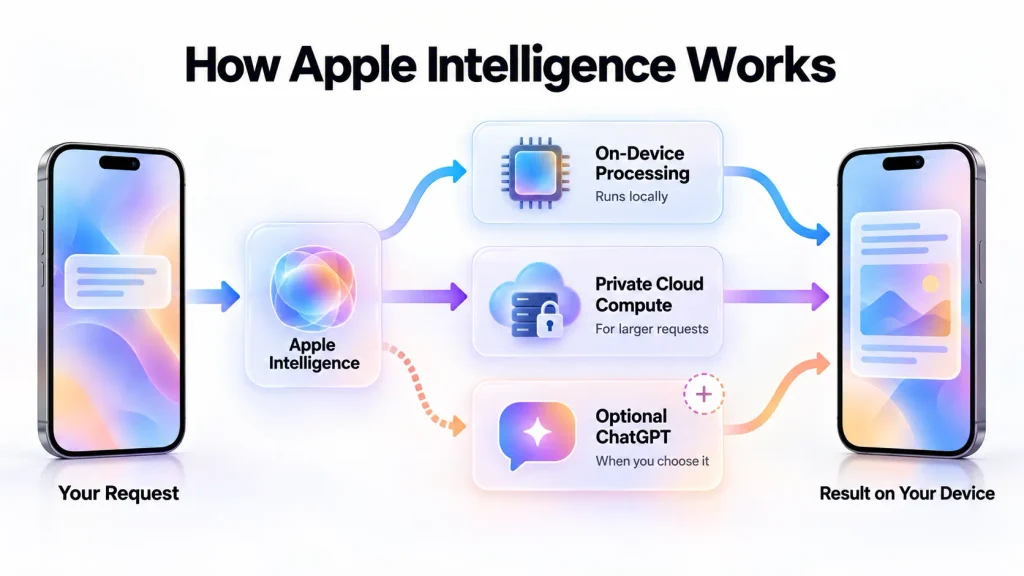
Apple Intelligence uses models that run on your device alongside larger models on Apple’s servers. The system checks whether it can handle a request locally or needs more computing power.
On-Device Processing
Many requests can run directly on the device, keeping the information needed for those tasks there. A feature handled entirely on-device may also work without an internet connection, provided everything it needs is already available locally.
Running AI models on the device requires suitable memory, storage, and processing power. That helps explain why Apple Intelligence has stricter hardware requirements than a typical software update.
Local processing does not make every feature offline. Requests for current web information, tasks that use a server-based model, and optional online services still need a connection.
Private Cloud Compute
For a request that needs a larger model, Apple Intelligence can send the information required for that task to Private Cloud Compute. Apple says the request is processed on its servers, returned to the device, and not retained or made accessible to Apple.
Apple publishes Private Cloud Compute software images for security researchers to inspect. It also says it may collect limited details, such as which feature was used and how long a request took, without collecting the request’s content. These are Apple’s documented design and privacy claims, not findings independently tested for this article. Apple explains the architecture and its security requirements in its Private Cloud Compute Security Guide. Requests sent to an optional service such as ChatGPT have separate privacy terms.
Personal Context and App Actions
On a supported device, Siri AI can draw on relevant information from messages, emails, notes, photos, and calendar events. It can also respond to content visible on the screen. This means it can answer questions about your information, rather than just provide a general web answer.
You could, for example, ask Siri to find a hotel confirmation in an old email or photos from a particular trip. It can also perform supported actions, such as creating a reminder or adding an event to Calendar. What it can do in a third-party app depends on that app’s available integration.
For a broader explanation of local and server processing, read our guide to on-device AI and cloud AI.
Apple Intelligence Features That Matter Most
The feature list is long, but several tools are likely to shape how people use it day to day.
Siri AI
Siri AI is the most visible part of the next generation of Apple Intelligence. It is built for back-and-forth conversations rather than isolated commands. It can answer general questions, understand follow-ups, draw on personal context, and respond to information visible on the screen.
There is also a dedicated Siri app that keeps conversations together across supported devices. On iPhone, you can start Siri AI by voice, with the side button, or by swiping down from the Dynamic Island. On iPad and Mac, it is integrated into Spotlight. Mac users can also ask about text, files, and images through context menus.
Availability is the catch. As of September 2026, Siri AI is a beta available in English, and access may involve a waitlist. Device, region, and platform restrictions apply. Apple’s current Siri AI requirements are more useful for checking access than its original announcement.
Writing Tools
Writing Tools can proofread, summarize, and rewrite text or change its tone. They appear in Apple apps and compatible third-party apps rather than in one writing application.
Siri AI goes further by drafting text from a description. In Messages and Mail, Apple says it can also reflect how you usually write to a particular recipient. That sounds useful, but the result still needs a read-through. AI can miss your intent, add an incorrect detail, or produce something you would never normally say.
Photos and Image Editing
Apple Intelligence adds several tools to Photos. Natural-language search can find an image without an exact date or album. Clean Up removes distractions, while newer tools can extend an image or adjust its framing after it was taken.
Image Playground creates images from descriptions. Image Wand can turn a rough sketch into an image in Notes, and Genmoji creates custom emoji-style images from a prompt.
Availability differs by device and platform. Apple also says some image tools that use server-based models may be subject to usage limits.
Visual Intelligence
Visual Intelligence helps you ask questions about what is in front of the camera or already on the screen. It can recognize visual content, find information, and suggest actions based on what it sees.
On supported iPhones, you can use camera-based features to ask about real-world objects. Visual Intelligence is also available on iPad, Mac, and Apple Vision Pro, though you access it differently on each platform.
Communication and Translation
Apple Intelligence can summarize unread conversations, suggest replies, highlight priority messages, and help reduce less important interruptions. Live Translation works in supported versions of Messages, Phone, and FaceTime, as well as with compatible AirPods. The supported languages and devices differ between these features.
Call Context can bring up relevant information while you call a business, such as a confirmation code or reservation number.
These tools could save time, but a summary is no substitute for the original message when a detail matters. It may leave out context or give the wrong part of a conversation too much weight.
Safari, Shortcuts, and Everyday Productivity
Apple Intelligence can group Safari tabs by topic. Safari’s Notify Me feature can also alert you to selected changes on a webpage, such as a restock or price change.
You can create a Shortcut from a description, while Calendar and Reminders can help turn natural-language requests into events and tasks. Mail can surface priority messages and suggest relevant actions. The benefit is often the time saved across many small tasks.
ChatGPT Integration
Apple Intelligence is not simply ChatGPT built into iOS. Apple uses its own on-device and server-based models for many features, while an optional ChatGPT extension can handle requests you choose to send to it.
The distinction matters for privacy. A ChatGPT request is handled differently from one processed on your device or through Apple’s Private Cloud Compute.
With Siri, confirmation before sending ordinary requests to ChatGPT can be controlled in settings. Siri will still ask permission before sending a file to ChatGPT. If you sign in to ChatGPT, your account settings and OpenAI’s data-handling policies apply.
Which Devices Support Apple Intelligence?
Apple Intelligence requires compatible hardware. Installing a software update cannot bring it to a device outside Apple’s supported list.
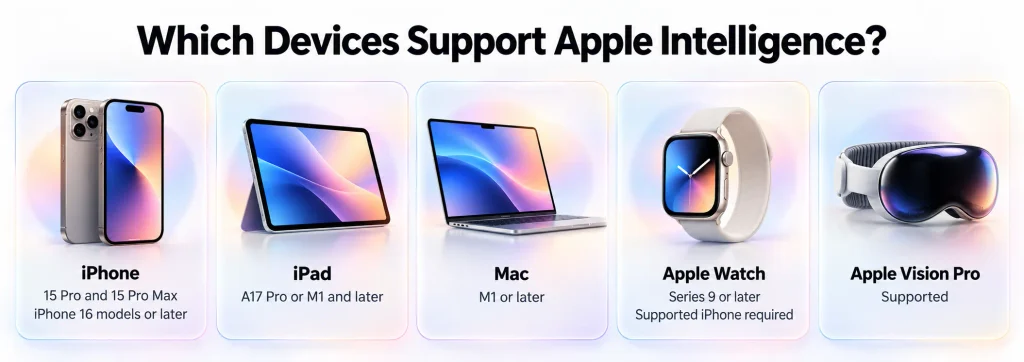
According to Apple’s current device and system requirements, supported devices include
| Device category | Supported hardware |
|---|---|
| iPhone | iPhone 15 Pro and 15 Pro Max; iPhone 16 models or later; and iPhone Air |
| iPad | iPad mini with A17 Pro and iPad models with M1 or later |
| Mac | Mac models with M1 or later, plus MacBook Neo with A18 Pro |
| Apple Vision Pro | Apple Vision Pro |
| Apple Watch | Series 9 or later, Ultra 2 or later, and SE 3 when paired with an Apple Intelligence-enabled iPhone; some features need the iPhone nearby |
A device on this list will not necessarily get every feature. Availability also depends on the software version, language, region, and, for some newer capabilities, the specific hardware.
Does iPhone 15 Have Apple Intelligence?
It depends on the model. The iPhone 15 Pro and iPhone 15 Pro Max support Apple Intelligence. The standard iPhone 15 and iPhone 15 Plus do not support Apple Intelligence.
The Pro models use the A17 Pro chip, while the standard models use the A16 Bionic. Apple includes only the Pro models from the iPhone 15 family on its compatibility list. Updating a standard iPhone 15 to the newest version of iOS will not enable Apple Intelligence.
What About iPhone 14 and iPhone 13?
No iPhone 14 or iPhone 13 model appears on Apple’s compatibility list. They can still use other iOS features where supported, but they do not support Apple Intelligence.
If AI is your main reason to upgrade, check whether the specific features you want work on the phone you are considering. Camera quality, battery life, display, storage, and software support may be more important to you in everyday use.
Software, Storage, Language, and Regional Requirements
Compatible hardware is only part of the requirement.
The next generation of Apple Intelligence comes with iOS 27, iPadOS 27, macOS 27, watchOS 27, and visionOS 27. Your device language and Siri language must match and be supported. If you change Siri’s language, Apple Intelligence may become temporarily unavailable while the new language downloads.
Storage matters too. Apple lists up to 8 GB of local storage for many eligible iPhone, iPad, Mac, and Apple Vision Pro models. Some configurations can require up to 14 GB, while Apple Watch can require up to 1.5 GB.
On supported iPhones, iPads, and Macs, Apple Intelligence supports English, Danish, Dutch, French, German, Italian, Norwegian, Portuguese, Spanish, Swedish, Turkish, Vietnamese, Simplified Chinese, Traditional Chinese, Japanese, and Korean. Apple Vision Pro supports a shorter language list, and individual features may support fewer languages still. Siri AI is currently a beta available in English.
Region can also change what you get. Apple says Apple Intelligence does not currently work on supported devices purchased in mainland China. For a supported device purchased elsewhere, it does not work while you are in mainland China and your Apple Account region is set to mainland China.
Siri AI has separate restrictions. It is currently unavailable on iPhone, iPad, and Apple Watch in the European Union, although eligible Mac and Apple Vision Pro users there can access it in English. Apple’s requirements page is the best place to check the current rules before buying a device for a particular feature.
How to Turn On and Use Apple Intelligence
On an eligible device, the next generation of Apple Intelligence becomes available after you install the current software, provided your device language, Siri language, and region are supported.
Siri AI has a separate setup step. To try the beta, open Settings > Siri > Try Siri AI (Beta) and follow the instructions. Apple may place you on a waitlist before it downloads.
If an expected feature is missing, check these points first:
- Confirm that your exact device model is supported.
- Install the latest compatible software update.
- Set the device language and Siri language to the same supported language.
- Make sure you have enough free storage.
- Connect to the internet and allow time for any required downloads.
- Check whether that particular feature is available on your device and in your language and region.
Once available, the features appear where you use them. Writing Tools show up when you work with text, photo-editing tools are in Photos, and Visual Intelligence can use the camera or onscreen content on supported devices. Siri AI handles conversations, personal-context questions, and supported app actions.
Does Apple Intelligence Work Offline?
Some tasks can, but Apple Intelligence as a whole cannot. A task handled entirely by models and information already on your device may work without an internet connection.
Other features need to go online. Image Playground sends image-generation requests to Apple’s Private Cloud Compute, while web answers and optional services such as ChatGPT require a connection. Apple also says Siri needs internet access.
A feature that combines local and online processing may be limited when you are offline. The useful question is whether the specific task you want to do runs entirely on the device.
Is Apple Intelligence Private and Safe?
Apple Intelligence has several privacy protections built into its design. Some requests run entirely on the device. For more demanding tasks, Apple says Private Cloud Compute receives only the information needed for the request and does not retain its content or make it accessible to Apple.
Those protections do not apply to every AI interaction in the same way. Optional services such as ChatGPT have separate data-handling terms. Privacy also does not guarantee accuracy: an AI answer can be wrong even when the request was processed securely.
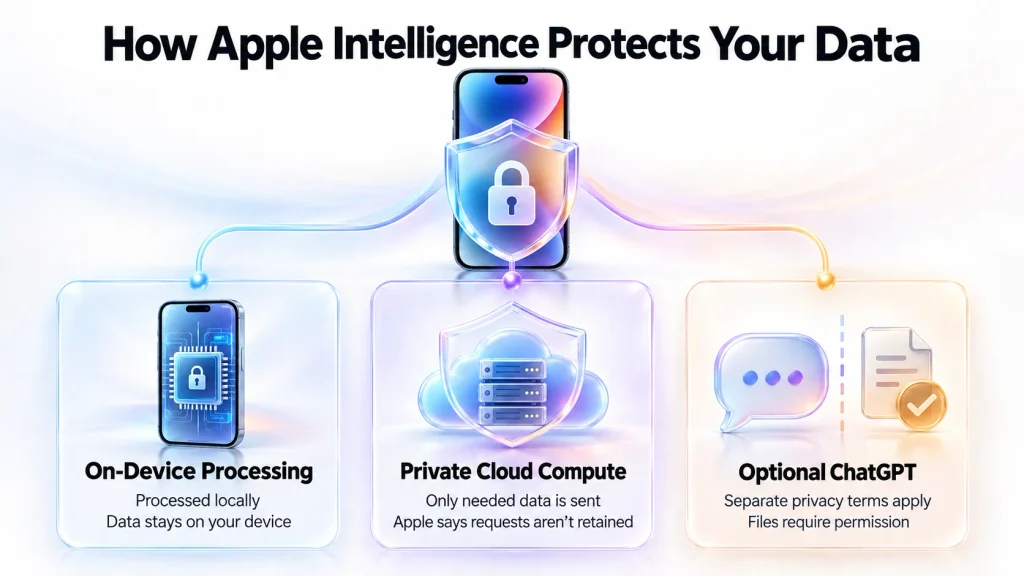
For sensitive information, check which service is handling the request and share only what the task needs. Verify important answers against the original information before acting on them.
Is Apple Intelligence Free?
Apple Intelligence is included with compatible devices. You do not need a separate subscription to enable its core features.
Apple says some features that rely on server-based models have usage limits. These include Siri AI, intelligent photo-editing tools, Image Playground, and cloud models in Shortcuts. Its support pages differ on when those limits take effect, but Apple says expanded access will be offered for a fee in the future.
Apple Intelligence’s core features are included on compatible devices, but some features that rely on server-side models have daily usage limits. Apple says expanded access to those features will be available for a fee in the future.
Does Apple Intelligence Drain Battery?
Yes, Apple Intelligence can use battery. On-device tasks require processing power, while visual searches also use the camera and screen. Model downloads and background setup after an update may temporarily add to battery use.
There is no reliable fixed percentage for Apple Intelligence battery drain without controlled testing. The effect depends on the device, battery condition, feature, network connection, temperature, and how often you use it. Cloud-based requests can still use power for the screen and network even when the larger model runs elsewhere.
If an iPhone’s battery life seems worse, check Settings > Battery and compare several similar days, preferably after update-related setup has finished. The figures can help identify unusual activity, but they cannot prove how much battery Apple Intelligence used.
Is Apple Intelligence Worth It?
If you already own a compatible device, Apple Intelligence is worth trying. Its basic features come included, and you can find tools for writing, photos, and communication in apps you may already use.
If you would need to buy a new device, AI alone is a weaker reason to upgrade. Compare the specific models for battery life, cameras, performance, and expected software support, then treat Apple Intelligence as one part of the decision.
If you are also deciding between Apple and Samsung software, our iOS vs One UI comparison looks at the broader differences in interface, multitasking, ecosystem integration, customization, and everyday use.
People who regularly write on their devices, search large photo libraries, handle many messages, or use Siri may find more to use here. Someone who mainly calls, browses, watches videos, and uses a few social apps may notice less benefit.
There are still limits to consider. Siri AI is rolling out as a beta in English, feature availability varies by device and region, and some server-based tools have usage limits. Before spending money, check whether the features you want work on the device and where you live. Base your purchase on what is available today, rather than on a promised update.
For more context on how these features fit into Apple’s wider device experience, see our guide to the Apple ecosystem.
Final Verdict
Apple Intelligence brings AI to tasks people already do on Apple devices. Siri is one part of it; writing tools, photo search, translation, and image editing appear across familiar apps. Depending on the request, processing happens on the device or through Private Cloud Compute.
Apple Intelligence is becoming a meaningful part of Apple’s software rather than a single AI feature. Its biggest advantage is integration: Siri, writing tools, Photos, Visual Intelligence, translation, and app actions appear inside tools people already use. But availability still depends heavily on your device, language, region, and sometimes server-side limits.
If you already own a compatible device, Apple Intelligence is worth exploring before deciding how useful it is to you. If you’re considering a new iPhone mainly for AI, compare the supported features you will actually use rather than upgrading for the Apple Intelligence name alone.
FAQs
What Is Apple Intelligence on iPhone?
Apple Intelligence is Apple’s built-in AI system for supported iPhones. It helps with writing, photo search and editing, summaries, translation, and Visual Intelligence. It also powers Siri AI, which can take supported actions across apps. Available features vary by model, language, and region.
What Does Apple Intelligence Actually Do?
It can draft and improve text, summarize emails and messages, find photos from a description, create or edit images, and translate conversations. Visual Intelligence can examine camera or onscreen content, while Siri AI can answer questions and take actions in supported apps. Available features vary by device, language, and region.
What iPhones Have Apple Intelligence?
Apple Intelligence supports the iPhone 15 Pro and iPhone 15 Pro Max, all iPhone 16 models, and later iPhones, including iPhone Air. The standard iPhone 15 and iPhone 15 Plus are not supported.
Does the Standard iPhone 15 Support Apple Intelligence?
No. In the iPhone 15 family, only the iPhone 15 Pro and iPhone 15 Pro Max support Apple Intelligence. Updating a standard iPhone 15 or iPhone 15 Plus will not enable it.
Is Apple Intelligence the Same as Siri?
No. Apple Intelligence powers features across Apple devices, including writing and photo tools. Siri AI is a conversational version of Siri built on that system. Siri also works on devices that do not support Apple Intelligence.
Is Apple Intelligence the Same as ChatGPT?
No. Apple Intelligence uses Apple Foundation Models on the device and through Private Cloud Compute. ChatGPT is a separate, optional extension for certain requests. You can use Apple Intelligence without enabling it.
Can Apple Intelligence Work Without the Internet?
Yes, for some features. Tasks processed entirely on the device may work offline once the necessary models are installed. Requests that need current web information, Private Cloud Compute, ChatGPT, or the newer Image Playground require an internet connection.
Can Apple Intelligence Be Turned Off?
You can turn off or restrict Apple Intelligence features, but the controls depend on your software version. In iOS 27, Apple lists separate settings for Siri AI, summaries, and other features. Earlier versions also provide a main Apple Intelligence switch.
Is Apple Intelligence Completely Free?
Basic Apple Intelligence access is included on compatible devices without a separate subscription. Apple lists daily limits for some server-based features and says expanded access will be available for a fee in the future.
Is Apple Intelligence Always Accurate?
No. It can misunderstand a request, provide incorrect information, or leave important context out of a summary. Verify facts against a reliable source, and review generated messages before sending them.