
Table of Contents
Introduction
Ask someone why they like Apple, and they’ll probably mention a specific device first: the iPhone, the MacBook, or the Apple Watch. But the real reason most people stick around isn’t any single gadget. It’s how everything works together.
Apple builds its hardware, software, and services to function as one connected Apple ecosystem rather than several separate products. Your iPhone and Mac can work together seamlessly. Your watch can unlock your laptop. Your AirPods can switch from one device to another without you touching a settings menu. Files move through iCloud, no matter which Apple device you’re using.
That kind of integration is exactly why so many people never leave the Apple ecosystem, even when a cheaper or more powerful alternative exists. Once you’ve built a small collection of Apple devices, walking away means losing dozens of small conveniences you’ve stopped noticing because they just work.
In this guide, we’ll look at what the Apple ecosystem really is, how Apple’s devices work together, where its biggest strengths lie, and whether it still sets the standard in 2026.
What Is the Apple Ecosystem?
The Apple ecosystem covers every device, operating system, and service that are designed to work together. Apple describes this approach through its Continuity features, which allow compatible devices to work together seamlessly.
That list includes the iPhone, iPad, Mac, Apple Watch, AirPods, Apple TV, HomePod, Apple Vision Pro, iCloud, Apple Intelligence, Apple Music, Apple Photos, and Apple Pay.
Each item works fine on its own, but the real benefits of the Apple ecosystem appear when you combine two or more Apple devices. Understanding how the Apple ecosystem works starts with seeing how Apple’s devices, software, and services communicate behind the scenes.
Answer a phone call from your laptop. Copy a sentence on your iPhone and paste it straight into a document on your iPad. Unlock your iPhone and Mac through your Apple Watch.
None of these features looks impressive on a single device. When you use them together, owning multiple Apple devices becomes much more convenient in everyday use. In daily use, the ecosystem feels strongest when you own at least an iPhone and one other Apple device, such as a Mac, Apple Watch, or AirPods.
Why the iPhone Is the Center of the Apple Ecosystem
Everything in the Apple ecosystem still revolves around the iPhone.
Buy a new Apple Watch or a pair of AirPods and start with your iPhone, which handles the pairing and transfers your settings automatically. Most other devices simply connect to whatever the iPhone already has running.
Your iPhone stores your contacts, photos, passwords, messages, and app data first and then spreads to your other devices through iCloud. For a lot of people, the iPhone has quietly become the hub their entire digital life runs through.
Pick up your AirPods, check your Apple Watch, or open your MacBook, and your iPhone is often working behind the scenes to keep everything in sync.
How Mac and iPhone Work Together
The connection between iPhone and Mac is arguably the strongest link in the whole system. Apple calls these connections “continuity features,” and some are especially useful. According to Apple, these are some of the most useful Apple ecosystem features people use every day.
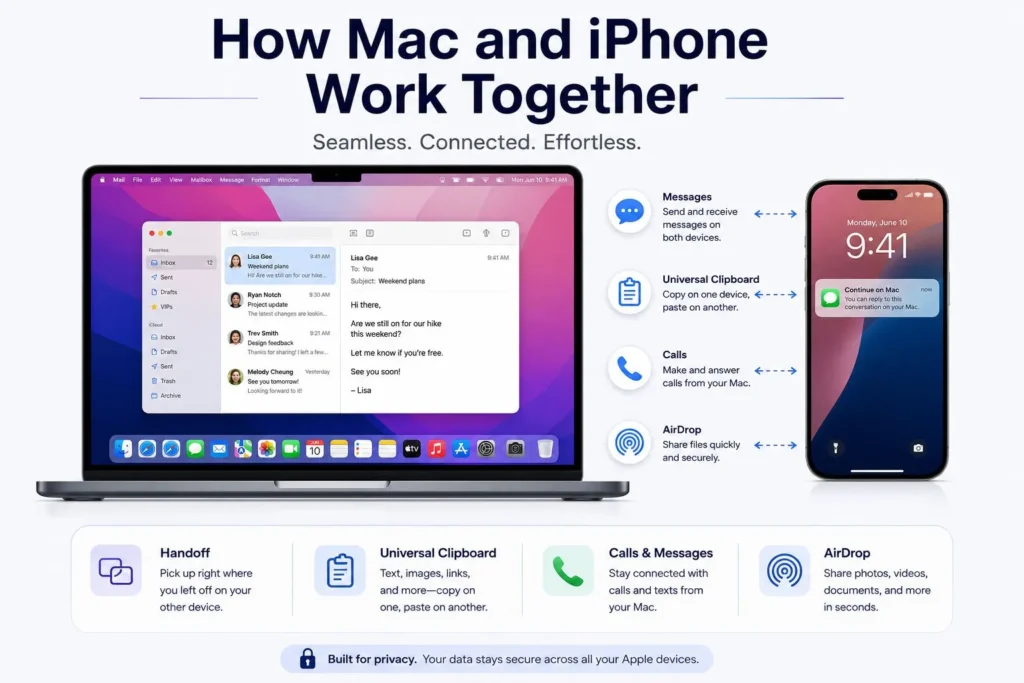
Handoff
Apple describes Handoff as letting you start something on one device and pick it back up on another without losing your place. Start typing an email on your phone while you’re traveling, then switch to your Mac and keep writing from the same point, with no copy-pasting required.
Universal Clipboard
According to Apple support, Universal Clipboard lets you copy something on one Apple device and paste it on another. Copy a photo on your iPhone, switch to your Mac, and paste it directly into a document.
Phone Calls and Messages
Apple syas, if your iPhone rings while you’re using your Mac, you can answer the call without picking your iPhone. Text conversations sync too, so you can start your conversation right from there, where you left off, when you switch to your Mac
AirDrop
AirDrop is still one of the most popular Apple ecosystem features because it makes sharing files between devices quick and effortless. It moves files between Apple devices over a direct connection, skipping cables, cloud uploads, and outside apps entirely.
It’s fast, it’s private, and it rarely asks you to think twice about how it works. Just bring your iPhones close together, and the transfer starts automatically.
Apple Watch and the Apple Ecosystem
Calling the Apple Watch just a smartwatch is not fair. It’s much more than just a smartwatch. Paired with an iPhone, it acts more like a second screen on your wrist. Notifications land there instantly, so you can take a quick look at a message without taking your phone out of your pocket.
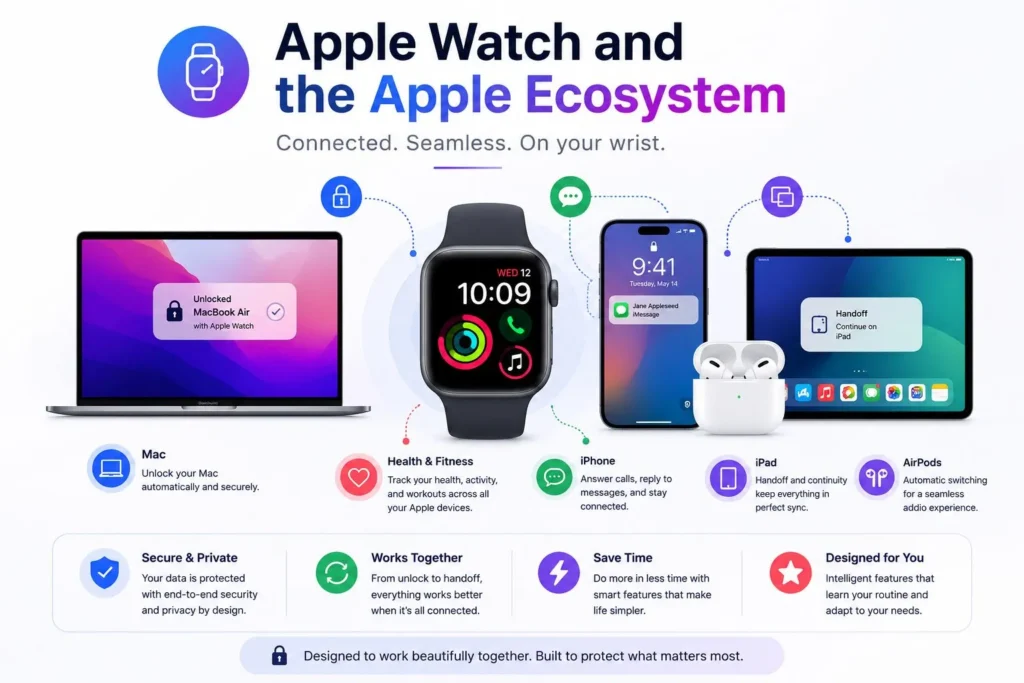
It also tracks workouts, heart rate, sleep, and general activity throughout the day. Beyond that, the watch can:
- Unlock a Mac
- Control music playback
- Help locate a misplaced iPhone
- Handle contactless payments
- Show turn-by-turn directions
Because almost none of this works without an iPhone nearby, the watch quietly keeps people tied to the rest of Apple’s lineup.
AirPods and Automatic Switching
Wireless earbuds are everywhere now, but AirPods still handle device switching better than most competitors. Once they’re linked to your Apple ID, they jump between devices on their own.
Imagine you’re listening to music on your Mac and a call comes in on your iPhone. The AirPods switch over by themselves, no manual reconnecting needed.
That kind of switching feels minor the first time it happens, but once you get used to it, it’s hard to go without. Spatial audio and Apple’s personalized sound profiles add another layer of convenience.
iCloud and the Apple Ecosystem
Most of the features that make the Apple ecosystem feel so smooth rely on iCloud running quietly in the background. Apple explains in Apple Support, it keeps the following in sync across devices: photos, videos, documents, contacts, calendars, passwords, notes, and Messages.
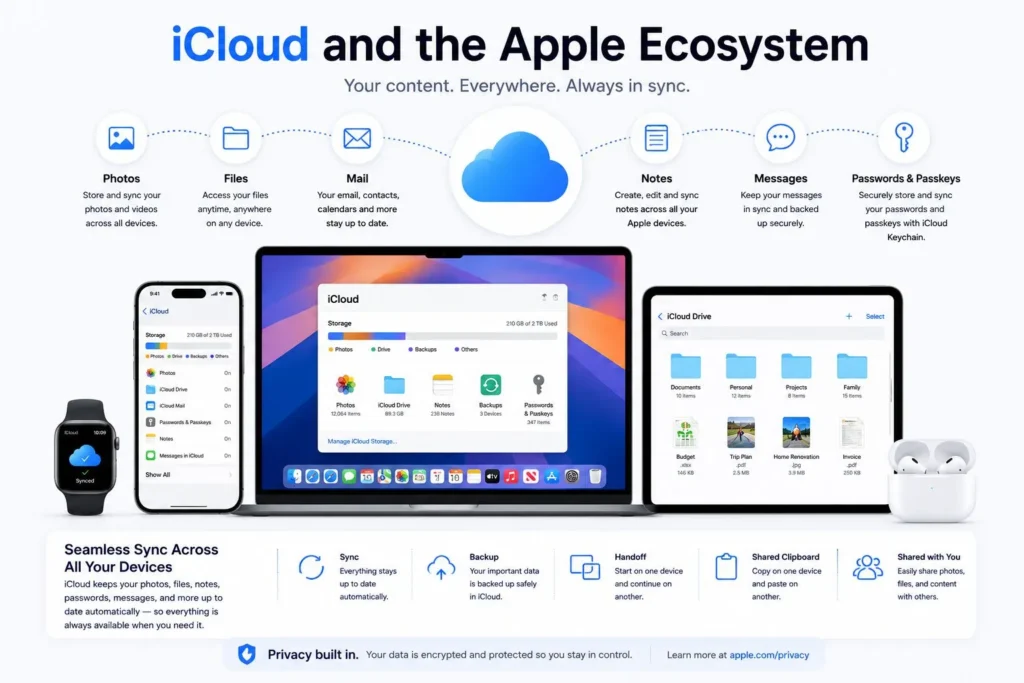
Take a picture on your iPhone, and it shows up on your Mac within seconds. Write down a note on your iPad, and it’s waiting for you on your phone the next time you open it. For anyone running more than one Apple device, iCloud handles a lot of file management that used to require manual transfers and backups.
Apple Intelligence and the Apple Ecosystem
By 2026, Apple Intelligence has grown into a key part of how Apple ties its devices together. According to Apple, rather than adding AI as a separate feature, Apple has woven it into the operating systems themselves.
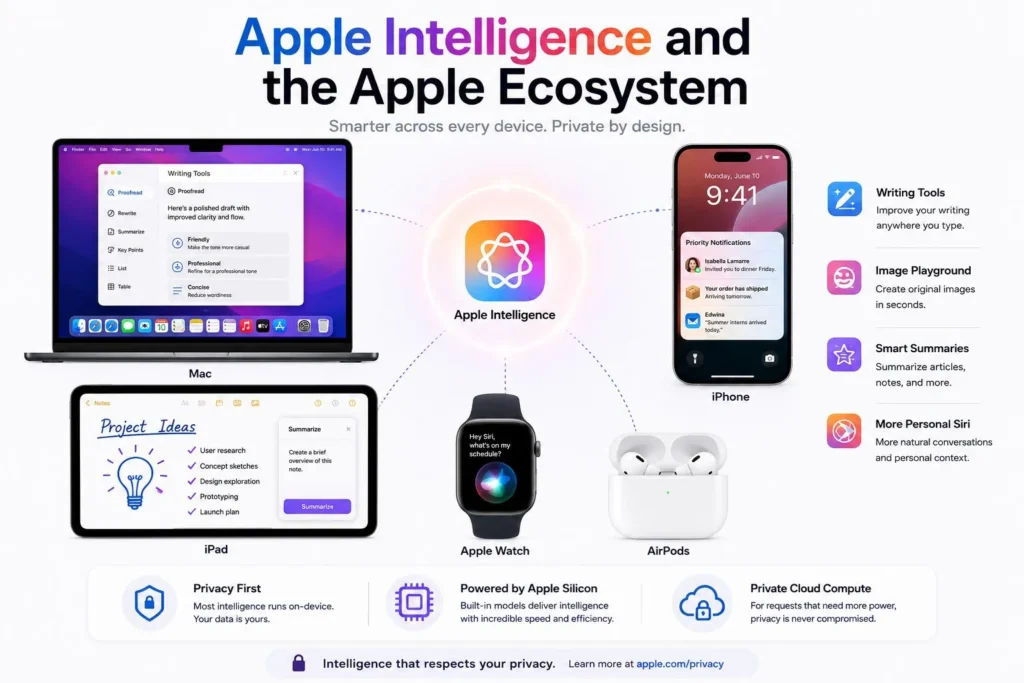
It now helps people to rewrite and polish text, summarize incoming notifications, sort out information, generate images, get more done with less effort, and search through personal data faster.
Because Apple controls both its chips and software, many Apple Intelligence features can run locally on supported devices instead of relying completely on the cloud. Much of this is possible because more AI processing now happens directly on the device. We explain this shift in Why On-Device AI Is Replacing Cloud AI.
That keeps more personal data on the device and reduces how much processing has to happen in the cloud. As Apple Intelligence continues to develop, expect it to tighten the links between devices even further rather than weakening the ecosystem.
If you are interested in knowing how Apple Intelligence works, read our complete guide, Apple Intelligence Explained.
The Role of Apple Services
Devices alone don’t build an ecosystem. Apple’s services play an important role as well.
- Apple Music gives subscribers a massive music catalog that plays consistently across every Apple device they own.
- Apple TV+ offers Apple’s original shows and films, available wherever you’re signed in.
- Apple Arcade offers you a library of games with no ads and no in-app purchases interrupting your game.
- Apple Fitness+ pairs with the Apple Watch to power guided workout sessions.
- Apple Pay lets you pay for things securely. Whether you’re checking out online or paying with your iPhone in a store, the experience is fast and straightforward.
- Apple One offers several of these services in a single subscription instead of separate bills.
Because the experience stays consistent across Apple’s devices, many people stick with the ecosystem.
Security and Privacy
Privacy has become a key part of how Apple presents its products, and many of its ecosystem features reflect that.
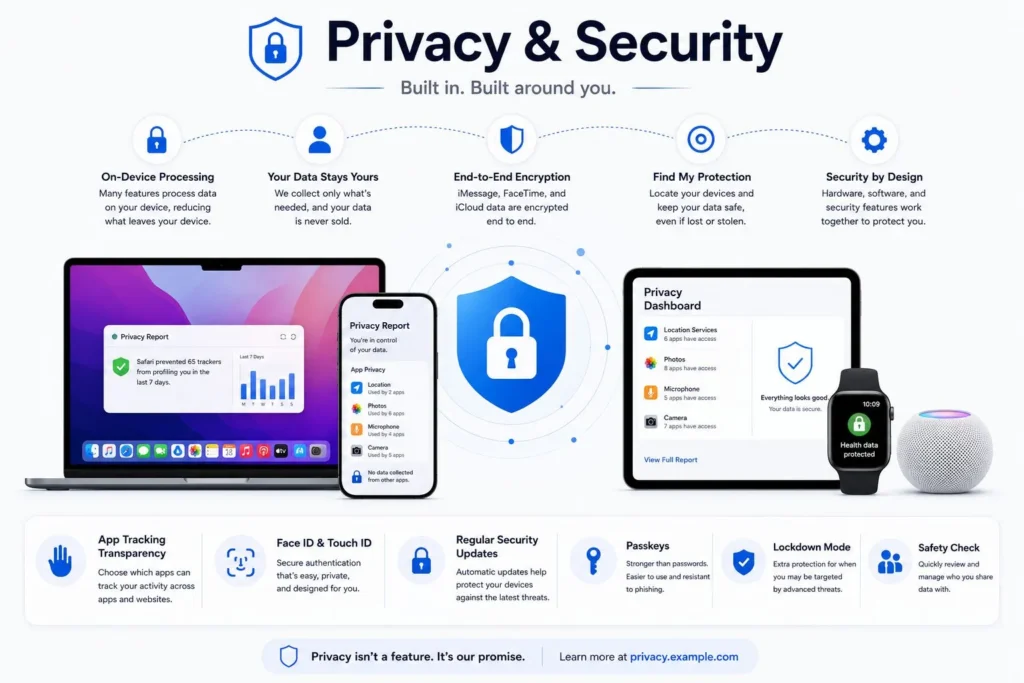
Some of the key features are end-to-end encrypted messaging, Face ID for secure authentication, iCloud Keychain for managing your passwords, app-level privacy controls, and Find My for tracking lost devices.
Managing every device through one Apple account also makes security easier to handle without extra effort. For a meaningful number of users, this is the single biggest reason they chose Apple in the first place.
The Lock-In Effect
Apple’s tightly connected ecosystem is often criticized for creating a lock-in effect. The more Apple devices and subscriptions you collect, the harder it becomes to leave the platform entirely. For example, your photo library lives in iCloud, AirPods perform best paired with Apple devices, an Apple Watch needs an iPhone to function fully, and apps you’ve bought may not transfer to another platform.
Some people see this as a downside, a loss of flexibility they didn’t sign up for. Others see it as simply what happens when integration runs this deep. Ultimately, the choice depends on whether you value flexibility or convenience more.
Is the Apple Ecosystem Worth the Cost?
Apple products rarely come cheap compared to competitors. Building out a full set of Apple devices requires a significant investment. If you’re still deciding between Apple’s ecosystem and Samsung’s approach, our iPhone vs Samsung: The Ultimate Comparison Guide (2026) breaks down the differences in hardware, software, cameras, AI, and long-term value.
A standard lineup might include an iPhone, Apple Watch, AirPods, MacBook, and iPad. Together, those devices can easily cost several thousand dollars.
Even so, many people believe the long-term benefits of the Apple ecosystem, including convenience, security, and software support, justify the higher price. Apple’s iOS documentation says that Apple has a strong reputation for long-term software support, many iPhones receive iOS updates for several years after launch, and they hold their resale value unusually well. Both of those factors reduce the real cost of ownership over time.
Apple Ecosystem vs Individual Devices
Apple has changed the question people ask before buying. Instead of “Is this the best laptop?” or “Is this the best phone?”, a lot of buyers now ask whether the whole ecosystem suits them better than anything else on the market.
A MacBook might be missing a feature or two that a comparable Windows laptop has. An iPhone won’t let you customize things the way an Android phone will. But once every device is communicating with the others, the combined experience compensates for whatever any single spec sheet is missing.
That change in thinking is one reason Apple has one of the most loyal customer bases in the tech industry.
Samsung takes a different approach by combining Galaxy AI with cross-device features. Learn more in Galaxy AI Explained: Every Samsung AI Feature You Should Know in 2026.
The Future of the Apple Ecosystem
Apple shows no sign of slowing down on integration. AI, augmented reality (AR) and virtual reality (VR), health tracking, and smart home devices all look set to play a bigger role going forward.
Apple Intelligence is already a clear signal of where the company wants to take things, like more personalization and more devices working as one. Future versions of iOS, macOS, watchOS, and visionOS are expected to further integrate the ecosystem.
Apple isn’t just trying to sell more individual products. It’s trying to make the connections between them harder to give up.
Conclusion
The ecosystem is arguably Apple’s biggest strength at this point. While other companies focus on specifications, Apple keeps investing in the experience that happens between devices.
Features like AirDrop, Handoff, Universal Clipboard, iCloud syncing, Apple Watch integration, AirPods switching automatically, and Apple Intelligence running quietly in the background contribute to this ecosystem. None of these features alone is enough to keep most people loyal to a brand. Together, they create a compelling reason to stay.
Ask most long-time Apple users why they keep buying Apple products, and the device itself is rarely the whole answer. It’s how well that device plays with everything else they already own. By now, it’s easier to see how the Apple ecosystem works and why so many people continue investing in it.
Apple is still following the same strategy in 2026. The iPhone, Mac, Apple Watch, and AirPods are all strong products on their own, but their real value comes from how naturally they work together.
Related Articles
- Apple Intelligence Explained: Features, Supported Devices, Privacy, and Everything You Need to Know
- Galaxy AI Explained: Every Samsung AI Feature You Should Know
- Why On-Device AI Is Replacing Cloud AI
FAQs
What is the Apple ecosystem?
The Apple ecosystem is Apple’s network in which all its devices feel like one big connected system. Your iPhone, Mac, iPad, Apple Watch, and AirPods are all designed to communicate with each other. So things like AirDrop, Handoff, iCloud, and Universal Clipboard just work without a setup for each device.
Why is the Apple ecosystem so popular?
Honestly, it just makes life a little easier. When your devices automatically pick up where you left off, share your files, and stay in sync without you having to think about it. People also appreciate that Apple takes privacy and long-term software support seriously. You’re not left behind after a couple of years.
Is the Apple ecosystem worth it in 2026?
If you already own a few Apple devices, the more Apple products you have, the more useful everything becomes. Add in Apple Intelligence, years of guaranteed software updates, and genuinely smooth device syncing, and for many people, it’s easy to see why the ecosystem is worth it.
Can you use the Apple ecosystem without an iPhone?
You can, but the iPhone is really the heart of everything. For example, you need an iPhone to get started with the Apple Watch and to unlock most of its features. That said, iCloud does a decent job of keeping your other Apple devices connected even when your phone isn’t nearby.
What are the benefits of the Apple ecosystem?
The main benefits of the Apple ecosystem are smooth device syncing, AirDrop, Handoff, Universal Clipboard, iCloud, Apple Watch integration, AirPods switching, Apple Pay, privacy controls, and long-term software support.