
Table of Contents
Introduction
Apple’s iOS and Samsung’s One UI approach things very differently. iOS puts a strong emphasis on consistency and simplicity, while Apple’s approach to privacy and security is more tightly controlled. If you’re already using other Apple devices, the integration between them can make the overall experience feel seamless.
One UI takes a more flexible approach. You get more customization options, more control over the interface, and more ways to set up your phone around the way you use it. It also connects well with other Galaxy devices, making the Samsung ecosystem feel more integrated.
So who wins in 2026? It’s not about which is objectively better. It’s about what fits you. If you’re comparing iOS vs One UI features, consider your daily habits, what you’re already invested in, and whether you like tinkering or just want things to work. This iOS vs One UI comparison focuses on the differences that actually matter in everyday use.
iOS vs One UI at a Glance
Before getting into the details, here’s a quick look at the One UI vs iOS features that matter most.
| Category | iOS | One UI |
|---|---|---|
| Customization | More controlled personalization | Deeper customization |
| Ease of use | Simple and consistent | More options and settings |
| Multitasking | App switching, no traditional split-screen | Split-screen and floating windows |
| Notifications | Structured notification management | More granular controls |
| App experience | More controlled app environment | More app and system flexibility |
| File management | Simpler, more restricted | More direct file access |
| Privacy & Security | Strong privacy controls | Strong privacy controls with more Android flexibility |
| Software updates | Centralized and consistent | Long-term support, but delivery varies |
| AI features | Apple Intelligence | Galaxy AI |
| Ecosystem | Strong Apple device integration | Strong Galaxy and Windows integration |
| Desktop experience | Limited desktop functionality | Built-in desktop experience with DeX |
| Performance | Consistent hardware/software optimization | Feature-rich with strong hardware/software integration |
| Accessibility | Extensive accessibility features | Extensive accessibility features |
| Gaming | Consistent hardware/software environment | Gaming tools and controls |
One technical point is worth clearing up first. One UI is Samsung’s software interface and feature layer built on Android, while iOS is Apple’s operating system. For everyday users, however, both define much of the software experience on a Galaxy phone or iPhone, which makes them useful to compare directly.
iOS vs One UI Customization
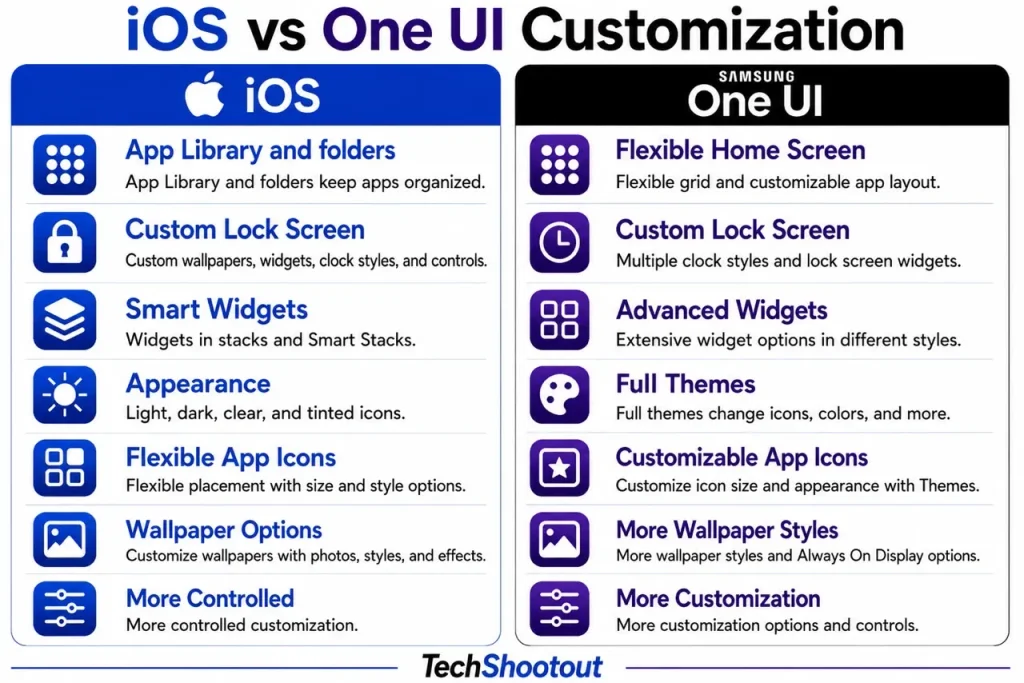
Customization is one of the clearest differences between iOS and One UI. Both platforms have become much more flexible over the years, but they still approach personalization differently.
iOS
iOS gives you plenty of ways to personalize an iPhone. You can customize the Home Screen and Lock Screen, arrange widgets, change app icons, and adjust several other visual elements.
But the difference becomes clearer when you actually start setting up the phone.
iOS gives you enough freedom to make the phone feel personal without requiring you to change dozens of settings. You can adjust the look and layout, but the overall experience still feels familiar. Even after customizing it, the phone still feels unmistakably like iOS.
That can be a benefit if you don’t enjoy constantly tweaking your phone. You can make the changes that matter to you and then continue using it as usual. The trade-off is that Apple still puts limits on how far you can change the overall interface.
One UI
One UI takes a more open approach to customization. Samsung gives Galaxy users more ways to change themes, icons, wallpapers, widgets, Lock Screen elements, and Home Screen layouts. You also get additional customization tools that let you change more aspects of the interface.
This is where the difference becomes noticeable in everyday use.
If you enjoy setting up your phone around the way you work, One UI gives you more room to experiment. You can spend more time deciding where things should go, how they should look, and how much information you want visible at a glance.
The extra freedom is useful, but it also means there are more settings to explore. Someone who enjoys tweaking their phone may see that as an advantage. Someone who just wants to set up the phone once and move on may find iOS less demanding.
Which Is Better for Customization?
The gap between the two platforms isn’t as large as it once was. iOS has become considerably more customizable, but One UI still gives users more control over the overall experience.
If you want simple personalization without spending much time adjusting everything, iOS is a good fit.
If you want deeper customization and enjoy changing the way your phone looks and works, One UI is the better choice.
Winner: One UI
iOS vs One UI Ease of Use
Ease of use isn’t just about having fewer features. It’s about how quickly you can figure out where things are and get things done without fumbling. That’s where the two platforms start to pull apart. iOS sticks to a formula you can count on, while One UI gives you more settings and options to explore.
iOS
If you want something that works the same way every time, iOS delivers. Jump between different iPhone models, and most everyday tasks behave the way you’d expect. Getting comfortable with one iPhone and moving to another usually feels pretty familiar.
The trade-off is that this simplicity comes partly from giving you fewer choices. Plenty of settings and behaviors just aren’t as flexible as they are on Android.
One UI
One UI gives you more to work with, and that’s both its strength and its biggest learning curve. Pick up a Samsung phone for the first time and you’ll find plenty of settings and features to explore. Some useful options aren’t immediately obvious, either.
But stick with it and that complexity starts paying off. You end up with a phone that bends to how you actually use it, rather than forcing you to work around the default setup.
One UI won’t feel as instantly simple as iOS, but give it time and it can end up feeling more tailored to you.
Which Is Easier to Use?
Want to pick up a phone and understand how most things work right away? iOS wins here. If you’re willing to spend some time exploring settings in exchange for more control, One UI becomes more rewarding over time.
Winner: iOS
iOS vs One UI Multitasking
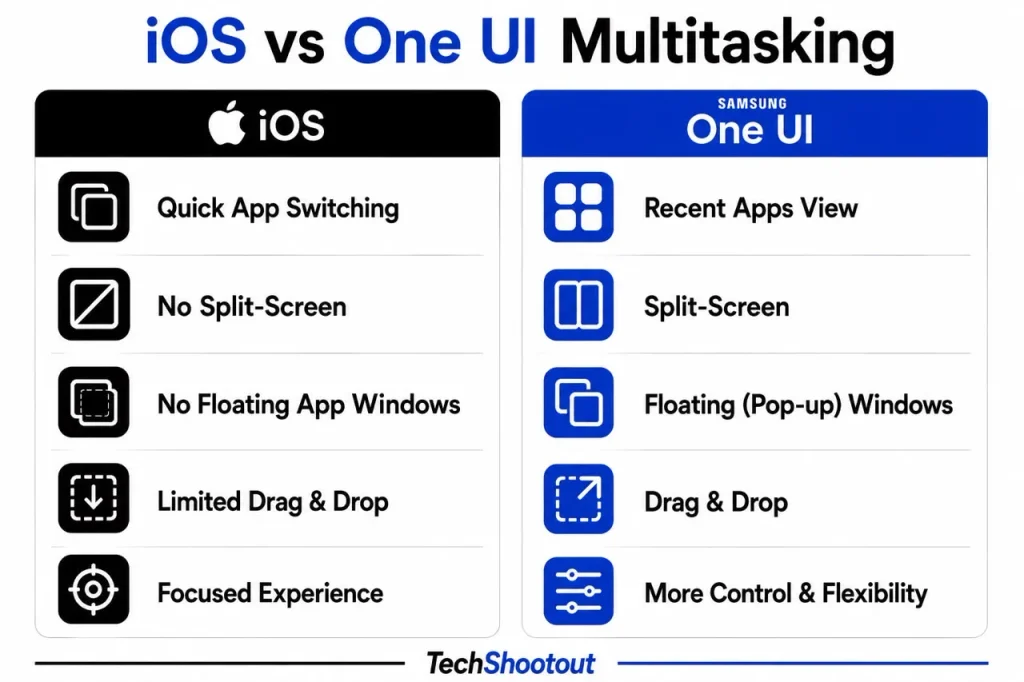
Switching between apps on an iPhone is fast and straightforward. For everyday tasks such as moving between Messages, Safari, email, and social media, iOS makes it easy to jump from one app to another without having to manage multiple windows.
The limitation becomes more noticeable when you need two apps on the screen at the same time. iPhones don’t offer the traditional split-screen or floating-window experience available on compatible Galaxy devices.
iOS
On compatible Galaxy devices, One UI supports split-screen apps and floating windows, allowing multiple apps to remain visible at once.
This becomes genuinely useful when a task involves two apps. You can research something in a browser while taking notes, view a document while replying to a message, or keep another app visible while working on the main task.
For people who use their phone for work or productivity, that extra flexibility can make a noticeable difference.
One UI
On compatible Galaxy devices, One UI supports split-screen apps and floating windows. That lets you keep multiple apps visible at once and move between tasks without constantly jumping back and forth.
It’s genuinely useful for things like taking notes while you’re researching something, glancing at a document while replying to a message, or working across two apps at the same time.
Which Is Better for Multitasking?
It really depends on how you use multitasking.
If you mainly switch quickly between apps, iOS provides a simple and efficient experience without making you manage multiple windows.
If you regularly need two apps visible at the same time, One UI is considerably more capable. Its split-screen and floating-window features are better suited to research, note-taking, document work, messaging, and other tasks that involve multiple apps.
Winner: One UI
iOS vs One UI Notifications
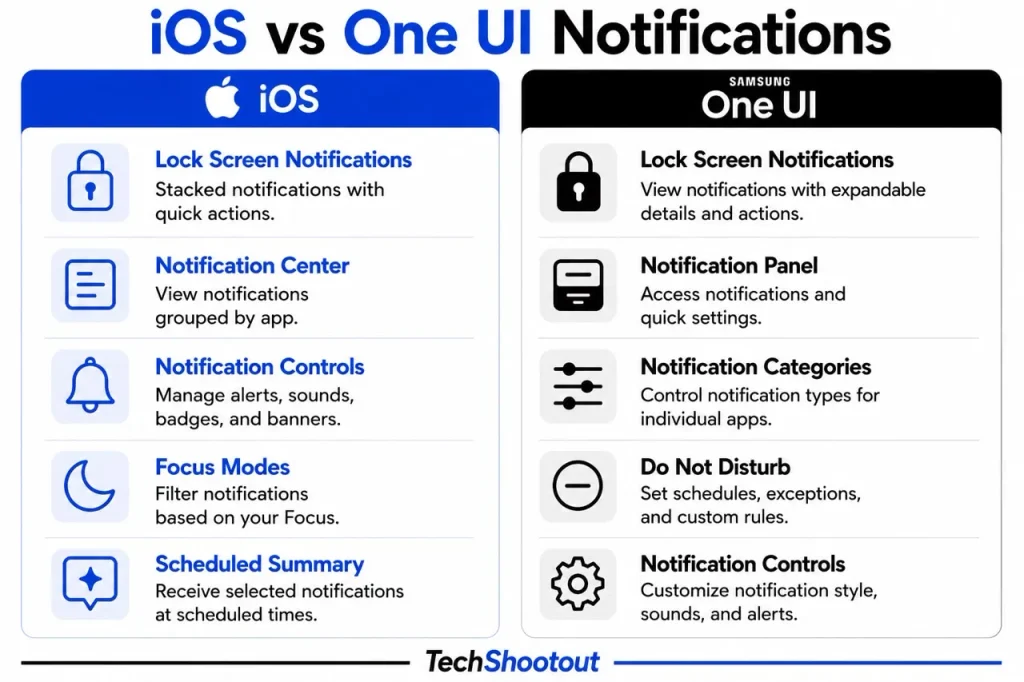
Notifications might seem minor, but they can have a big effect on how your phone feels throughout the day. Both iOS and One UI give you plenty of ways to manage alerts, but iOS takes a more structured approach while One UI gives you finer control.
iOS
iOS runs its notifications through the Notification Center and the Lock Screen. You can decide how each app delivers its alerts, bundle notifications together, and lean on Focus modes to cut down on interruptions when you’re working, sleeping, or driving.
You pick which apps get to interrupt you without having to fine-tune every notification category. Once you’ve set your important apps and Focus modes the way you want, the system mostly just stays out of your way.
One UI
One UI goes deeper. Android’s notification categories let compatible apps break their alerts into separate types, so you can choose exactly which notifications you want and how they should behave.
This feature is useful when an app sends multiple types of notifications, and you don’t want to disable them all at once. You can control those categories individually instead of treating every alert from the app the same way.
The catch is that there’s more to figure out. If you enjoy fine-tuning the alerts you receive, that extra flexibility is a significant advantage. If you’d rather not deal with all that, iOS asks a lot less of you.
Which Is Better for Notifications?
If simple notification management with solid control over interruptions is what you’re after, iOS gets the job done. If you want more detailed control over specific types of alerts, One UI gives you more flexibility.
Winner: One UI
iOS vs One UI App Experience
Apps don’t follow the same rules once you move from iOS to One UI. Apple takes a more controlled approach to how apps interact with iOS, while Android gives compatible apps more flexibility.
iOS
Apple keeps tight control over apps and the App Store, which is a big reason iPhones feel consistent from one model to the next. It also gives Apple more control over how apps interact with the operating system.
Permissions, notifications, payments, privacy settings, and other system-level features are closely integrated into iOS. If you’d rather have a more managed setup, that consistency can feel like a relief.
The trade-off is having less control over how apps interact with the system.
One UI
One UI benefits from Android’s greater flexibility. You can change default apps, manage files with fewer restrictions, and, where supported, install apps from outside the Google Play Store. Compatible apps also have more ways to integrate with the Android environment.
In practice, this comes in handy if you don’t want to be locked into the default apps or workflows that come with the phone. You can choose which app handles different tasks and shape the experience around how you actually use your phone.
The downside is that more freedom also means more decisions land on your plate.
Which Is Better for the App Experience?
If you’d rather have things tightly managed and predictable, with the OS doing more of the work for you, iOS is the stronger pick.
If you want more say over default apps, file access, and how apps integrate with your phone, One UI pulls ahead.
Winner: One UI
iOS vs One UI File Management
File management is one of the more practical differences between iOS and One UI. If you regularly download documents, move files between folders, transfer them to other devices, or use external storage, you’ll notice the gap pretty quickly.
iOS
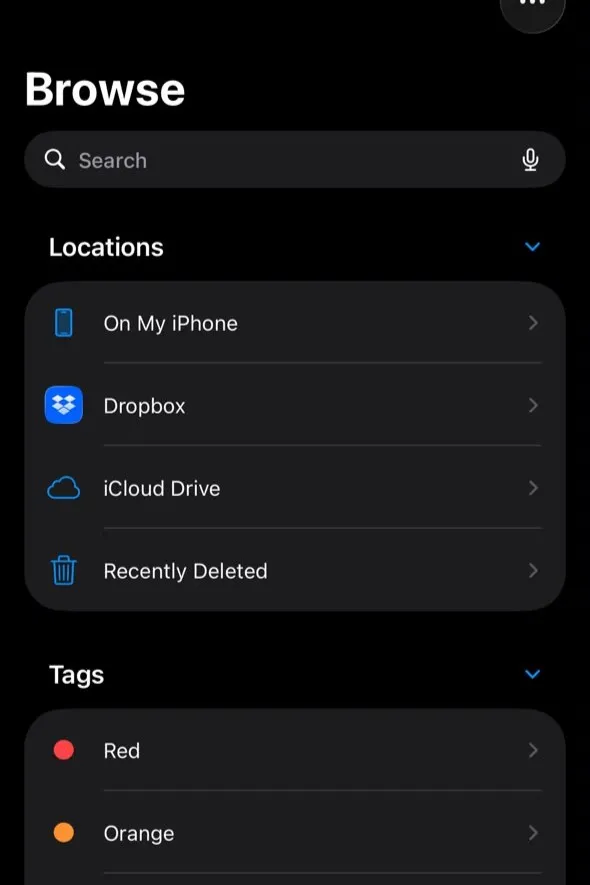
Apple has made the Files app much more capable. You can browse folders, organize documents, access cloud storage, and connect supported external drives and storage devices.
For everyday document work, that’s usually enough. You can download a file, find it later, move it into a folder, and share it without much trouble.
The limitation appears when you want more direct control over how files are stored and managed. iOS still places tighter limits on how apps interact with the file system compared with Android.
If most of your file-related tasks involve documents and cloud storage, you may never find this particularly restrictive.
One UI
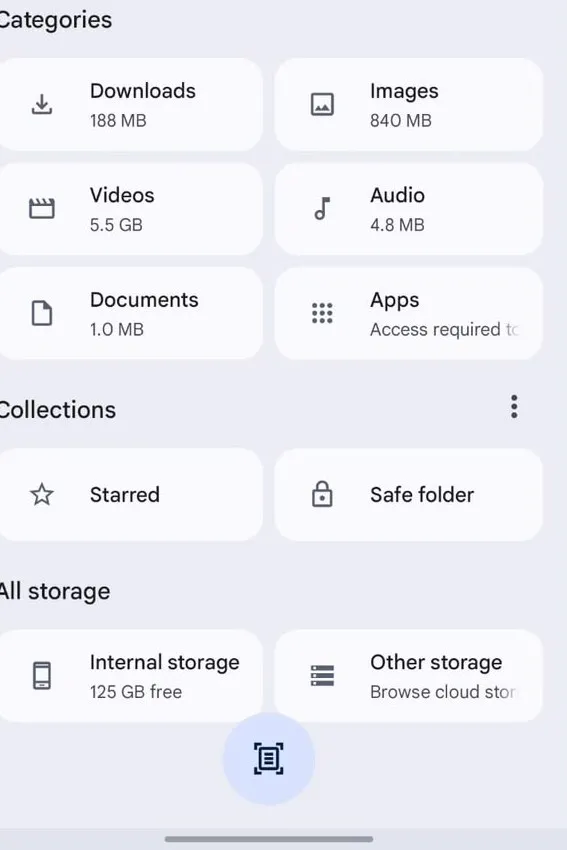
One UI gives you more direct control over files and folders. Samsung’s My Files makes it straightforward to browse, move, rename, organize, and share files, while Android’s more open approach gives compatible apps greater access to local files and external storage.
If you’re downloading documents, moving media between folders, transferring files from external storage, or organizing a large collection of local files, One UI generally requires fewer workarounds.
That extra flexibility can make a Galaxy phone feel more natural if you regularly work with local files.
Which Is Better for File Management?
If you mainly deal with documents, cloud storage, and occasional downloads, iOS’s Files app is capable enough and keeps things relatively straightforward. If you regularly manage local files, folders, or external storage, One UI is the more flexible option.
Winner: One UI
iOS vs One UI Privacy and Security
Both platforms take security seriously, so this isn’t really a question of one being safe and the other being unsafe. The real difference is in how Apple and Samsung approach privacy, and how much control they give you.
iOS
Apple builds privacy directly into iOS from the ground up. You get control over app permissions, tracking, location access, contacts, photos, and other sensitive data.
In daily use, this can feel reassuring. Many privacy protections are built right into the system, so you don’t have to manage every setting yourself. You can open your settings, see what each app has access to, and turn that access off if you want to.
Apple controls both the iPhone hardware and iOS, giving it tighter control over how the platform’s privacy and security features work together.
One UI
Samsung combines the security features built into Android with its own security tools. Samsung Knox adds another layer of protection on supported Galaxy phones, while you still get to manage app permissions, device access, and privacy settings yourself.
The result is more flexibility without abandoning strong security protections. If you’d rather have more say in how your data and device are managed, this approach can work well.
Which Is Better for Privacy and Security?
If you want strong privacy protections built into the system and don’t want to manage every detail yourself, iOS is the stronger choice.
If you want strong security paired with more control over privacy and device settings, One UI is a solid option, especially on Galaxy phones that support Knox.
Winner: Depends on your priority
iOS vs One UI Software Updates
Software support matters more than it used to. A phone isn’t just about the features it has when you buy it; regular software updates and security patches can shape the experience for years.
Both Apple and Samsung now support many newer devices for years, but the way those updates reach users is different.
iOS
Apple controls both the iPhone hardware and iOS software, allowing it to deliver major updates directly to supported devices. That centralized approach makes it easier for supported iPhones to stay on the same major version of iOS.
In everyday use, this makes software updates relatively straightforward. You don’t generally have to think about which manufacturer is responsible for the operating system or deal with separate update schedules.
One UI
Samsung has significantly expanded its software support, with compatible Galaxy phones receiving Android platform updates, One UI upgrades, and security patches for several years.
The main difference is rollout timing. An update can reach different Galaxy models at different times depending on the device, region, carrier, and software version.
Samsung’s long-term support is a genuine strength, but the experience can be less uniform than Apple’s centralized approach.
Which Is Better for Software Updates?
If you value consistent and centralized software delivery, iOS has the advantage.
If you’re buying a newer Galaxy and care about long-term support, One UI has become much more competitive and shouldn’t be dismissed simply because Android updates have historically been more fragmented.
Winner: iOS
iOS vs One UI AI Features
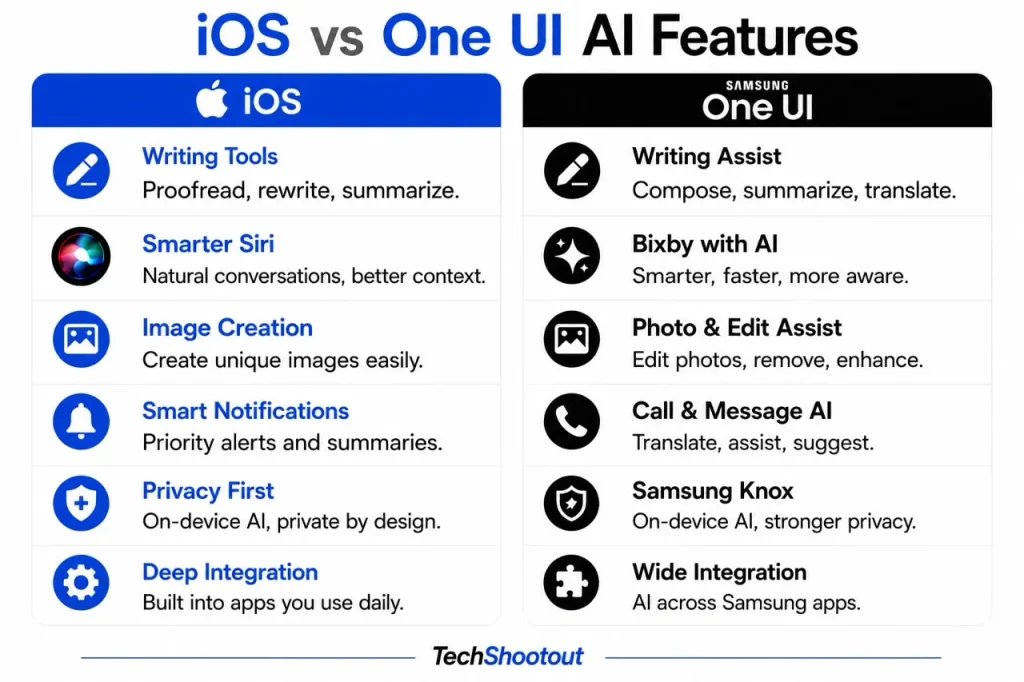
Apple and Samsung have both made AI a bigger part of their phone software, but they take different approaches. Apple Intelligence is closely integrated into iOS, while Galaxy AI offers a broader range of tools across the Galaxy experience.
iOS
Apple Intelligence brings AI features to supported iPhones and other parts of Apple’s software ecosystem. Depending on the device, language, and region, it can help with writing, notifications, image creation and editing, Siri, and other everyday tasks.
What stands out about Apple’s approach is how closely these features are tied to the operating system. They’re built into places you’re already using rather than presented as a separate collection of AI tools.
That makes Apple’s approach appealing if you’d rather AI be built into the features you already use instead of constantly putting new tools in front of you.
If you want a deeper look at Apple’s approach to on-device AI, features, supported devices, and privacy, see our Apple Intelligence guide.
One UI
Samsung takes a wider approach with Galaxy AI. On supported devices, its AI tools cover writing, translation, communication, transcription, image editing, search, and other tasks.
One UI gives you more opportunities to use AI across different parts of the phone. That’s useful if you actively want AI help with communication, editing, translation, or getting things done.
The downside is that the experience can vary depending on the Galaxy model, software version, language, and region you’re using. For a more detailed breakdown of Samsung’s AI tools and what they can actually do, check out our Galaxy AI guide.
Which Is Better for AI?
If you want AI that feels closely built into the operating system and Apple’s wider ecosystem, Apple Intelligence is the better fit.
Galaxy AI has the upper hand if you prefer a larger selection of AI tools distributed throughout various areas of your phone.
Winner: Depends on what you want from AI
iOS vs One UI Ecosystem
The ecosystem around your phone can matter just as much as the phone itself, especially if you already own a computer, tablet, smartwatch, or earbuds from the same company.
iOS
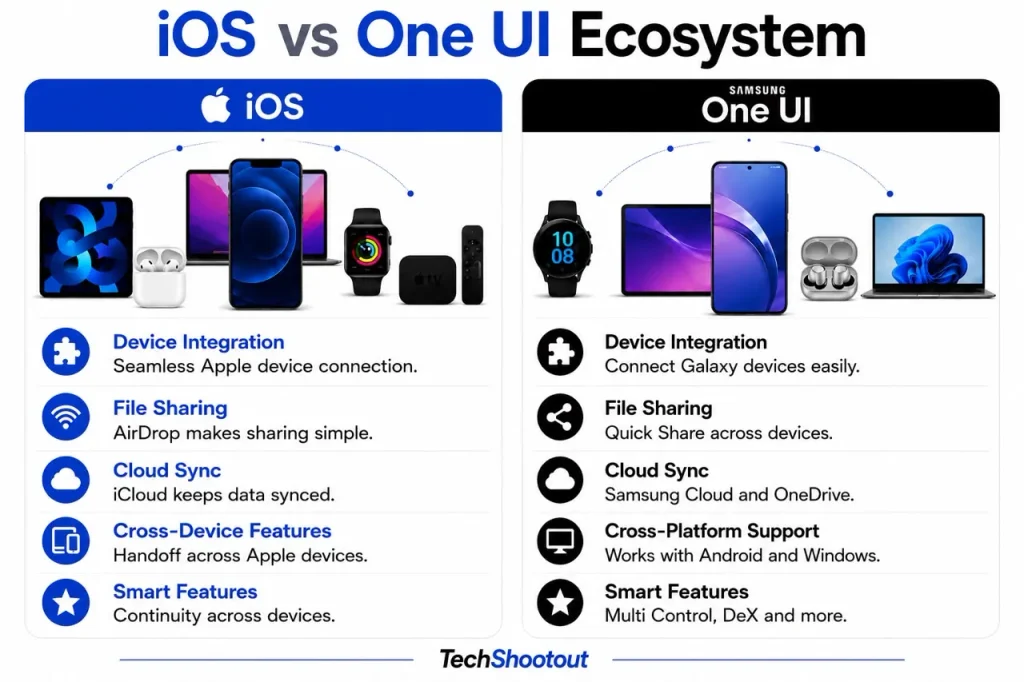
The Apple ecosystem is one of iOS’s strongest selling points. An iPhone connects closely with a Mac, iPad, Apple Watch, AirPods, and other Apple products. Features such as AirDrop, Handoff, iCloud, and Universal Clipboard are designed to make working across Apple devices feel seamless.
Things that would normally take a few separate steps start to feel like one continuous task. You can send files between devices, pick up where you left off on another Apple device, and keep your information synced without thinking much about which device is in front of you. The more Apple devices you own, the more that convenience adds up.
If you’re interested in how Apple’s devices work together beyond the features mentioned here, our Apple ecosystem guide takes a closer look at that connected experience.
One UI
One UI connects closely with Samsung’s Galaxy ecosystem, including Galaxy tablets, watches, earbuds, and other supported devices. It also links up with Windows PCs through Link to Windows, and Quick Share makes sending files between supported devices simple.
If your main computer runs Windows, this makes a Galaxy phone a genuinely practical pick. You can build a setup around Galaxy devices without needing to abandon Windows.
If you want to see how Samsung connects Galaxy phones with tablets, watches, earbuds, Windows PCs, and other devices, our Samsung ecosystem guide goes into more detail.
Which Is Better for the Ecosystem?
If you already own a Mac, iPad, Apple Watch, or AirPods, iOS is more advantageous because Apple’s devices are designed to work together seamlessly. Apple’s devices are designed from the start to work together.
If you use Galaxy devices alongside a Windows PC, One UI gives you a more flexible setup if you mix Galaxy, Android, and Windows devices.
Winner: Depends on the devices you already own
iOS vs One UI Desktop Experience
Both platforms work well with computers, but Samsung goes a step further with DeX, letting compatible Galaxy phones provide a desktop-style experience.
iOS
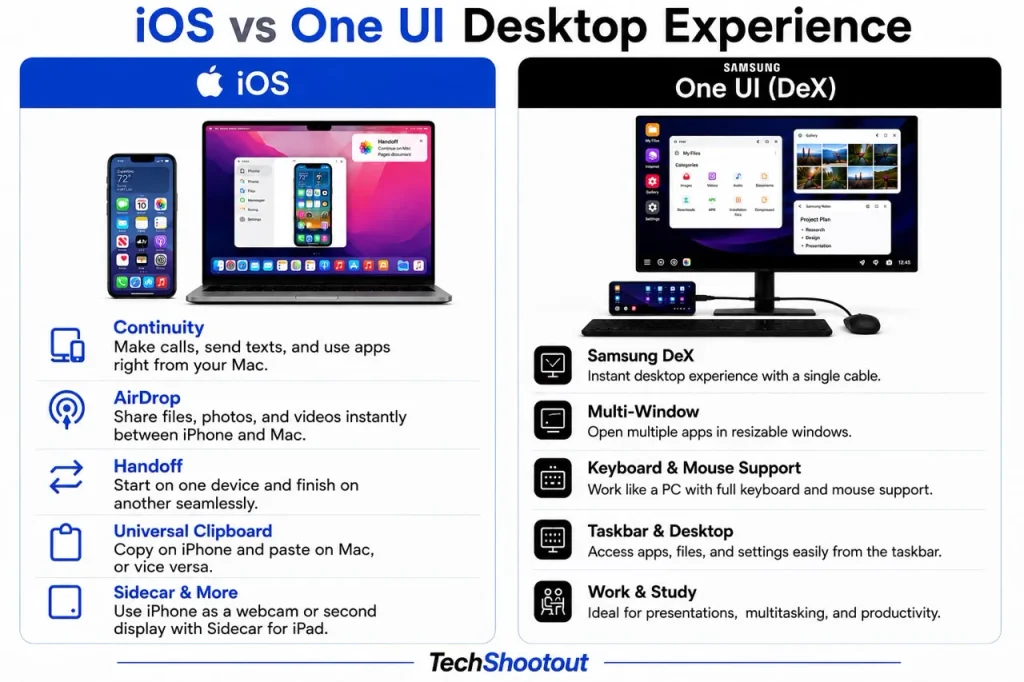
An iPhone stays connected to a Mac through Apple’s Continuity features, including Handoff and AirDrop. The focus here is making the iPhone work smoothly alongside your other Apple devices, not turning the phone itself into a desktop computer.
If you already own a Mac, this setup can be very convenient. Your iPhone fits naturally into the wider Mac ecosystem without needing to create a separate desktop environment.
One UI
On compatible Galaxy phones, Samsung DeX provides a desktop-style experience when you connect the phone to a monitor and supported accessories. DeX gives you resizable windows, a desktop layout, keyboard and mouse support, and the ability to run several apps on a bigger screen.
Rather than simply mirroring your phone screen, DeX provides an interface designed for a larger display. For lighter work such as handling documents, browsing the web, managing files, or juggling several apps, a compatible Galaxy phone can feel much more like a desktop computer.
It’s not going to replace a full computer for everyone. But if you want your phone to take on a bigger role in how you get work done, it’s genuinely useful.
Which Is Better for the Desktop Experience?
If you want your phone to work smoothly alongside a computer you already own, iOS fits naturally into the Apple setup.
If you want your phone to provide a desktop-style interface when connected to a monitor, One UI has the clear edge with Samsung DeX.
Winner: One UI
iOS vs One UI Performance and Smoothness
Judging performance by software alone is tricky, since the hardware plays a huge role in how fast and smooth a phone feels. On today’s flagship devices, both iOS and One UI can deliver a fast, polished experience day to day.
iOS
Apple makes both the iPhone hardware and iOS software, which lets the company fine-tune the operating system around its own devices. That close pairing helps Apple optimize animations, responsiveness, and app performance for each supported iPhone.
The result feels less about raw speed and more about consistency. iOS doesn’t have to account for the wide range of hardware configurations found across Android phones.
One UI
One UI has gotten noticeably more polished on recent Galaxy phones, especially the higher-end models.
The real strength here isn’t speed for its own sake. It’s how much functionality One UI packs in while still staying smooth on capable Galaxy hardware.
Which Is Better for Performance and Smoothness?
If consistent performance across a tightly controlled set of devices matters most to you, iOS has the edge.
One UI is the best option if you want a feature-rich interface that still operates smoothly on contemporary Galaxy hardware.
Winner: Tie
iOS vs One UI Accessibility
Both iOS and One UI cover a wide range of accessibility needs, from vision and hearing to mobility, speech, and interaction. What matters more than the feature count is how well those tools actually work and which ones a person needs day to day.
iOS
iOS includes tools for screen reading, magnification, display adjustments, Voice Control, and other forms of assisted interaction. None of this feels bolted on. It’s built straight into the operating system itself.
For anyone who depends on a specific accessibility feature, the experience really comes down to one thing: how well that feature fits their daily routine.
One UI
One UI, paired with Android’s own accessibility tools, offers screen reading, magnification, display adjustments, hearing-related controls, and several ways to interact with the phone.
Samsung gives users a wide range of choices here. That said, the experience can shift depending on which Galaxy device you’re using and which accessibility tools you turn to.
Which Is Better for Accessibility?
If accessibility is a priority for you, the smart move is to look at the exact features you rely on and see how each one performs on the specific iPhone or Galaxy model you’re considering.
Winner: Depends on your needs
iOS vs One UI Gaming
Gaming performance depends mostly on the hardware inside the phone, but software still shapes how games feel and how much control you have while playing.
iOS
Apple’s tight control over iPhone hardware and iOS helps deliver a consistent gaming experience across supported devices.
Day to day, the real advantage isn’t a long list of gaming settings. It’s consistency. Developers get a relatively predictable platform to build for, while users get a straightforward gaming experience.
If you just want to install a game, connect a controller, and start playing, iOS keeps that process simple.
One UI
Samsung takes a more configurable approach to gaming. Galaxy phones come with tools like Game Booster, which lets users adjust performance, notifications, and other gaming-related settings.
The difference stands out more if you like having a hand in shaping your gaming experience. You can manage interruptions and adjust certain settings yourself instead of relying entirely on the phone’s default behavior.
That said, the experience varies between Galaxy models, so a high-end Galaxy and an entry-level Galaxy shouldn’t be judged as the same kind of gaming device.
Which Is Better for Gaming?
If you want tight hardware and software integration with a simple, no-fuss gaming experience, iOS is a strong pick.
If you want more control over gaming settings and how your phone behaves while you play, One UI offers more flexibility.
Winner: Depends on what you value
Who Should Choose iOS?
Go with iOS if you want a phone experience that’s simple, stays consistent, and doesn’t take much time to learn. It fits people who don’t need to dig into deep system-level customization and would rather stick with an interface that feels the same no matter which supported iPhone they’re using.
It’s also a natural fit if you’re already tied into Apple’s ecosystem, especially if a Mac, iPad, Apple Watch, or AirPods are already part of your everyday routine.
And if centralized updates, Apple’s approach to privacy, and tight hardware-software integration matter more to you than deep customization, iOS is built around exactly that.
Who Should Choose One UI?
One UI is the right pick if you want more say over how your phone looks and works. It suits people who care about deeper customization, multi-window multitasking, flexible file management, and system-level control.
If you’re already running a Windows PC alongside Samsung or Android devices, One UI also fits well into that kind of mixed setup.
It’s a good choice, too, if you want your phone to carry more of your productivity work. Features like Samsung DeX can turn a compatible Galaxy phone into a real part of a larger desktop-style setup.
Final Thoughts
So, iOS vs One UI: which is better in 2026? Looking at One UI vs iOS as a whole, neither platform is simply better for everyone.
After going through both platforms across everyday use, there’s no single winner. iOS is the better fit if you’d rather have a controlled and consistent experience. One UI makes more sense if you’re after more flexibility and control.
If you want something that stays controlled and familiar from one iPhone to the next, go with iOS. If you’d rather have the freedom to shape your phone around how you actually work, One UI is likely the better fit.
The best platform isn’t the one that wins every category. It’s the one that fits how you actually use your phone.
If you’re still deciding between an iPhone and a Samsung Galaxy rather than just comparing iOS and One UI, our iPhone vs Samsung ultimate comparison breaks down the differences across hardware, cameras, battery life, performance, AI, software, and ecosystem.
FAQs
Is iOS better than One UI in 2026?
Neither one’s objectively better for everyone. It really comes down to what you want from your phone. iOS is the stronger pick if you value simplicity, consistency, centralized updates, privacy controls, and tight integration with Apple devices. One UI suits you better if you’re after more customization, multitasking, flexible file management, and more control over how your phone works.
What is the main difference between iOS and One UI?
The real difference between the two boils down to control. iOS keeps things more controlled and consistent, while One UI, Samsung’s spin on Android, gives you more freedom to customize, multitask, manage files, and dig into system-level settings. Whether you’re drawn to simplicity or flexibility ultimately decides which one suits you better.
Is One UI more customizable than iOS?
Yes. One UI generally offers more customization than iOS. Samsung gives you more ways to change the look and behavior of a Galaxy phone, while iOS has become considerably more customizable but still keeps the overall experience more controlled and consistent.
Which is better for multitasking, iOS or One UI?
One UI has the edge when it comes to multitasking on compatible Galaxy devices. With split-screen apps and floating windows, you can run multiple apps on screen at once. iOS makes jumping between apps fast and easy, but iPhones don’t offer that same traditional multi-window setup.
Which has better AI features, Apple Intelligence or Galaxy AI?
It really depends on what you’re looking for from AI. Galaxy AI tends to offer a wider range of tools spread across the Galaxy experience, including writing, translation, transcription, communication, image editing, and search. Apple Intelligence takes a more integrated approach, weaving AI into iOS and the broader Apple ecosystem. Just keep in mind that features can vary depending on your device, language, and region.
Which gets software updates faster, iPhone or Samsung Galaxy?
iPhones tend to have the upper hand when it comes to consistent software updates. Since Apple controls both the hardware and iOS, supported devices get major updates through one centralized system. Samsung has also stepped up its long-term software support, but when a Galaxy phone gets an update can still vary depending on the model, region, carrier, and software version.
Which is better for productivity, iOS or One UI?
One UI’s generally the better pick if you want more productivity features built right into the phone. Multi-window support, flexible file management, and Samsung DeX can make compatible Galaxy phones a lot more useful for getting work done. That said, iOS still holds its own as a productivity platform, especially if you’re already using a Mac, iPad, or other Apple devices.