
Introduction
OLED screens are everywhere now, from flagship phones and high-end TVs to laptops, tablets, and gaming monitors. It’s easy to see why. OLED delivers deep blacks, excellent contrast, and picture quality that can make an LCD look flat beside it. But one concern still makes some buyers hesitate: OLED burn-in.
The risk is real. OLED pixels gradually wear with use, and repeated static elements such as logos, taskbars, or game HUDs can cause uneven wear that eventually leaves a permanent trace.
For most people buying an OLED device in 2026, though, burn-in isn’t something to lose sleep over. Modern displays include protections that help reduce uneven wear, while normal mixed use keeps screen content changing.
Burn-in hasn’t disappeared. What really matters is how you use your screen. So let’s look at what causes OLED burn-in, who is most at risk, and what you can do to help prevent it.
Contents
What Is OLED Burn-In?
OLED burn-in is what happens when part of an OLED screen wears differently from the rest of it, leaving behind a faint but permanent mark. The reason comes down to how OLED screens work.
Unlike an LCD, which has a backlight behind the panel, every pixel in an OLED display makes its own light. Those pixels can even switch off completely, giving OLED its deep blacks and excellent contrast. But OLED pixels don’t last forever. The materials that produce the light slowly wear down as the screen is used.
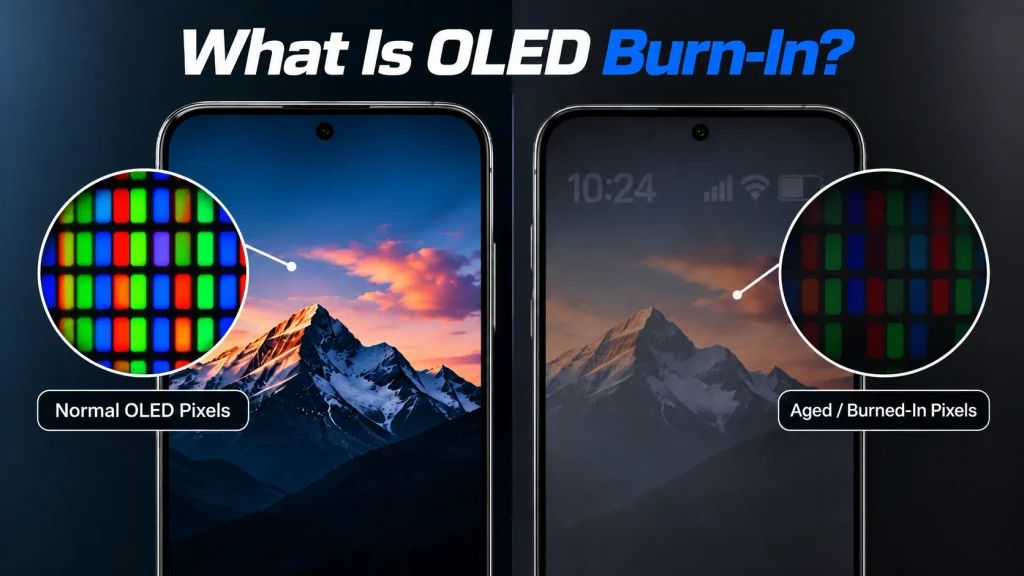
Usually, that isn’t a problem because the whole screen is constantly showing different things. Trouble can start when the same bright image stays in one place day after day.
A TV channel logo is a clear example. If that logo sits in the same corner for hours every day, it uses those pixels differently from much of the surrounding screen.
Over a long period, the difference can become noticeable. Change the channel or put on a movie, and you may still see a faint outline of the old logo in the background. That’s burn-in. The image isn’t actually stuck on the screen. The pixels in that area have simply aged differently from the pixels around them.
Is OLED Burn-In Still a Problem in 2026?
Yes, OLED burn-in can still happen.
Modern OLED screens are much better at managing it, but OLED pixels still wear with use. If some pixels are worked harder than others for long enough, permanent burn-in is still possible. For most people, though, it isn’t something to constantly worry about.
Phones, TVs, and monitors now use protections such as subtle image shifts, brightness adjustments, screen savers, static-image detection, and routines that help compensate for uneven pixel wear.
The way most of us use our screens helps too
Think about your phone during a normal day. You might message, watch videos, scroll through social media, browse the web, take photos, and play games. The content is constantly changing, which is very different from displaying the same bright elements for hours every day.
The same applies to OLED TVs. Switching between movies, shows, sports, YouTube, and games spreads usage across the panel. Leaving the same news channel on for hours each day, with a fixed logo and ticker, creates a higher-risk pattern.
So, can a modern OLED screen still get burn-in?
Yes. But what matters more is how you use it. For most people watching varied content and using a modern OLED device normally, burn-in isn’t a strong reason on its own to avoid OLED.
OLED Burn-In vs Image Retention
Temporary image retention is often confused with OLED burn-in because the two can look similar.
Image retention is temporary. A faint outline of a logo, menu, or game HUD may appear after staying on screen for a long time, but it usually fades with different content or after some time.
Burn-in is permanent. It happens when some OLED pixels have aged more than others, leaving a pattern that remains visible across different content.
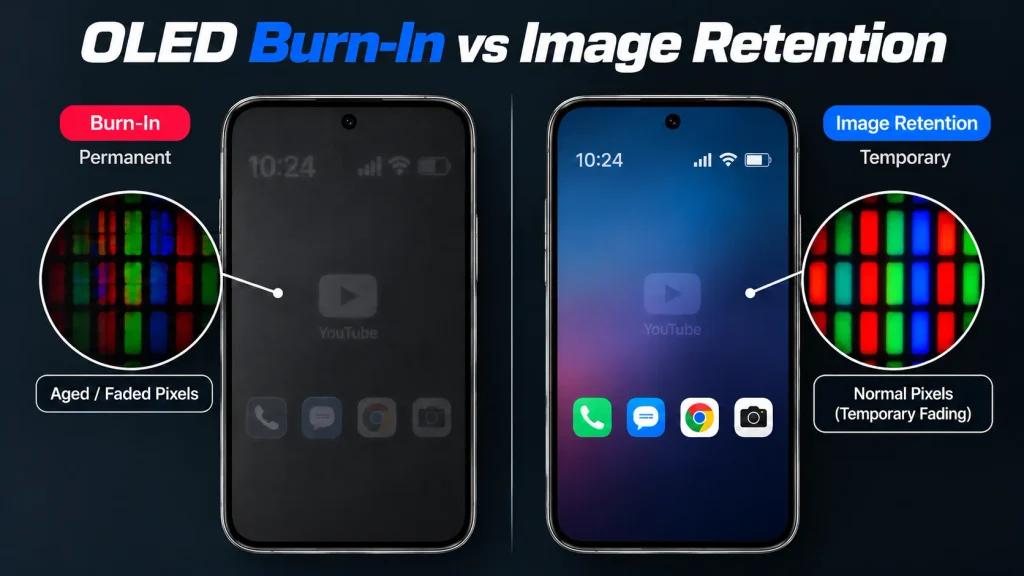
So, a ghost image doesn’t necessarily mean burn-in. If it fades, it’s likely image retention. If it stays, it could be permanent burn-in.
What Actually Causes OLED Burn-In?
The main cause of OLED burn-in is uneven pixel aging. Every OLED pixel gradually wears with use. Burn-in becomes a problem when some pixels are used more heavily than others, especially when the same static elements appear repeatedly. Common examples include:
- TV channel logos and news tickers
- Game HUDs
- Navigation elements
- Desktop taskbars
- Static menus and toolbars
Brightness matters too. Brighter pixels generally work harder, so repeatedly displaying the same bright elements can contribute to uneven wear.
There’s no fixed number of hours before burn-in appears. Brightness, temperature, content, static screen time, panel characteristics, and built-in protection features can all affect the risk.
How High Is the OLED Burn-In Risk Today?
Burn-in risk depends more on how you use an OLED screen than simply owning one. Phones and TVs usually display constantly changing content, from messages and webpages to videos, movies, sports, and games. This helps spread wear across the panel. With normal mixed use, burn-in generally isn’t something most people need to worry about.
Risk increases when the same elements remain on screen for hours every day. A news channel may keep its logo and ticker in fixed positions, while an OLED monitor may display the same taskbar, browser controls, and menus throughout the workday.
That doesn’t mean burn-in will definitely happen, but repeated static content can increase uneven pixel wear over time.
Which OLED Devices Are Most at Risk?
OLED comes in several forms across phones, TVs, and monitors, but the underlying technology still relies on self-emissive pixels. If you’re confused by the terminology, our OLED vs AMOLED comparison explains how the two are related.
Smartphones
For most people, smartphone burn-in risk is low. Apps, webpages, videos, and other content constantly change, while features such as automatic brightness can help reduce unnecessary pixel stress.
Static elements such as status icons remain a consideration, but normal mixed use is very different from displaying the same bright image for hours every day.
OLED TVs
Risk depends heavily on what you watch. Movies and shows constantly change, while games, news, and sports may keep HUDs, logos, tickers, or scoreboards in fixed positions for long periods. The concern isn’t just how long the TV is on, but how often the same bright elements stay in the same spots.
OLED Monitors and Laptops
Monitors and laptops can face greater risk from static desktop elements such as taskbars, browser controls, menus, and work applications that remain visible for hours.
That doesn’t make OLED a poor choice for desktop use, but people who display the same interface every day should make effective use of built-in OLED protection features.
How to Prevent OLED Burn-In
You don’t need to excessively protect your OLED screen to prevent burn-in. A few sensible habits can reduce unnecessary wear without changing the way you use your device.
Don’t Leave Static Content on the Screen
This is probably the easiest habit to follow. If you’ve paused a game or video and you’re walking away for a while, there’s no reason to leave that image sitting on the screen. Turn the display off or let the device go to sleep.
Use Screen Timeout
A screen timeout is useful on phones, tablets, laptops, and monitors. If you forget about the device, the screen will switch off instead of leaving the same interface on display for hours. You don’t need an unusually short timeout. Just choose one that makes sense for the way you use the device.
Avoid Unnecessary High Brightness
Sometimes you need a bright screen. Using your phone outdoors on a sunny day is an obvious example. There’s no reason to avoid high brightness when you actually need it.
But keeping an OLED screen at maximum brightness all the time isn’t particularly helpful either, especially if the same bright elements remain on screen for long periods. On a phone, automatic brightness is an easy way to let the device adjust the screen for your surroundings.
Keep OLED Protection Enabled
Modern OLED devices use several features to reduce uneven pixel wear. Depending on the device, these may shift the image slightly, dim static elements, activate a screen saver, or run compensation routines in the background.
You may never notice them working, so unless you have a specific reason to disable them, it’s best to leave them on.
Allow Automatic Panel Maintenance
Some OLED TVs and monitors run automatic maintenance cycles to help compensate for uneven pixel wear. In most cases, simply let the display handle this on its own and follow the manufacturer’s guidance.
There’s usually no need to run a manual pixel or panel refresh regularly. Use these more intensive routines only when recommended by the manufacturer.
Vary Static Desktop Content
You don’t need to constantly rearrange windows on an OLED monitor. But if your desktop stays mostly unchanged throughout the day, small changes can help.
Auto-hide the taskbar, use a screen saver, let the monitor sleep during breaks, and avoid leaving bright static elements on screen when they’re not needed.
Does Dark Mode Help Prevent OLED Burn-In?
Dark mode can help, but it won’t prevent OLED burn-in on its own. On an OLED screen, each pixel produces its own light. Those pixels can turn off completely when a portion of the screen displays true black.
That means a dark interface may reduce how much some parts of the display are being used. But dark mode doesn’t make static elements disappear. Bright icons, buttons, or other interface elements in the same spot for hours still use pixels, even if most of the screen is black.
So if you already like dark mode, there’s no harm in using it. It may reduce pixel use in some parts of the screen and can also save power on OLED devices under the right conditions. Just don’t think of it as a cure for burn-in. How long static elements stay on the screen, how bright they are, and how you use the display over time still matter.
We also tested whether Dark Mode saves battery on an OLED iPhone using an iPhone 15, and the results showed lower battery consumption during our Dark Mode test.
Can OLED Burn-In Be Fixed?
If you notice a faint image on your OLED screen, first determine whether it’s temporary image retention or permanent burn-in.
Image retention can fade with normal use, rest, or the display’s built-in maintenance. True burn-in is permanent. Once OLED pixels have aged unevenly, software can’t restore them to their original condition.
Panel compensation features may make some issues less noticeable, but they can’t reverse physical pixel wear. Videos that cycle through colors can’t repair degraded OLED pixels either.
If permanent burn-in becomes severe enough to affect normal viewing, panel replacement is the only way to fully eliminate it.
How to Check Your OLED Screen for Burn-In
Display a few solid colors full-screen at your normal brightness and look for faint shapes or uneven areas. Grey is particularly useful for spotting subtle differences.
Look for recognizable patterns such as logos, status bars, taskbars, or game HUDs. If you see something, continue using the screen normally. Temporary image retention may fade, while burn-in will remain visible.
Keep in mind that slight OLED panel uniformity differences don’t necessarily mean burn-in.
And don’t test for burn-in by deliberately leaving a bright static image on screen for days. You could end up causing the problem you’re trying to detect.
How Long Does OLED Burn-In Take?
There’s no fixed number of hours before an OLED screen develops burn-in.
Two identical displays can run for the same amount of time but age differently. One might show constantly changing content at moderate brightness, while another displays the same bright interface for hours every day. The second is more likely to develop uneven pixel wear.
Brightness, heat, static content, panel characteristics, and built-in protection features all affect the risk. So, think of burn-in as uneven wear that builds over time, not a countdown based on screen-on hours.
Should You Avoid OLED Because of Burn-In?
For most people buying an OLED device in 2026, burn-in isn’t a reason to avoid it. OLED offers deep blacks, excellent contrast, strong HDR performance, and great picture quality. Burn-in remains a limitation, but the actual risk depends heavily on how you use the screen.
For phones and TVs showing varied content, it’s generally a minor concern. OLED monitors deserve more consideration if you spend hours every day with the same taskbar, menus, spreadsheets, or other static elements on screen. That doesn’t make OLED monitors a bad choice, but heavy static desktop use makes burn-in more relevant.
Final Thoughts
So, should you still worry about OLED burn-in in 2026? It’s worth knowing about, but for most people, it isn’t something to fear. Burn-in is still possible because OLED pixels wear with use. Modern protection features reduce the risk, but they can’t eliminate it completely.
Your usage matters most. Repeated bright static content creates more risk than varied everyday use. Keep OLED protection features enabled, use sensible brightness, and avoid leaving unnecessary static content on screen for long periods.
For most people, OLED burn-in is something to understand, not a reason to avoid OLED.
FAQs
Is OLED burn-in permanent?
Yes. True OLED burn-in is permanent because it results from uneven pixel wear. Temporary image retention can look similar, but it may fade after displaying different content or after the screen has been turned off for a while.
How long does it take for OLED burn-in to happen?
There is no fixed number of hours. Burn-in depends on several factors, including brightness, how long static elements remain on-screen, your overall usage pattern, and the protection features built into the device. Normal mixed use is very different from displaying the same bright interface for hours every day.
Can OLED burn-in be fixed?
Not really. There is no true OLED burn-in fix once the pixels have permanently worn unevenly. Some TVs and monitors have compensation or panel-maintenance features that may make the problem less noticeable, but they cannot restore degraded pixels to their original condition.
How can I prevent OLED burn-in?
The easiest way to reduce the risk of OLED burn-in is to avoid leaving bright static content on the screen for unnecessarily long periods. Use a reasonable brightness, let the display turn off when it isn’t being used, and keep the manufacturer’s built-in OLED protection features enabled.
Should I worry about OLED burn-in on my phone?
For normal smartphone use, burn-in usually isn’t something you need to constantly worry about. Most people regularly switch between apps, videos, webpages, photos, and other content. The OLED burn-in risk becomes more relevant when the same bright static elements remain on-screen for long periods, day after day.