Table of Contents
Introduction
The Apple ecosystem vs Samsung ecosystem debate has changed a lot over the years. There was a time when choosing between Apple and Samsung was simple. Now it’s not just about the phone. It’s about everything connected to it. This includes your laptop, tablet, smartwatch, and smart home devices. Both companies have built ecosystems where each device you add works better with the rest of your devices.
Apple has spent over a decade making sure its devices communicate with each other in ways that feel effortless. Samsung has taken a different approach with its Galaxy lineup, combining powerful hardware with Android’s flexibility and close integration with Google and Microsoft.
So which one is actually better in 2026?
The honest answer is that it depends on you. If you want everything to just work without thinking about it, the answer is clear. If you want more device options, more flexibility, and better pricing, that points to another. This comparison focuses on real-world ecosystem use, including device compatibility, software features, privacy, smart home support, AI tools, pricing, and long-term value.. So you can decide for yourself.
What Is an Ecosystem?
An ecosystem is a group of devices, software, and services that work together. Rather than managing each device on its own, everything is designed to stay connected. Everything shares information automatically.
You might start writing an email on your phone, continue on your tablet, and send it from your laptop without transferring anything manually. Your smartwatch can unlock your phone, your earbuds switch between devices, and your photos appear on every screen you own.
Apple controls both hardware and software, so its devices rarely run into compatibility issues, and the experience stays consistent. Samsung takes a different approach. Galaxy features combine with Android, Google, and Microsoft services to offer more options, but the experience depends on what you mix together. Neither approach is wrong. It comes down to what matters more to you.
Understanding how each company connects its devices makes the Apple ecosystem vs Samsung ecosystem comparison much easier to understand.
Device Lineup
Apple Ecosystem Devices
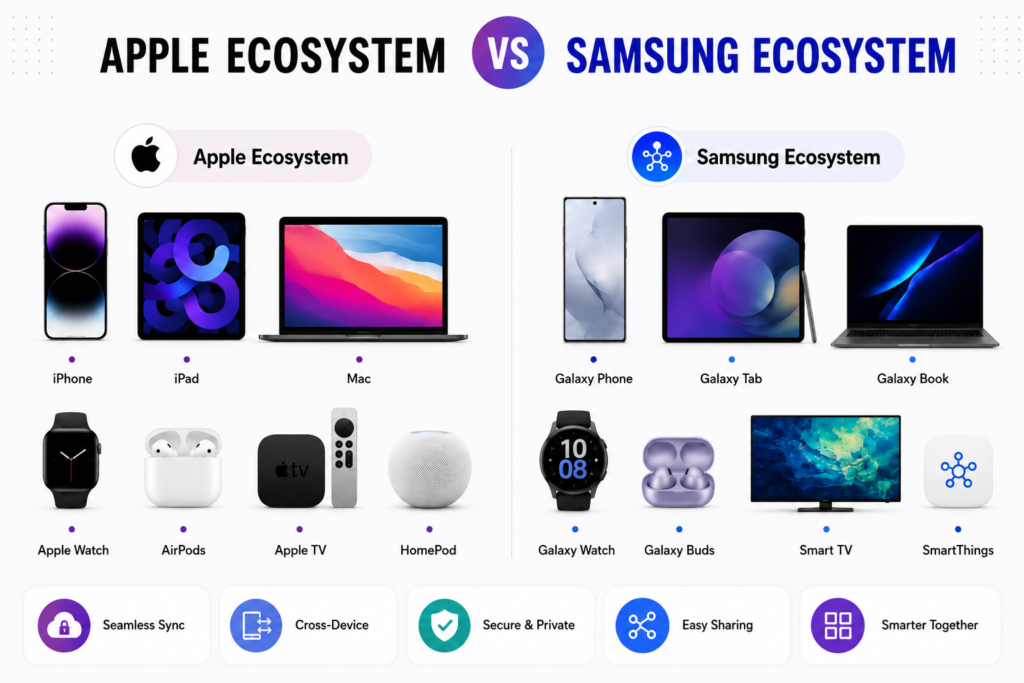
Apple keeps its lineup tight, centred on a focused range of products, including the iPhone, iPad, Mac, Apple Watch, AirPods, Apple TV, HomePod, AirTag, and Vision Pro. Everything runs on the same Apple ID, syncs through iCloud, and works together without much effort. Apple provides an overview of how its ecosystem works through its official Apple Continuity documentation.
Updates arrive at the same time across supported devices, and accessories stay compatible for years. The only real drawback is price. Apple doesn’t make budget products.
Samsung Ecosystem Devices
Samsung’s lineup is much broader: Galaxy smartphones, tablets, laptops, watches, earbuds, SmartTags, monitors, TVs, and home appliances. Galaxy devices also work with Google services, Windows PCs, and a large range of third-party accessories. Samsung explains how Galaxy devices connect across phones, tablets, laptops, and other products in its official ecosystem guide.
There’s something at every price point, from affordable phones to flagship foldables. The trade-off is that some features depend on Google, Microsoft, or other partners.
Verdict
Apple offers a well-integrated and consistent set of devices built to work together. Samsung offers more variety, more price options, and better compatibility across different platforms. For pure integration, Apple leads. For choice and flexibility, Samsung wins.
Cross-Device Features
Cross-device integration is where the differences between the Apple ecosystem vs Samsung ecosystem become most noticeable.
Apple Ecosystem Cross-Device Features
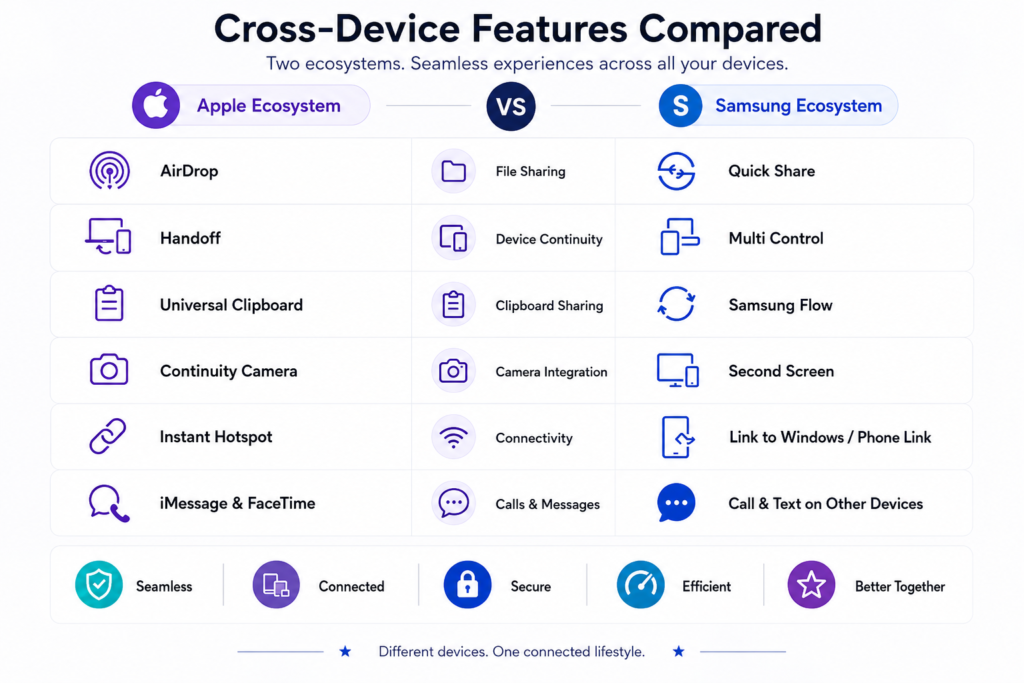
Apple’s cross-device features are one of its biggest strengths. Apple explains features like Handoff, Universal Clipboard, Continuity Camera, and Instant Hotspot in its official Continuity guide. Handoff lets you start a task on one device and continue it on another. Universal Clipboard lets you copy on your iPhone and paste on your Mac. You can handle calls and messages from any Apple device. AirDrop transfers files quickly without any setup.
AirPods switch automatically between your active Apple devices. Universal Control lets one keyboard and mouse operate both a Mac and iPad. Continuity Camera turns your iPhone into a Mac webcam. Instant Hotspot connects your Mac to your iPhone’s mobile data without a password. Everything works as part of one system, not a collection of separate apps.
Samsung Ecosystem Cross-Device Features
Samsung has worked hard to build cross-device connectivity. Multi Control lets a Galaxy Book keyboard and mouse operate nearby Galaxy tablets and phones. Second Screen turns a Galaxy tablet into a wireless display for a Galaxy Book. Samsung Flow handles file transfers and screen mirroring across devices.
Quick Share transfers files wirelessly between Galaxy devices and many Windows PCs. Link to Windows shows notifications, messages, photos, and Android apps directly on a Windows computer. Galaxy Buds switch between compatible Samsung devices, and Samsung Internet syncs browsing across phones, tablets, and laptops. Samsung provides official documentation for Quick Share and Multi Control compatibility across supported Galaxy devices.
Some features depend on Windows or Google services, so the ecosystem doesn’t feel quite as unified as Apple’s.
Verdict
Apple’s ecosystem feels more smooth across devices. Most features just work without much setup. Samsung has closed the gap and handles Windows and Android compatibility better. If all your devices are Apple, the experience is smoother. If you mix in Windows or other Android devices, Samsung gives you more flexibility.
AI Features
AI is becoming one of the biggest differences in the Apple ecosystem vs Samsung ecosystem, especially as both companies expand intelligent features across multiple devices.
Apple Ecosystem AI Features
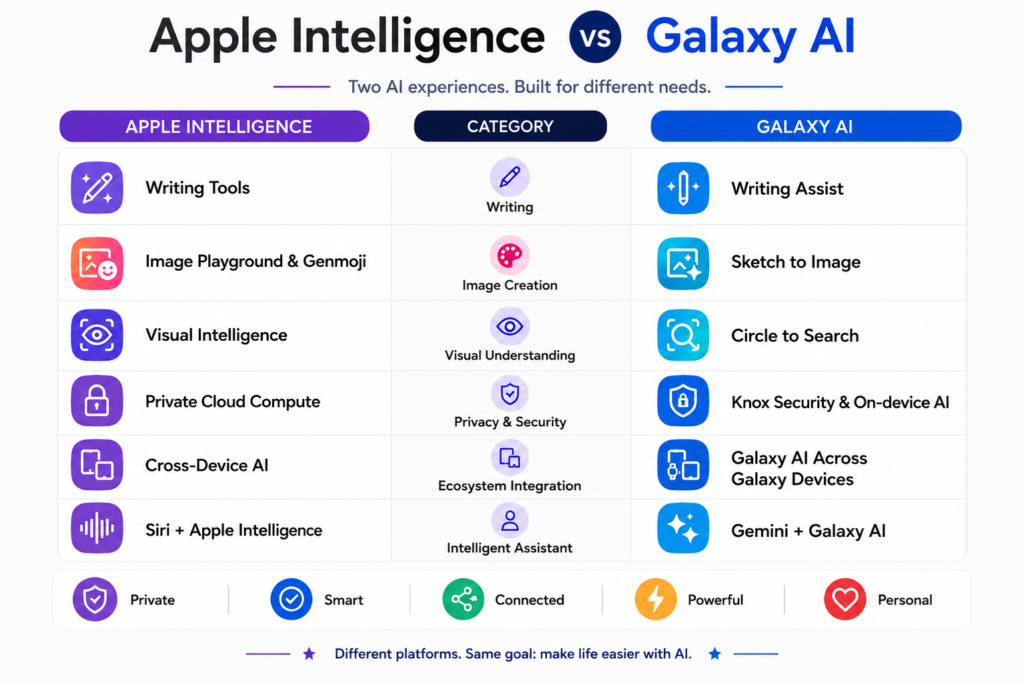
Most Apple Intelligence features run directly on your device, which improves responsiveness and keeps more of your personal data on the device. Apple explains how Apple Intelligence combines on-device processing with Private Cloud Compute for more demanding requests.
Writing Tools let you rewrite, summarize, and proofread text across supported apps. Notifications are prioritized intelligently. Visual Intelligence lets you point your camera at something to learn more about it. Siri handles follow-up questions better and works more naturally with your apps. Many of these features rely on on-device AI for faster responses and improved privacy. Learn more in our guide explaining why on-device AI is replacing cloud AI.
Because Apple controls the hardware and software, these features work consistently across iPhone, iPad, and Mac. The downside is that many of them only work on newer devices. If you want to learn more about Apple Intelligence and its AI features, read our complete guide to Apple Intelligence.
Samsung Ecosystem AI Features
Samsung has invested heavily in Galaxy AI, combining its technology with Google’s Gemini. Samsung’s official Galaxy AI page outlines features such as Live Translate, Note Assist, Browsing Assist, and Photo Assist. Live Translate handles real-time translation during calls. Writing Assist improves text, Note Assist summarizes notes, and Browsing Assist shortens long web pages.
Photo and video editing tools now include object removal, image expansion, reflection removal, and audio enhancement. AI features also extend to Galaxy Watches for health insights, Galaxy Buds for translation, and Galaxy Books for productivity on Windows. Many of these features are available across multiple price ranges, not just flagship devices. To explore Galaxy AI in more detail, check out our complete guide to Galaxy AI.
Verdict
Samsung currently offers a wider range of AI tools, especially across phones, tablets, watches, and Windows-connected devices. Google’s partnership gives Galaxy users access to some of the most advanced Android tools available. Apple is more consistent and privacy-focused, but Samsung currently has the advantage.
Smart Home
Apple Ecosystem Smart Home
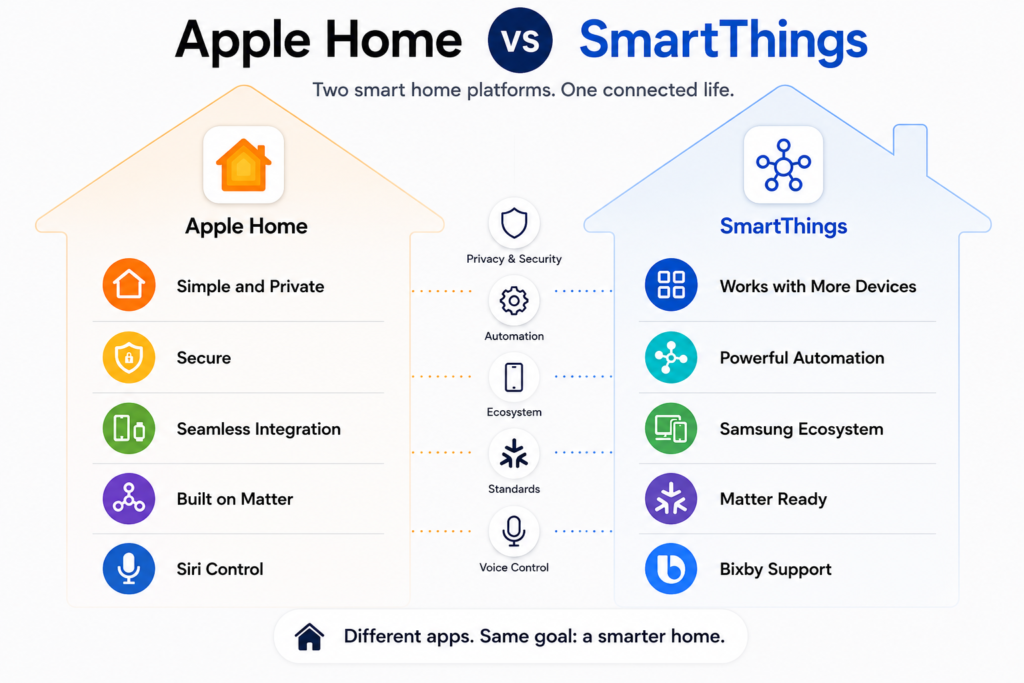
Apple’s smart home runs through the Home app, which controls lights, locks, thermostats, cameras, and plugs from your iPhone, iPad, Mac, Apple Watch, or Siri. Automations can activate based on your location, time, or other device activity.
Privacy is handled well, requests are handled with encryption and sensitive data stays protected. Matter support has also improved compatibility with third-party products.
The drawbacks are worth knowing. You’ll need an Apple TV or HomePod to unlock advanced automations, and support for Apple Home still isn’t as broad as it is for Google Home or Amazon Alexa.
Samsung Ecosystem Smart Home
SmartThings is Samsung’s smart home platform and supports a wide range of compatible devices and brands. It goes well beyond phones and tablets. Samsung TVs, refrigerators, washing machines, air conditioners, and robot vacuums can all be part of the same SmartThings setup.
It supports thousands of third-party devices, manages everything from one app, and can suggest automations based on your habits. It also supports Matter and works on Android, iOS, Windows, and the web. You don’t need Galaxy devices to use it.
Verdict
Apple’s smart home works well if you already use Apple devices and want a clean, private experience. Samsung’s SmartThings is more capable for larger homes or mixed-brand setups. It supports more products and manufacturers and extends into home appliances.
File Sharing
Apple Ecosystem File Sharing
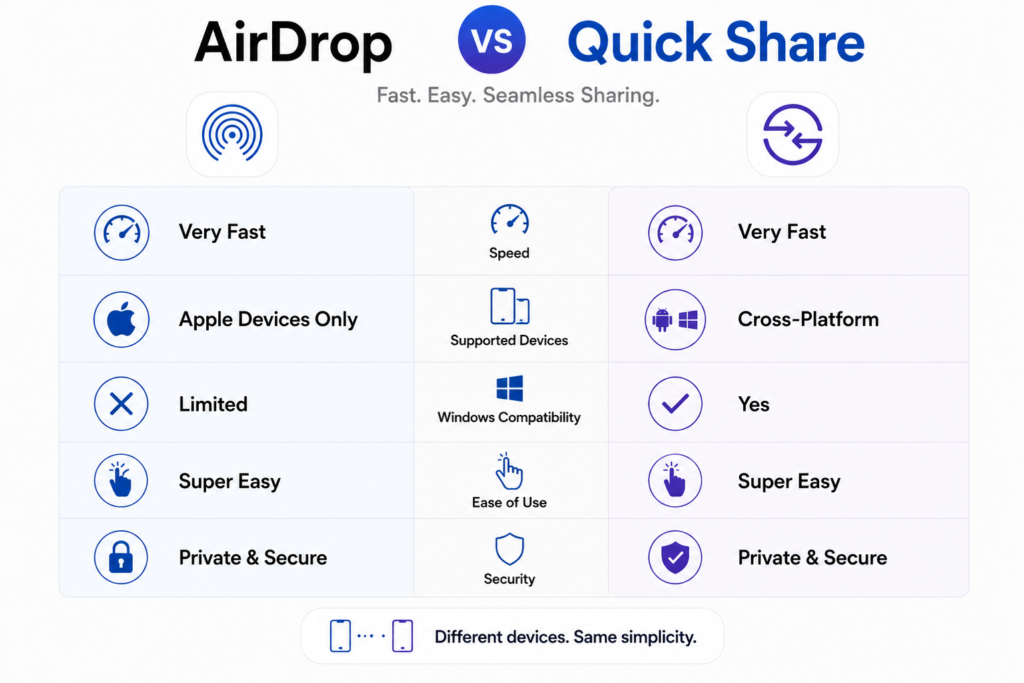
AirDrop makes file sharing between Apple devices fast without any setup. iCloud Drive keeps files in sync across iPhone, iPad, and Mac. Universal Clipboard lets you copy on one device and paste on another. Apple provides detailed instructions for using AirDrop and iCloud Drive across supported devices.
The limitation is obvious once you step outside Apple’s ecosystem. Sending files to Android or Windows usually means reaching for cloud storage or a third-party app.
Samsung Ecosystem File Sharing
Quick Share handles fast wireless transfers between Galaxy devices and, increasingly, Windows PCs. Samsung integrates with Google Drive, Microsoft OneDrive, and Nearby Share, providing greater flexibility in file sharing.
Samsung Flow keeps files, clipboard content, and notifications moving between phones, tablets, and laptops. Android’s open nature also makes it easier to share files with devices from other manufacturers.
Verdict
AirDrop remains one of the fastest and simplest file-sharing tools available within Apple’s ecosystem. Quick Share has improved significantly and handles cross-platform sharing much better. If all your devices are Apple, AirDrop and iCloud are excellent. If you work across different operating systems, Samsung is more flexible.
Productivity
Apple Ecosystem Productivity Features
Handoff lets you pick up tasks across devices without any manual transfers. iCloud keeps your notes, reminders, calendars, and files in sync across your Apple devices. Universal Control connects a Mac and iPad to one keyboard and mouse. Continuity Camera uses your iPhone as a Mac webcam. Sidecar turns an iPad into a second display. Apple documents productivity features such as Sidecar, Universal Control, and Continuity Camera on its support website.
Apps like Pages, Numbers, Keynote, and Notes are deeply integrated across Apple platforms. For creative professionals, Macs remain a top choice for video editing, design, software development, and music production.
Samsung Ecosystem Productivity Features
Samsung DeX is one of the ecosystem’s most practical features. Connect a Galaxy phone or tablet to a monitor, and you get a desktop-like interface with resizable windows, keyboard support, and proper multitasking. Samsung provides detailed information about DeX and supported features on its official website.
Galaxy Books connect closely with Galaxy phones through Multi Control, Second Screen, Notes sync, and Quick Share. Link to Windows brings notifications, messages, photos, and mobile apps to a Windows PC. Samsung Notes has also developed into a strong cross-device note-taking app, especially when used with the S Pen.
Verdict
Apple is the stronger choice for creative professionals already using Macs and iPads. Samsung offers more flexibility through DeX, Windows integration, and S Pen support, particularly useful for users who rely on Microsoft Office or want a desktop-like experience from their phone.
Privacy & Security
Privacy and security are another major part of the Apple ecosystem vs Samsung ecosystem comparison because both companies take very different approaches.
Apple Ecosystem Privacy & Security
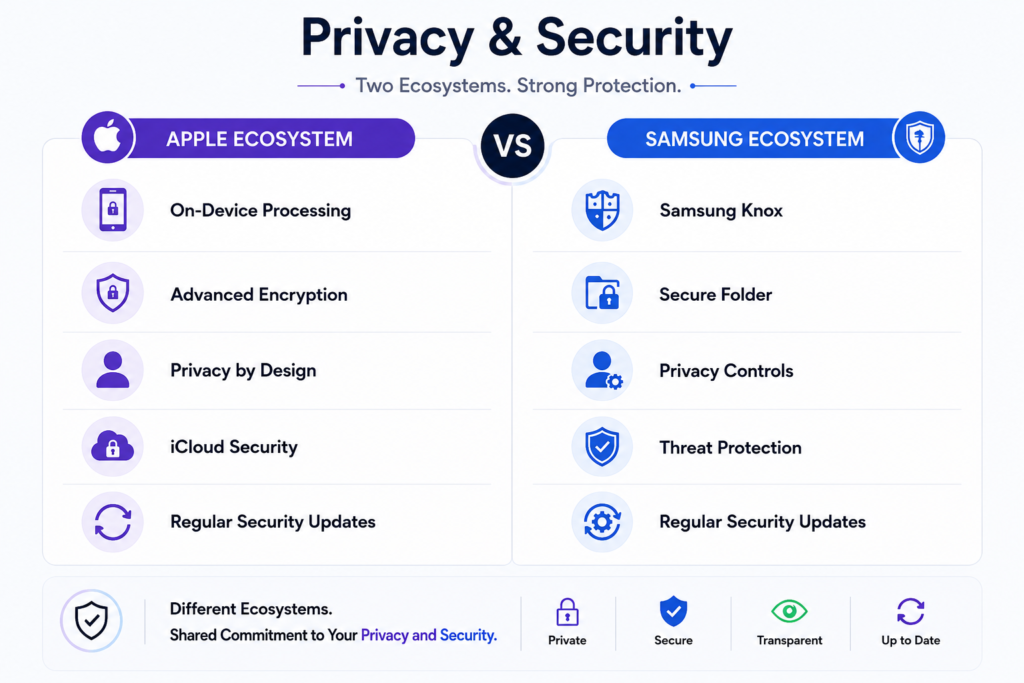
Apple puts a strong focus on privacy, and you can see that in everyday use. Things like Face ID, Touch ID, Find My, and Activation Lock aren’t just features. They work quietly in the background, protecting your devices without getting in the way. When AI is involved, your device handles most of the work instead of sending it to a remote server.
If an app wants to track you across the web, it has to ask first, and you can just say no. Before you even download something, Privacy Nutrition Labels make it easy to see what data an app collects before you download it. And when Apple releases a security update, it arrives on all supported devices at the same time.
Samsung Ecosystem Privacy & Security
Samsung protects its devices with Knox, a built-in security platform that uses multiple layers of defense against hardware and software threats. It’s used by businesses and government organizations around the world. Galaxy devices include fingerprint and facial recognition, plus Secure Folder for isolating private apps and data.
Flagship Samsung devices now receive several years of Android and security updates. Google’s security features add another layer of protection. Because Samsung runs Android, users have more freedom to customize and install apps, which is an advantage but also requires more care about where software comes from.
Verdict
Apple leads on privacy, limiting data collection and keeping processing on-device where possible. Samsung delivers multi-layered security with Knox while allowing more flexibility. If privacy is your top concern, Apple has an advantage. If you want strong security without giving up customization, Samsung is a solid choice.
Third-Party Compatibility
Apple Ecosystem Compatibility
Apple’s ecosystem works best within Apple’s own products. Features like AirDrop, Handoff, Universal Control, and Apple Watch integration only work fully with Apple hardware. Matter support has helped with smart home compatibility, but mixing brands can still be less seamless.
Samsung Ecosystem Compatibility
Samsung connects easily with Windows, Google services, and Android devices from other manufacturers. Quick Share, Link to Windows, Google Workspace, Microsoft Office, and SmartThings all help Samsung products work with other brands. You can choose headphones, smartwatches, or cloud storage from almost any manufacturer and still keep core features intact.
Verdict
Apple’s ecosystem is deeply rewarding if you buy everything from Apple. Samsung gives you far more freedom to mix and match brands and platforms. If you prefer staying within one brand, Apple is excellent. If you want flexibility, Samsung is the better fit.
Gaming
Apple Ecosystem Gaming
iPhones, iPads, and Macs run demanding games well due to powerful processors and tight hardware-software optimization. Apple Arcade gives you a growing library of premium games with no ads or in-app purchases, with progress syncing across iPhone, iPad, Mac, and Apple TV. The Mac game library is growing, but it’s still smaller than Windows.
Samsung Ecosystem Gaming
Samsung’s flagship Galaxy phones are built for gaming with high-refresh-rate AMOLED displays, powerful processors, advanced cooling, and large batteries. Game Booster, external controller support, cloud gaming, and Google Play’s massive game library all contribute to the experience. Samsung Gaming Hub supports multiple cloud gaming services on compatible Samsung devices. Foldables offer a larger screen for a different kind of gaming. Galaxy Book laptops bring the ecosystem to Windows gaming.
Verdict
Apple is the better choice for mobile gaming and cross-device play through Apple Arcade. Samsung has the edge in variety, a larger game selection through Android, cloud gaming, Windows gaming, and hardware built for performance. Casual gamers will be fine with Apple. If you game on Windows or want more options, Samsung has a broader ecosystem.
Price & Value
Price is often the deciding factor in the Apple ecosystem vs Samsung ecosystem debate, especially for buyers planning to invest in multiple devices.
Apple Ecosystem Value
Apple products are priced at the premium end. iPhones, Macs, iPads, and Apple Watches cost more than comparable alternatives. However, Apple supports devices with software updates for many years, resale values stay strong, and build quality is consistently high. Many users keep Apple devices for five years or more, which helps justify the upfront cost.
Samsung Ecosystem Value
Samsung has options at every price point. The Galaxy A series covers the affordable models, and the S series and foldables include the premium end, and there’s a lot in between. Tablets, watches, earbuds, and laptops are all available at multiple price points, so you can build an ecosystem without spending everything at once. Trade-in deals and bundled offers help bring the premium models within reach. Resale values are lower than Apple’s, but for buyers on a budget, Samsung offers better overall value.
Verdict
Apple offers strong long-term value through software support, durability, and resale prices, but the entry cost is high. Samsung gives you more choice, better affordability, and easier access to premium features without a large initial investment. If budget isn’t a concern and you plan to keep devices for years, Apple is worth it. If you want flexibility across price ranges, Samsung is the stronger choice.
Which Ecosystem Is Best for You?
After comparing every major feature, the Apple ecosystem vs Samsung ecosystem decision ultimately depends on how you use your devices.
Apple is for people who want everything to work together without any effort. If you already have an iPhone, adding a Mac, iPad, Apple Watch, or AirPods improves that experience. The privacy focus, long software support, and consistency also make it a strong fit for professionals and students.
Samsung is for people who want flexibility. More device options, better Windows and Android compatibility, strong smart home support through SmartThings, and some of the most advanced AI features available. It’s also easier to get into at different price points.
Neither ecosystem works for everyone. The right choice comes down to the devices you already own, your budget, and what you actually use day to day.
Final Verdict
In the end, the Apple ecosystem vs Samsung ecosystem comparison doesn’t have one universal winner. The better choice depends on your priorities.
Apple is stronger in integration, privacy, and consistency. Every product works with the others, and the experience improves as you add more devices. Samsung is better in flexibility, broad compatibility, and new features. Samsung offers strong hardware, Android’s versatility, advanced AI, Windows integration, and a solid smart home platform.
If you want the smoothest single-brand experience, Apple is the choice. If you want more compatibility, more choices, and more flexibility, Samsung is the stronger option. The right ecosystem is the one that suits your life, your budget, and the devices you already own.
Still deciding? Our detailed guides to the Apple ecosystem and Samsung ecosystem explore each platform in greater detail to help you choose the one that’s right for you.
Frequently Asked Questions
Apple ecosystem vs Samsung ecosystem: Which is better?
Neither ecosystem is for everyone. Apple suits those who want seamless integration, strong privacy, and devices that just work together. Samsung suits those who want flexibility, broader compatibility, and more options at different price points.
Is the Apple ecosystem more connected than the Samsung ecosystem?
Apple offers a more tightly integrated experience because it designs both the hardware and software. Features like AirDrop, Handoff, Universal Clipboard, and Continuity Camera work consistently across Apple devices. Samsung offers similar features, but some depend on Google or Microsoft services.
Does the Samsung ecosystem work with Windows PCs?
Yes. Samsung integrates closely with Windows through Link to Windows, Quick Share, Multi Control, and Samsung DeX. These tools make it easy to transfer files, sync notifications, and use Galaxy devices alongside a Windows PC.
Which ecosystem is better for smart homes?
Apple Home works best if you’re already using Apple devices and privacy is a priority. Samsung SmartThings supports a wider range of devices and brands, making it the better fit for mixed-brand smart home setups and connected appliances.
Is it expensive to build an Apple ecosystem?
Apple products cost more upfront but receive long software support and hold their resale value well. Samsung covers a much wider price range, making it easier to build an ecosystem gradually.